InkAI Review : Un générateur de tatouages IA qui prévisualise les designs sur votre corps
By: AI Collection
At a glance
Ink AI - Tattoo Generator
Vous pensez à vous faire tatouer. C'est permanent, ça va vous coûter quelques centaines de dollars, et le design que vous avez en tête n'existe pas vraiment encore — vous pouvez le décrire, mais vous ne pouvez pas le dessiner. Cet écart entre "j'ai une idée" et "j'ai quelque chose avec lequel un tatoueur peut travailler" est exactement l'espace qu'InkAI est conçu pour combler.
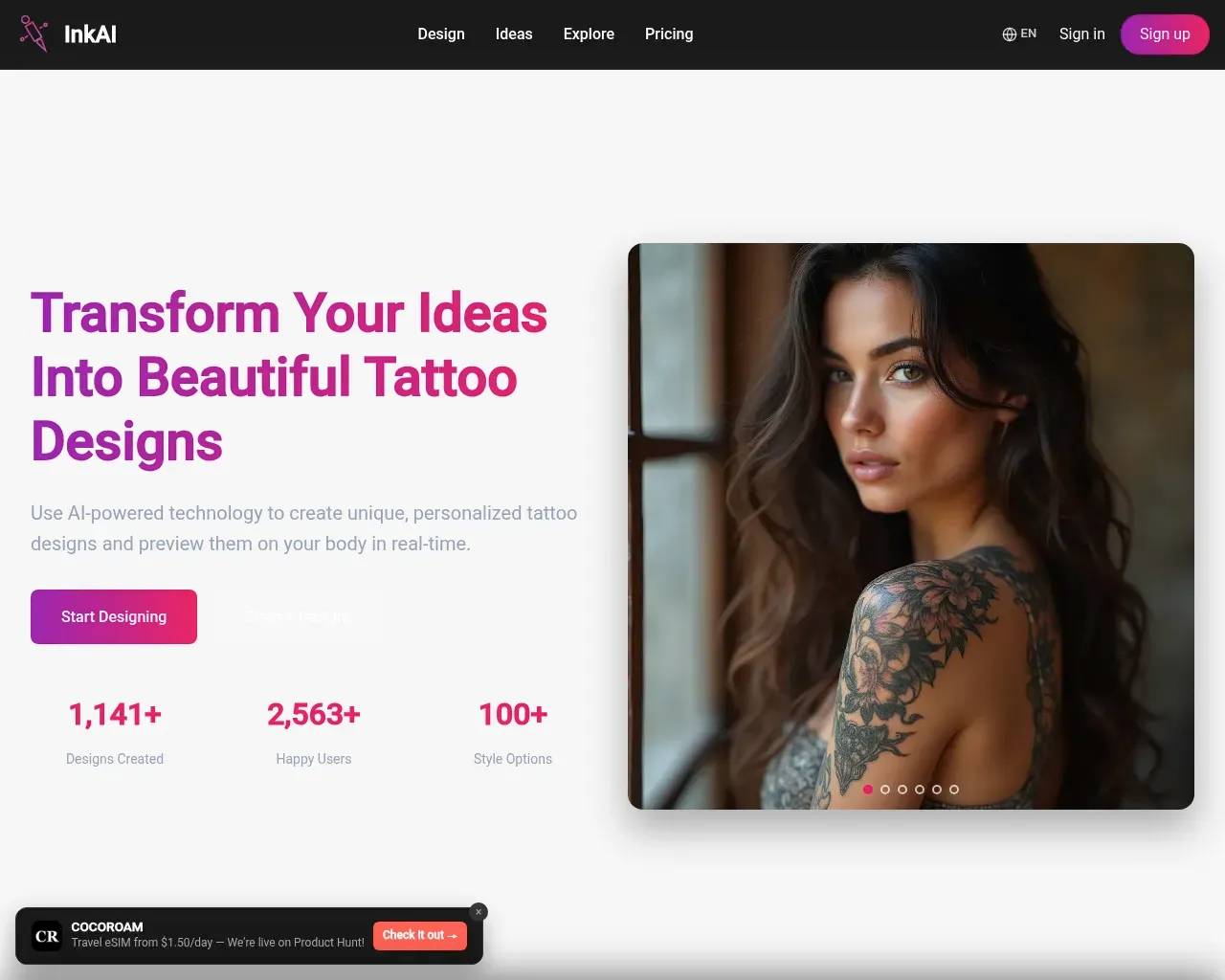
InkAI (sur ink-ai.io) est un générateur de designs de tatouages basé sur l'IA et accessible en ligne. Vous tapez une description du tatouage que vous souhaitez, choisissez un style et un emplacement, et il produit des concepts de design en quelques secondes. Il se situe dans l'espace de l'art par IA mais avec un objectif étroit et sensé : l'encre, pas l'illustration générale.
Comment ça fonctionne en pratique
Le cycle de base est texte-vers-image, optimisé pour l'esthétique du tatouage. Vous décrivez votre idée ("une boussole minimaliste avec des sommets de montagne, style ligne fine, avant-bras"), le générateur retourne des concepts, et vous itérez en reformulant le prompt — il n'y a pas de limite fixe de tentatives, vous pouvez donc continuer à affiner jusqu'à ce que quelque chose vous convienne. Le site annonce plus de 100 options de style couvrant le traditionnel, le tribal, l'aquarelle, la ligne fine et plus encore, plus un bouton "surprenez-moi" si vous voulez que le style soit choisi pour vous.
L'expérience de navigation mise fortement sur l'inspiration. La page d'accueil et la galerie Explore sont organisées par motif (lions, dragons, papillons, crânes, méduses, champignons) et par emplacement (avant-bras, dos, cuisse, doigt, manche complète), ce qui est une façon vraiment utile d'entrer si vous savez où vous voulez de l'encre mais pas quoi.
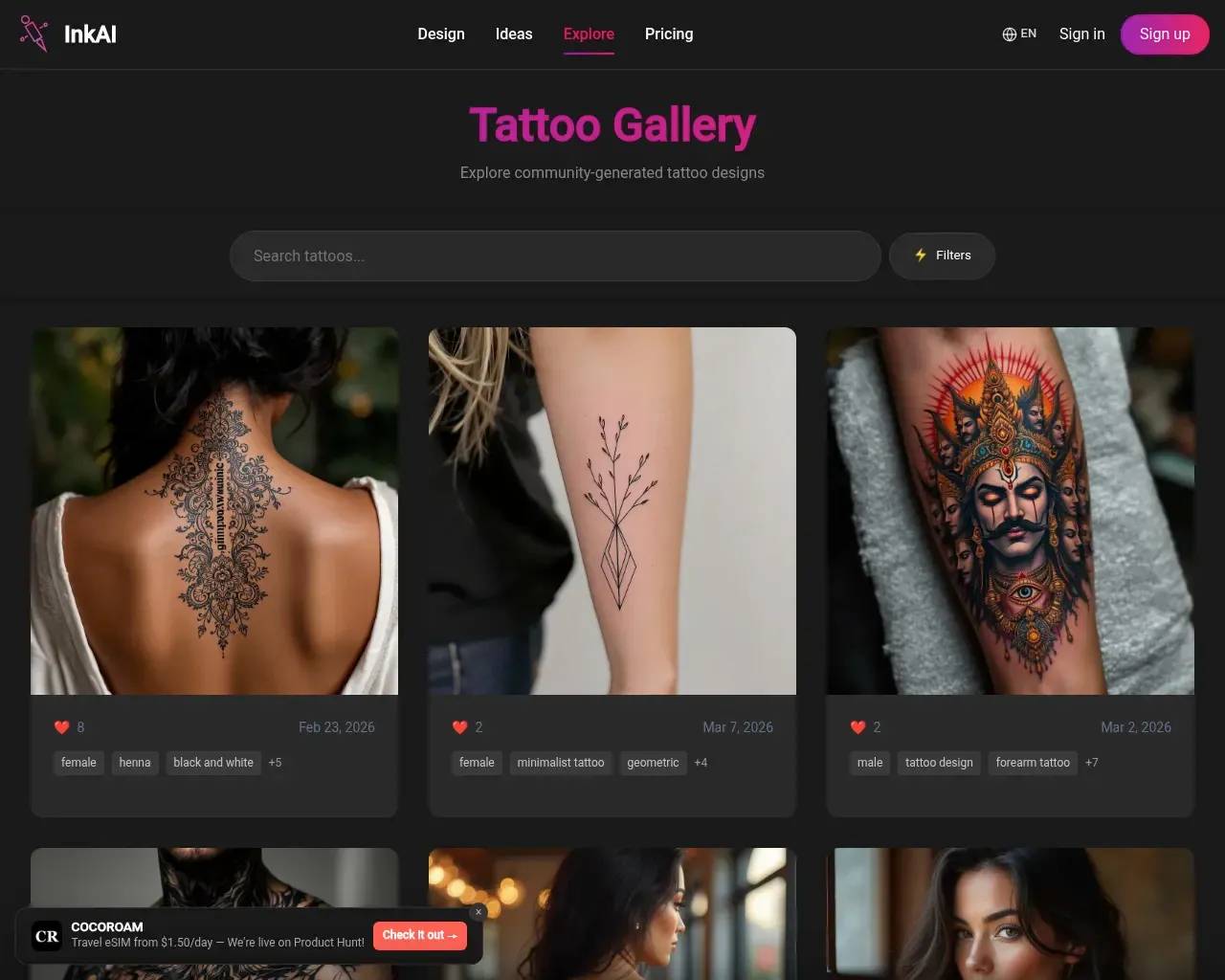
La fonctionnalité la plus ambitieuse est AI Generate On Me. Au lieu de voir un design flottant sur une toile vierge, vous téléchargez 5–10 photos de vous-même sous différents angles, le système entraîne un modèle sur vous (le site dit que cela prend environ 10 minutes), puis il rend les tatouages choisis directement sur des images de votre propre peau. Pour quelque chose d'aussi conséquent, "à quoi ressemblera-t-il vraiment sur mon bras" est la vraie question, et c'est la réponse la plus différenciée d'InkAI.
Ce que ça coûte
InkAI fonctionne sur un modèle de crédits avec deux niveaux payants, et c'est là que le "gratuit" dans "Générateur de tatouages IA gratuit" nécessite un astérisque — ce que vous obtenez réellement, c'est un court essai gratuit, pas un outil indéfiniment gratuit.
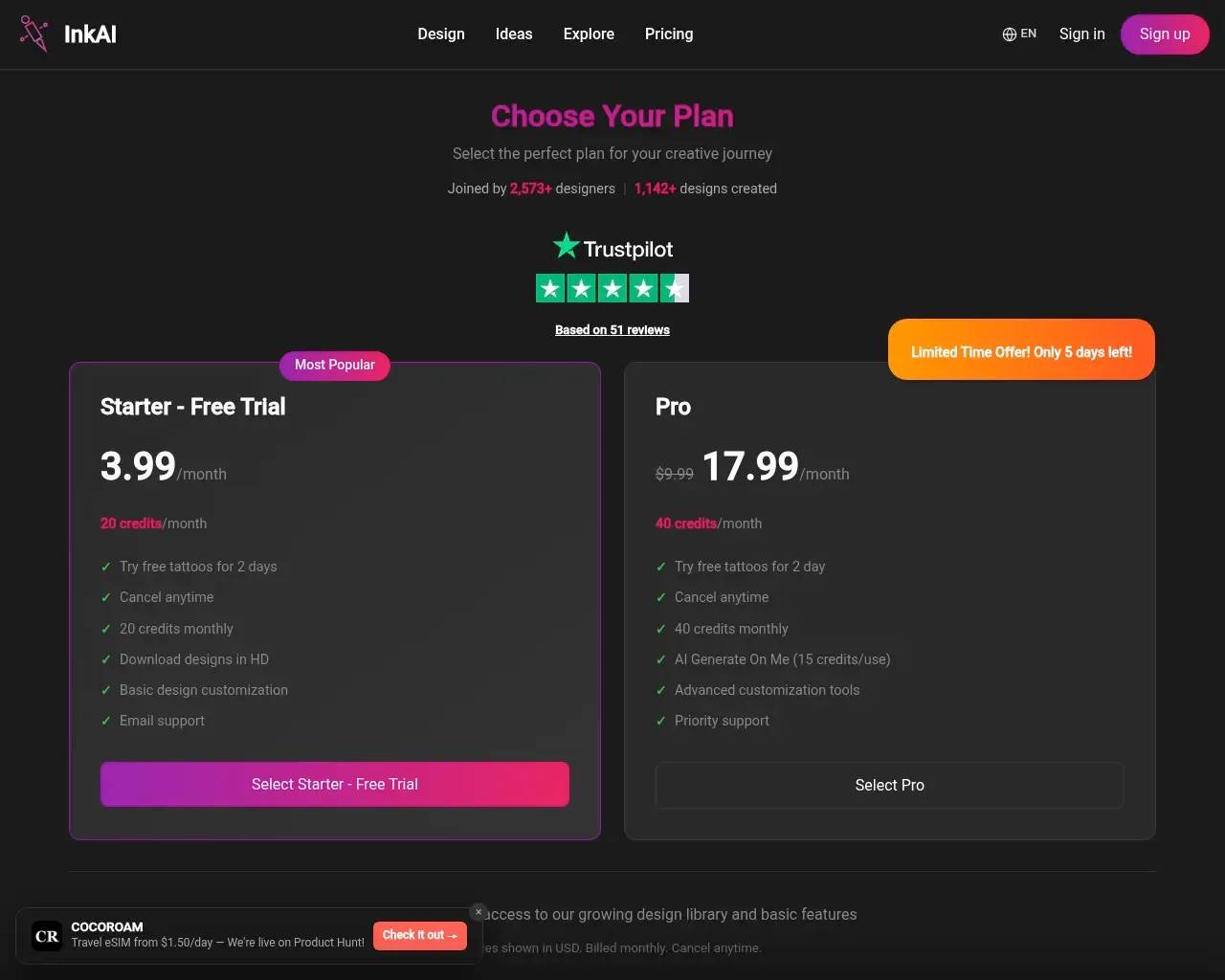
- Starter — $3.99/mois, 20 crédits/mois, facturé après un essai gratuit de 2 jours. Comprend les téléchargements HD, la personnalisation de base et le support par e-mail.
- Pro — affiché à $9.99/mois (contre $17.99), 40 crédits/mois, plus la fonctionnalité AI Generate On Me, la personnalisation avancée et le support prioritaire.
Un chiffre qui vaut la peine d'être calculé : Generate On Me coûte 15 crédits par utilisation, et Pro inclut 40 crédits par mois. Cela représente environ deux rendus sur le corps par mois avant d'avoir besoin d'acheter plus de crédits — suffisant pour finaliser un tatouage, serré si vous êtes un explorateur indécis. Les deux plans sont facturés mensuellement et peuvent être annulés à tout moment selon la page de tarification. La remise Pro est enveloppée dans un compte à rebours "offre limitée, seulement 5 jours restants", le type de bannière d'urgence qui tend à se réinitialiser — traitez-le comme le prix standard plutôt qu'une offre passagère.
Ce à quoi réfléchir avant de s'engager
Quelques mises en garde honnêtes, basées sur ce que le site lui-même dit :
L'affirmation de "prévisualisation AR en temps réel" est plus douce qu'elle ne le laisse entendre. La page d'accueil promet que vous pouvez "les prévisualiser sur votre corps en temps réel" avec la cartographie corporelle AR. Mais la FAQ, répondant à la question de savoir si vous pouvez prévisualiser un tatouage sur votre corps, dit clairement : "Pas pour le moment. Nous travaillons sur un simulateur de tatouage." Le rendu sur le corps qui existe est le flux Generate On Me entraîné sur des selfies — puissant, mais c'est une étape d'entraînement du modèle de 10 minutes, pas un essayage en direct avec la caméra. Si un vrai miroir AR est ce que vous imaginez, ajustez vos attentes en conséquence.
Vos téléchargements et designs ne sont pas privés par défaut. Sur le plan de base, les designs que vous créez sont ajoutés à la galerie publique Explore d'InkAI ; les garder privés nécessite le plan Pro. Ajoutez à cela le fait que Generate On Me demande 5–10 photos de vous-même, et la confidentialité devient une vraie considération — lisez les conditions avant de télécharger des images personnelles.
Le nom est encombré. "Ink AI," "InkAI," "Inker AI," "Ink Studio AI" et plusieurs applications iOS/Android partagent une marque presque identique. Les avis indépendants que vous trouvez en ligne décrivent fréquemment un produit différent, alors jugez les plaintes (et les éloges) des homonymes avec prudence — cet avis porte spécifiquement sur l'application web ink-ai.io. Je n'ai pas trouvé de discussion substantielle de tiers liée sans ambiguïté à ce site, et il n'a aucune présence sur Hacker News, donc le bilan public est mince.
Design IA ≠ pochoir prêt à tatouer. Comme avec tout outil d'art génératif, le résultat est un concept. Un bon tatoueur devra toujours adapter le poids des lignes, le contraste et l'échelle pour la peau. Les témoignages sur le site ont un ton promotionnel et semblent génériques, alors pondérez légèrement le marketing et jugez par vos propres résultats générés pendant l'essai.
Pour qui c'est fait
InkAI convient le mieux si vous êtes dans la phase d'idéation : vous souhaitez explorer de nombreuses directions rapidement, rassembler des images de référence organisées par motif et emplacement, et — sur Pro — avoir une idée approximative de la façon dont un design se pose sur votre corps avant de réserver un rendez-vous. Il est également genuinement multilingue, avec des pages localisées en allemand, japonais, espagnol, portugais, coréen et chinois, donc ce n'est pas un produit uniquement américain.
Il convient moins si vous avez besoin d'un pochoir fini et prêt à imprimer sans retouche humaine, ou si vous vous attendiez à un outil gratuit pour toujours — l'essai se convertit rapidement en abonnement payant.
La décision intelligente est l'évidente : commencez par l'essai Starter de 2 jours, passez une poignée de vos vraies idées à travers, et ne passez à Pro que si Generate On Me vaut les quelques dollars supplémentaires pour votre design spécifique. À moins de $10/mois pour le niveau supérieur, le risque est faible — notez simplement la date de fin d'essai pour que la première facture ne vous surprenne pas.
Sources consultées
- Page d'accueil d'InkAI — description du produit, fonctionnalités, statistiques, étapes de fonctionnement et FAQ
- Page de tarification d'InkAI — niveaux Starter/Pro, allocations de crédits, coût en crédits de Generate On Me et nombre d'avis
- robots.txt + sitemaps d'InkAI — pages indexables confirmées et couverture multilingue (de/ja/es/pt/ko/zh)
- Listing AI Tool Hunt pour ink-ai.io — a confirmé ce domaine comme un outil distinct et répertorié parmi les produits aux noms similaires
- Recherche web générale pour "Ink AI tattoo generator review" — utilisée pour établir le paysage encombré d'homonymes (et pour éviter d'attribuer les avis des homonymes à ce site)
Published on: June 3, 2026
Vous cherchez des alternatives à Ink AI - Tattoo Generator ? Voir toutes les alternatives à Ink AI - Tattoo Generator →
Have an AI tool of your own? Submit it below and get a free, in-depth product review article — just like this one.
Ajoutez votre outil IA en quelques secondes
Collez votre URL et nous préparerons la fiche. Vous relisez et modifiez chaque champ avant l'envoi.