FlowchartAI
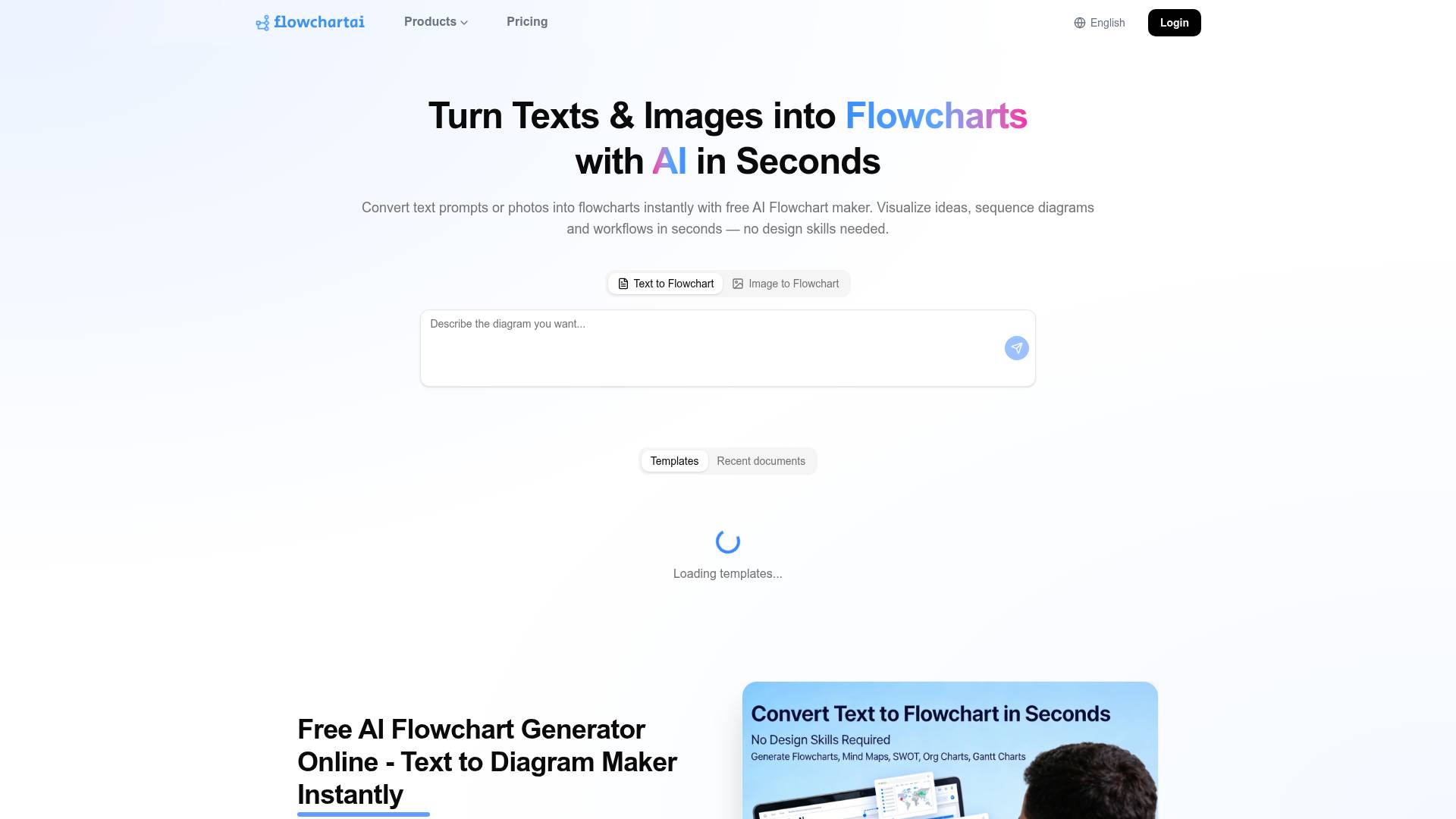
FlowchartAI is an AI tool. Free AI Learning Assistant, Flowchart Maker & PDF Image Excel Converter | FlowChartAI.
- Category
- Study & Tutor
- Pricing
- Paid
- Alternatives
- 6 similar tools
- Last updated
- today
- Source
- Official site ↗
AI Collection Top Picks

Study & Tutor Category Picks
About FlowchartAI
Generate interactive timeline, flowchart, mindmap, charts and diagrams with FlowChartAI from any sources: text, PDF, Word, PPT, Spreadsheet and images.
FlowchartAI's Pricing Plans
FlowchartAI may change prices at any time. Here's our latest information:
Pricing Plans
Lite
$8.99
Monthly
- Get 320 credits
- AI Flowchart Generator
- PDF Format Conversion Tools
- Image & Video Format Conversion
- Video Watermark & Subtitle Remova
- YouTube, TikTok & Instagram Video Downloader
- E-commerce Background Removal & Replacement
- High-Speed, High-Quality API Generation
- Full Access to All Platform Features with One Payment
What you get
Additional Information
Generate professional, interactive visualizations effortlessly with FlowChartAI — your all-in-one solution for transforming raw content into clear, engaging, and dynamic diagrams.
FlowChartAI empowers you to automatically create interactive timelines, flowcharts, mind maps, charts, and complex diagrams from virtually any input source. Whether you're working with plain text, PDFs, Word documents, PowerPoint presentations, spreadsheets, or even images, FlowChartAI intelligently analyzes your content and converts it into structured, easy-to-understand visuals in seconds.
Designed for creators, educators, marketers, and teams, FlowChartAI eliminates the need for manual diagram building. Simply upload or paste your content, and let AI handle the heavy lifting—extracting key information, organizing relationships, and presenting it in a visually compelling format.
With its interactive capabilities, users can explore data and ideas more intuitively—zoom into details, navigate through structured flows, and present complex concepts with clarity and impact. Whether you're mapping out a business process, summarizing a report, visualizing strategies, or creating educational materials, FlowChartAI helps you communicate smarter and faster.
Frequently asked questions
What is FlowchartAI used for?
Free AI Learning Assistant, Flowchart Maker & PDF Image Excel Converter | FlowChartAI.Is FlowchartAI free?
FlowchartAI is a paid product. See the Pricing section for current plans.What are alternatives to FlowchartAI?
Where can I get FlowchartAI?
FlowchartAI is available at https://www.flowchartai.tech.What category is FlowchartAI in?
FlowchartAI is listed in Study & Tutor.What is an AI flowchart generator and how does it work?
AI flowchart generator uses natural language processing to convert plain text descriptions into structured flowcharts. Type or paste a process description, and the AI identifies steps, decision points, and branches to produce a complete diagram automatically — no manual drawing required.Is FlowChartAI's flowchart maker really free trial?
Yes. Completely free trial — unlimited diagrams, unlimited nodes, full AI generation, and all export formats. No credit card, no trial period, no feature gating. Free for individuals, students, and teams.How do I create a flowchart online with FlowChartAI?
Open FlowChartAI in your browser, type a description of your process, and click Generate. The AI produces your flowchart in seconds. Edit, customize, and export to PNG, SVG, or PDF — all in browser, no installationCan FlowChartAI convert text to flowchart automatically?
Absolutely. The core feature is text to flowchart conversion. Paste process descriptions, meeting notes, SOPs, or pseudocode, and the AI parses it into a structured diagram recognizing conditional logic and loops, parallel processes, and sequential steps.What types of diagrams can the diagram generator create?
Flowcharts, process flow diagrams, decision trees, UML diagrams (class, sequence, activity), workflow diagrams, mind maps, org charts, and swimlane diagrams.How is FlowChartAI's AI flowchart generator different from other flowchart software?
FlowChartAI is AI-first — describe your process in text and get a complete diagram automatically, rather than manually dragging shapes. It's also completely free with no signup, making it the best AI flowchart tool for speed and accessibility compared to traditional flowchart software.Does FlowChartAI support team collaborative flowchart editing?
Yes. Share a live link with teammates for real-time viewing, editing, and commenting on the same diagram. Version history and workspace organization included.Can developers use it as a flowchart generator for coding workflows?
Definitely. Describe system architecture, API flows, or algorithms in text/pseudocode and get corresponding diagrams with UML notation support and developer-friendly export formats.Do I need to sign up to use the online flowchart generator?
No sign-up and no installation. Browser-based, works instantly. Open the website, start typing, generate your first diagram in seconds.What export formats does the diagram maker support?
PNG (high-res), SVG (vector), PDF (print-ready), and JSON (programmatic). All free, no watermarks. Copy to clipboard for pasting into presentations or docs.
Compare FlowchartAI with…
Pick any tool to see a structured side-by-side: pricing, deployment, capabilities, and content policy.