
TopView AI Review: From TikTok Script Generator to Full AI Video Studio
By: AI Collection
At a glance

Topview AI TikTok Video Generator
FreemiumTopView AI Review: From TikTok Script Generator to Full AI Video Studio
If you tried TopView a year ago and filed it away as "the tool that writes TikTok hooks," it's worth a second look. The core idea is still there — paste a topic, get a script, drop in your footage — but the platform behind it has grown into something closer to a multi-model AI video studio, with access to several third-party generation engines bundled under one subscription.
What it actually does
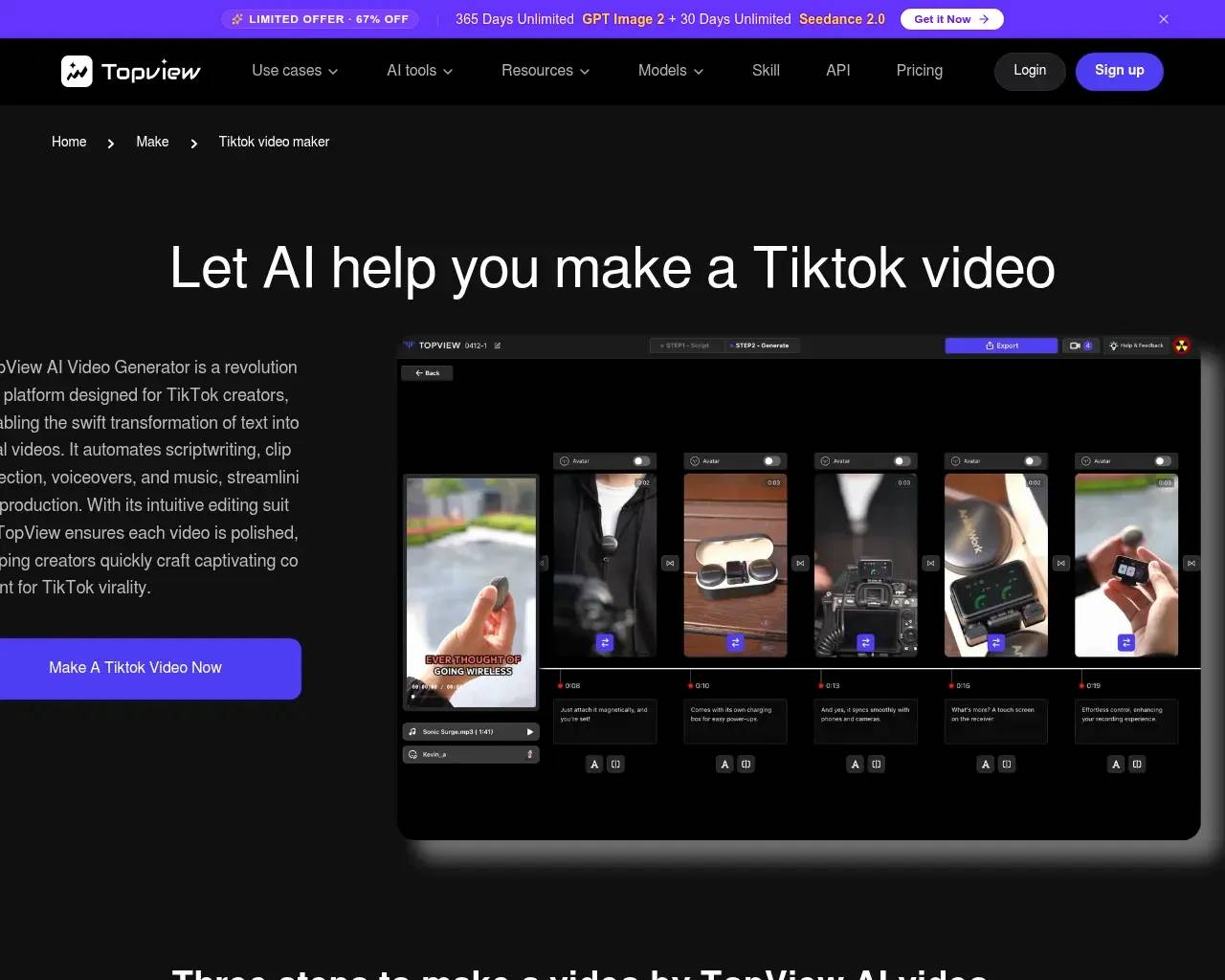
The TikTok Video Maker, the page most people land on, walks through three steps: upload your raw clips and describe what the video is about, pick from a set of AI-generated script options (TopView says these are informed by patterns from "millions of successful ad videos"), then let the AI assemble your footage to match the chosen script — adding voiceover, captions, and pacing automatically. You preview before exporting, so nothing publishes without a look first.
That part hasn't changed much from the original pitch. What has expanded is the use-case layer around it. TopView now ships dedicated templates for eight distinct short-form formats — trend-jacking/challenge edits synced to trending audio, "how-to" edutainment pieces built from text scripts and AI avatars, storytime vlogs that clean up raw day-in-the-life footage, reaction/duet remixes, fast-cut listicle videos, behind-the-scenes narratives, mood/aesthetic pieces, and meme-style skits. Each template is really just a different editing recipe applied to your footage, but having them named and pre-configured saves the trial-and-error of figuring out pacing and structure yourself. There's also auto-resizing so one master video gets reformatted for TikTok, Shorts, Reels, and other vertical/landscape targets without manual re-editing.
Standout features
The thing that separates TopView from a simple caption-and-cut tool is the model access bundled into pricing. The platform's current plans list direct access to several named generation models — Seedance 2.0, Kling 2.6 (including motion control variants), Nano Banana and Nano Banana Pro for image generation, and Seedream — alongside the original script/voiceover/AI-avatar pipeline. In practice that means TopView functions partly as a video maker and partly as a unified front-end for multiple AI video/image generators, which is a different value proposition than "TikTok script tool."
Pricing
Pricing is credit-based rather than flat-rate. The Free tier gives limited access with a watermark and one concurrent task. Pro runs $29/month (or $348 billed annually) with 960 credits a year, full model access, and four concurrent tasks. Business is $75/month ($900 annually) with 3,000 credits and eight concurrent tasks, plus a discounted top-up pack. Ultra is $150/month ($1,800 annually) with 500 credits refreshing monthly, twelve concurrent tasks, and "unlimited relax generation" for lower-priority, credit-free jobs during off-peak demand. There's also an Enterprise tier with custom credit allocation and a dedicated account manager. Credit cost varies by model — a Seedance 2.0 720p clip costs more credits than a faster/lower-res variant — so the effective cost-per-video depends heavily on which model you actually use, not just which plan you're on.

Who it's a good fit for
Solo creators and small-business marketers who need a steady stream of short-form video without hiring an editor are the clearest fit — the workflow is genuinely simple enough for someone with zero editing background, per the FAQ's own framing and consistent with what third-party reviewers report. E-commerce sellers turning a product link into an ad, and social media managers who need to push the same content across TikTok, Shorts, and Reels in different aspect ratios, also line up well with what the platform is built for. If your actual need is access to specific cutting-edge generation models (Kling, Seedance) without juggling separate subscriptions to each, the credit-pooling angle is worth comparing against going direct.
Honest considerations
Third-party feedback is genuinely mixed rather than uniformly glowing. On Trustpilot, some reviewers describe it as a tool that "actually saves time," while others report that "credits vanish, outputs disappoint" — a complaint that tracks with the credit-based pricing model, where a few unsatisfying generations can burn through a chunk of a monthly allowance before you land on a usable result. A G2 reviewer noted it's "much faster than filming and editing manually," which matches the core pitch, but other independent write-ups flag inconsistent output quality requiring multiple regenerations, and occasional technical/subscription friction. None of that is unusual for AI generation tools broadly — output variance and credit economics are a known trade-off across the category — but it's worth budgeting for a few wasted credits while you learn which prompts and templates work for your footage, rather than assuming first-try output every time.
One practical note for evaluating it yourself: because pricing and model access here are credit-metered rather than flat "X videos per month," the real cost-per-video depends on which generation models you lean on — worth checking current credit costs per model before committing to an annual plan.
A representative workflow
For the social-media use case specifically, the pattern is: paste a reference video URL (say, a viral format you want to replicate), upload your own footage, and let the AI Agent apply similar hook, pacing, and effects to your clips rather than copying the content itself. It's a faster way to test formats than manually reverse-engineering why a competitor's edit performs well.

Sources consulted
- TopView AI — TikTok Video Maker — workflow steps, FAQ, testimonials
- TopView AI — Pricing — plan tiers, credits, model access
- TopView AI — Social Media Use Cases — the 8 viral format templates, cross-platform resizing
- TopView AI sitemap — used to locate the pricing and use-case pages
- Web search aggregating third-party reviews (Trustpilot, G2) — mixed user sentiment on output consistency and credit economics
Published on: June 24, 2026
Looking for alternatives to Topview AI TikTok Video Generator? See all Topview AI TikTok Video Generator alternatives →
Have an AI tool of your own? Submit it below and get a free, in-depth product review article — just like this one.
Add your AI tool in seconds
Paste your URL and we'll draft the listing. You review and edit every field before submitting.
More Product Reviews:

By: AI Collection
By: AI Collection