- Category
- Note Taking & Second Brain
- Pricing
- Freemium
- Alternatives
- 6 similar tools
- Last updated
- 3 weeks ago
- Source
- Official site ↗︎
AI Collection Top Picks

Note Taking & Second Brain Category Picks


About Ideamap
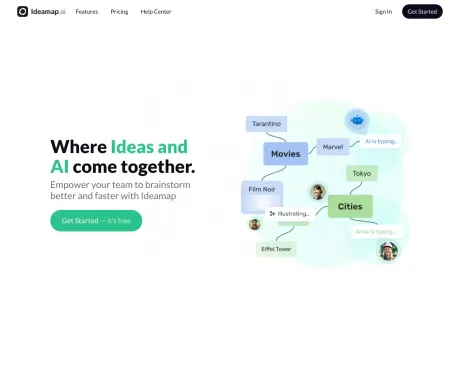
Ideamap is a visual workspace for brainstorming where teams collaborate on ideas and use AI to boost their creativity.
Ideamap's Pricing Plans
Ideamap may change prices at any time. Here's our latest information:
Free for small teams.
Free
$0
- 5 rooms
- 5 attendees per room
- Use standard AI
- Unlimited ideas
- Unlimited users
Basic
$7
/ member / month
- Unlimited rooms
- 15 attendees per room
- Everything in Free, and
- Standard AI copilots
- Advanced facilitation
- Export content
- Import ideas
- Version history
Pro
$15
/ member / month
- Unlimited rooms
- 100 attendees per room
- Everything in Basic, and
- Extract ideas from post-its
- Generate AI images
- Use premium AI
What you get
Additional Information
Features of Ideamap
- Unified Workspaces: Customize individual workspaces with Rooms for various brainstorming themes.
- Easy Sharing & Collaboration: Generate links, email invites, QR codes, and embeds for swift participation.
- Seamless Import/Export: Transition smoothly between Ideamap and other tools with CSV and XSLX support.
- Native Microsoft Teams Integration: Incorporate Ideamap into your Microsoft Teams ecosystem.
AI-Enhanced Features
- Dynamic Idea Generation: Use AI to produce a diverse array of concepts.
- AI Co-Pilots: Integrate AI assistance to guide brainstorming sessions.
- Smart Topic-Detection: Group ideas into themes with AI precision.
- Prebuilt Framework Templates: Apply proven strategies like SWOT or SCAMPER instantly.
- Duplicate Idea Detection: Maintain originality in brainstorming with AI checks.
- AI Challenge Suggestion: Let AI set the pace with creative challenge prompts.
- AI-Powered Inspiration: Begin with AI-crafted topics or icebreakers.
Facilitation Features
- Structured Agenda: Keep discussions on track with a defined meeting structure.
- Session Timer: Manage brainstorming time effectively with a visual countdown.
- Goal Setting: Aim for specific idea generation targets.
- Creative Music Background: Foster a creative atmosphere with background tunes.
- Engaging Voting System: Prioritize ideas with flexible voting mechanisms.
- Magic Summary: Get automated session summaries for insight and review.
Use-Cases for Ideamap
- Product Development: Streamline the ideation process for new product features.
- Marketing Strategy: Create and collaborate on marketing initiatives.
- Business Innovation: Generate and refine business ideas collectively.
- Remote Team Collaboration: Facilitate effective brainstorming in a remote work environment.
FAQ
Q: How does Ideamap facilitate remote team collaboration?
A: Ideamap offers real-time collaboration within digital workspaces, complete with AI assistance and virtual brainstorming tools that adapt well to a remote work setup?
Q: Can Ideamap be integrated with other tools our team uses?
A: Yes, Ideamap can import and export data in CSV and XSLX formats and has a native integration with Microsoft Teams.
Q: How does the AI Co-Pilot feature work?
A: The AI Co-Pilot offers real-time idea generation, challenge suggestions, topic-detection, and assists in facilitating the brainstorming session.
Q: Is there a limit to the number of participants in a brainstorming session?
A: For exact limits, please refer to the chosen plan.. However, Ideamap is designed to support both small teams and larger groups.
Q: Does Ideamap provide any templates or frameworks for brainstorming?
A: Yes, Ideamap includes various built-in framework templates, like Mindset Shifting and SCAMPER, to get your brainstorming session off to a quick start.
Frequently asked questions
What is Ideamap used for?
A Better way to Brainstorm with AI.Is Ideamap free?
Ideamap has a free tier; paid plans unlock additional features.What are alternatives to Ideamap?
Where can I get Ideamap?
Ideamap is available at https://ideamap.ai.What category is Ideamap in?
Ideamap is listed in Note Taking & Second Brain.Use-Cases for Ideamap
- **Product Development**: Streamline the ideation process for new product features. - **Marketing Strategy**: Create and collaborate on marketing initiatives. - **Business Innovation**: Generate and refine business ideas collectively. - **Remote Team Collaboration**: Facilitate effective brainstorming in a remote work environment.**Q: How does Ideamap facilitate remote team collaboration?** <br>
A: Ideamap offers real-time collaboration within digital workspaces, complete with AI assistance and virtual brainstorming tools that adapt well to a remote work setup?**Q: Can Ideamap be integrated with other tools our team uses?** <br>
A: Yes, Ideamap can import and export data in CSV and XSLX formats and has a native integration with Microsoft Teams.**Q: How does the AI Co-Pilot feature work?** <br>
A: The AI Co-Pilot offers real-time idea generation, challenge suggestions, topic-detection, and assists in facilitating the brainstorming session.**Q: Is there a limit to the number of participants in a brainstorming session?** <br>
A: For exact limits, please refer to the [chosen plan](https://ideamap.ai/pricing).. However, Ideamap is designed to support both small teams and larger groups.**Q: Does Ideamap provide any templates or frameworks for brainstorming?** <br>
A: Yes, Ideamap includes various built-in framework templates, like Mindset Shifting and SCAMPER, to get your brainstorming session off to a quick start.
Compare Ideamap with…
Pick any tool to see a structured side-by-side: pricing, deployment, capabilities, and content policy.