- Category
- Email Assistant
- Pricing
- Freemium
- Alternatives
- 6 similar tools
- Last updated
- 6 days ago
- Source
- Official site ↗︎
AI Collection Top Picks

Email Assistant Category Picks
About Blocks
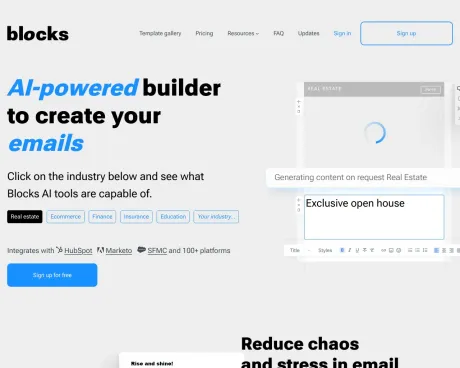
A drag-and-drop email builder for responsive HTML emails. Design once, export to any major platform — no code, no layouts that break in Outlook.
Blocks's Pricing Plans
Blocks may change prices at any time. Here's our latest information:
Save up to 16% with yearly billing
Free
$0
/ month
- 1 user
- 1 project
- 10 emails & templates
- Integrations & export to other platforms
- Mobile-friendly responsive emails
- AI text assistant & image generator
Personal
$20
/ month
- 1 user
- 1 project
- 30 emails & templates
- Integrations & export to other platforms
- Mobile-friendly responsive emails
- AI text assistant & image generator
Advanced
$45
/ month
- 3 users
- 2 projects
- 300 emails & templates
- Integrations & export to other platforms
- Mobile-friendly responsive emails
- AI text assistant & image generator
Pro
$95
/ month
- Unlimited users
- Unlimited projects
- Unlimited emails
- Integrations & export to other platforms
- Mobile-friendly responsive emails
- AI text assistant & image generator
Frequently asked questions
What is Blocks used for?
No-code HTML email template builder — Blocks.Is Blocks free?
Blocks has a free tier; paid plans unlock additional features.What are alternatives to Blocks?
Where can I get Blocks?
Blocks is available at https://useblocks.io.What category is Blocks in?
Blocks is listed in Email Assistant.What Features do you have?
1. AI Power. The AI writing assistant will elevate your email copy (and subject lines!) while the AI image generator will craft flawless visuals for your email campaign. 2. Template Gallery. Includes 65+ (and growing) responsive HTML templates. Add your email copy and visuals and you’re all set! 3. ESP Compatibility. It doesn’t matter what ESP you’re using. If it supports HTML, you won’t see any problems! 4. Responsiveness. All of Blocks’ templates are fully responsive! Your email will display just fine no matter what device your subscribers use! 5. Clean Code. Blocks creates clean code leaving out all the unnecessary elements that may break your email (in contrast with other email builders). ###How do I get started with Blocks?
Anyone can start working in Blocks. To get to the sign-up page, you need to click the 'Try it for free' button, enter your email address, set a password, agree to the Privacy Policy, and optionally subscribe for updates.How can I book a demo call?
To schedule a call, go to the main page and click 'Book a demo call.' Fill out a short form, and we'll contact you as soon as possible.Do I have to know HTML to create or edit email templates?
With Blocks builder, anyone can create and edit emails without HTML knowledge. The preview panel allows you to edit text blocks easily.Can I migrate to Blocks from another email builder?
Yes, you can export your email templates from other email editors and work with them in Blocks. It supports templates from several email editors.Can I send an email campaign straight from Blocks?
You can’t send email campaigns from the Blocks builder, but you can build and set up an email and export the HTML code to your ESP of choice.What is the difference between the Free and Paid versions?
The Free plan allows 1 user and 1 project with up to 10 emails and templates. Paid plans offer additional features like export/import, AI tools, and unlimited projects.
Compare Blocks with…
Pick any tool to see a structured side-by-side: pricing, deployment, capabilities, and content policy.