- Category
- Customer Support
- Pricing
- Free
- Alternatives
- 6 similar tools
- Last updated
- 2 days ago
- Source
- Official site ↗︎
AI Collection Top Picks

Customer Support Category Picks


About Chatim
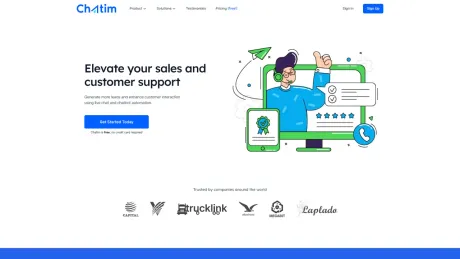
Add free live chat and an AI chatbot to your website in minutes. Real-time visitor chat, automation, and built-in CRM. Free plan - no credit card needed.
What you get
Additional Information
Features:
1. Live Chat
Live chat is a powerful tool to boost customer satisfaction and to increase conversions.
2. Chatbot
Automate your company's website sales and customer support with 24/7 automated chatbot.
3. Analytics
Gain immediate access to critical data about your customer's behaviors and preferences.
4. Chatim CRM
Integrate live chat with the Chatim CRM system to enhance lead generation and sales.
Frequently asked questions
What is Chatim used for?
Chatim - Free Live Chat & AI Chatbot for Your Website.Is Chatim free?
Chatim is free to use.What are alternatives to Chatim?
Where can I get Chatim?
Chatim is available at https://chatim.app.What category is Chatim in?
Chatim is listed in Customer Support.1. Live Chat
Live chat is a powerful tool to boost customer satisfaction and to increase conversions.2. Chatbot
Automate your company's website sales and customer support with 24/7 automated chatbot.3. Analytics
Gain immediate access to critical data about your customer's behaviors and preferences.4. Chatim CRM
Integrate live chat with the Chatim CRM system to enhance lead generation and sales.What is Chatim?
Chatim is a live chat software that combines real-time human chat with intelligent chatbot automation. It helps businesses engage website visitors, provide instant support, and convert more leads into customers. The platform includes live chat, chatbot builder, CRM, analytics, and help desk features.How does the chatbot automation work?
Chatim offers both rule-based and AI-powered chatbot automation. You can create chatbots using our drag-and-drop builder without any coding. The chatbot can handle common questions, qualify leads, schedule appointments, and seamlessly transfer to human agents when needed. It works 24/7, even when your team is offline.Is Chatim free to use?
Yes! Chatim offers a free plan that includes essential live chat and basic chatbot features. You can start for free with no credit card required. As your business grows, you can upgrade to premium plans for advanced features like AI automation, unlimited chatbots, and priority support.How long does setup take?
Setup is incredibly fast. You can install Chatim on your website in under 5 minutes by adding a simple code snippet. If you're using WordPress, Shopify, or other popular platforms, installation is even easier with our plugins. Once installed, you can customize the chat widget and create chatbots immediately.Can I customize the chat widget appearance?
Absolutely! Chatim offers extensive customization options. You can change colors, position, size, greeting messages, and more to match your brand identity. The widget is fully responsive and adapts seamlessly to desktop, tablet, and mobile devices.What happens when I'm offline?
When you're offline, your chatbot continues working 24/7 to assist visitors. You can also configure the widget to collect messages and contact information, which will be saved in your inbox for follow-up. This ensures you never miss a potential customer, even outside business hours.Does it work on mobile devices?
Yes! Chatim is fully optimized for mobile devices. The chat widget is responsive and works perfectly on smartphones and tablets. Additionally, we offer mobile apps for iOS and Android, so you can chat with customers on the go and receive real-time notifications.Is customer data secure?
Security is our top priority. Chatim uses industry-standard encryption to protect all data. We're GDPR compliant and follow strict privacy policies. All conversations and customer information are securely stored, and you have full control over your data. We never share or sell customer information to third parties.
Compare Chatim with…
Pick any tool to see a structured side-by-side: pricing, deployment, capabilities, and content policy.