- Category
- Translation & Transcript
- Pricing
- Free
- Alternatives
- 6 similar tools
- Last updated
- 1 weeks ago
- Source
- Official site ↗︎
AI Collection Top Picks

Translation & Transcript Category Picks



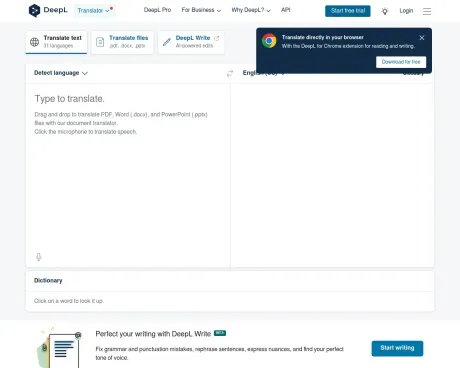
About DeepL
Explore our AI suite and get more done: Translate speech, text, and media, or integrate the DeepL API.
What you get
Additional Information
Features
Tailor translations to fit your needs
Easily adjust translations to suit your context with alternatives.
Select alternative words or phrases
Alternative translations save you the time of searching for a different word or phrase for your translation. Simply click on a word, choose between the alternative options, and the surrounding text will be automatically adjusted. It’s that simple.
Enjoy unlimited text translation
Translate as much text as you like without worrying about restrictions.
Translate text without limits
With DeepL Pro, you can bypass the free translator’s character limit and translate as much as you need via the web and desktop apps.
Translate whole documents
Save time and effort by translating an entire document with one click.
Translate PDF, Word, and PowerPoint files
All translated documents maintain their original formatting. With DeepL Pro, you can also edit translated documents, as well as translate larger files and more file types.
Set the right tone
Instantly adapt translations to fit your target audience.
Choose between formal and informal tone of voice
Adjust the tone of your translation by selecting either formal or informal tone of voice, which automatically updates the pronouns and related words used in your translation.
Create your own glossary
Automatically customize your translations with the right words and phrases for your context.
Specify how words and phrases are translated
Save editing time by setting rules to ensure your key words and phrases are always translated correctly. With our Advanced and Ultimate plans, you can create multiple glossaries and upload your own.
Benefit from our built-in dictionary
Gain more insight into the meaning of specific words used in your translations.
Click on a word to instantly look it up
With the dictionary, you can look up words from both the source text and translation. This will give you more context into the translation, as well as examples and potential synonyms, all without ever having to leave your translation.
Integrate DeepL with your CAT tool
Speed up your translation process by integrating DeepL translations directly in your CAT tool.
All-in-one solution for professional translators
Accessing DeepL Pro translations in your computer-assisted translation (CAT) tool allows you to pre-translate your files automatically, enrich your translation memories, and keep your text’s original formatting. Many of the leading tools like Trados Studio, memoQ, and Across allow DeepL Pro integrations.
Frequently asked questions
What is DeepL used for?
DeepL AI Platform: Translation, Voice & API.Is DeepL free?
DeepL is free to use.What are alternatives to DeepL?
Where can I get DeepL?
DeepL is available at http://www.deepl.com.What category is DeepL in?
DeepL is listed in Translation & Transcript.Tailor translations to fit your needs
Easily adjust translations to suit your context with alternatives. #### Select alternative words or phrases Alternative translations save you the time of searching for a different word or phrase for your translation. Simply click on a word, choose between the alternative options, and the surrounding text will be automatically adjusted. It’s that simple.Enjoy unlimited text translation
Translate as much text as you like without worrying about restrictions. #### Translate text without limits With DeepL Pro, you can bypass the free translator’s character limit and translate as much as you need via the web and desktop apps.Translate whole documents
Save time and effort by translating an entire document with one click.Translate PDF, Word, and PowerPoint files
All translated documents maintain their original formatting. With DeepL Pro, you can also edit translated documents, as well as translate larger files and more file types.Set the right tone
Instantly adapt translations to fit your target audience. #### Choose between formal and informal tone of voice Adjust the tone of your translation by selecting either formal or informal tone of voice, which automatically updates the pronouns and related words used in your translation.Create your own glossary
Automatically customize your translations with the right words and phrases for your context. #### Specify how words and phrases are translated Save editing time by setting rules to ensure your key words and phrases are always translated correctly. With our Advanced and Ultimate plans, you can create multiple glossaries and upload your own.Benefit from our built-in dictionary
Gain more insight into the meaning of specific words used in your translations. #### Click on a word to instantly look it up With the dictionary, you can look up words from both the source text and translation. This will give you more context into the translation, as well as examples and potential synonyms, all without ever having to leave your translation.Integrate DeepL with your CAT tool
Speed up your translation process by integrating DeepL translations directly in your CAT tool. #### All-in-one solution for professional translators Accessing DeepL Pro translations in your computer-assisted translation (CAT) tool allows you to pre-translate your files automatically, enrich your translation memories, and keep your text’s original formatting. Many of the leading tools like Trados Studio, memoQ, and Across allow DeepL Pro integrations.How does the free trial work?
A trial period is available for our Individual and Team plans. You won't have to pay anything until the end of the trial, and you can cancel at any time. Trials aren't available to users who have previously received a DeepL trial.If I have a DeepL Pro subscription, can I get a trial for the Write Pro add-on?
You can only get a trial of the Write Pro add-on if your DeepL Pro subscription is currently in trial.What payment methods are accepted?
We accept payment by credit or debit card, SEPA Direct Debit.
Compare DeepL with…
Pick any tool to see a structured side-by-side: pricing, deployment, capabilities, and content policy.