MyMap.AI SWOT Analysis Generator: a free AI SWOT maker, reviewed
By: AI Collection
At a glance
4.0 / 5
MyMap.AI Swot Analysis Generator
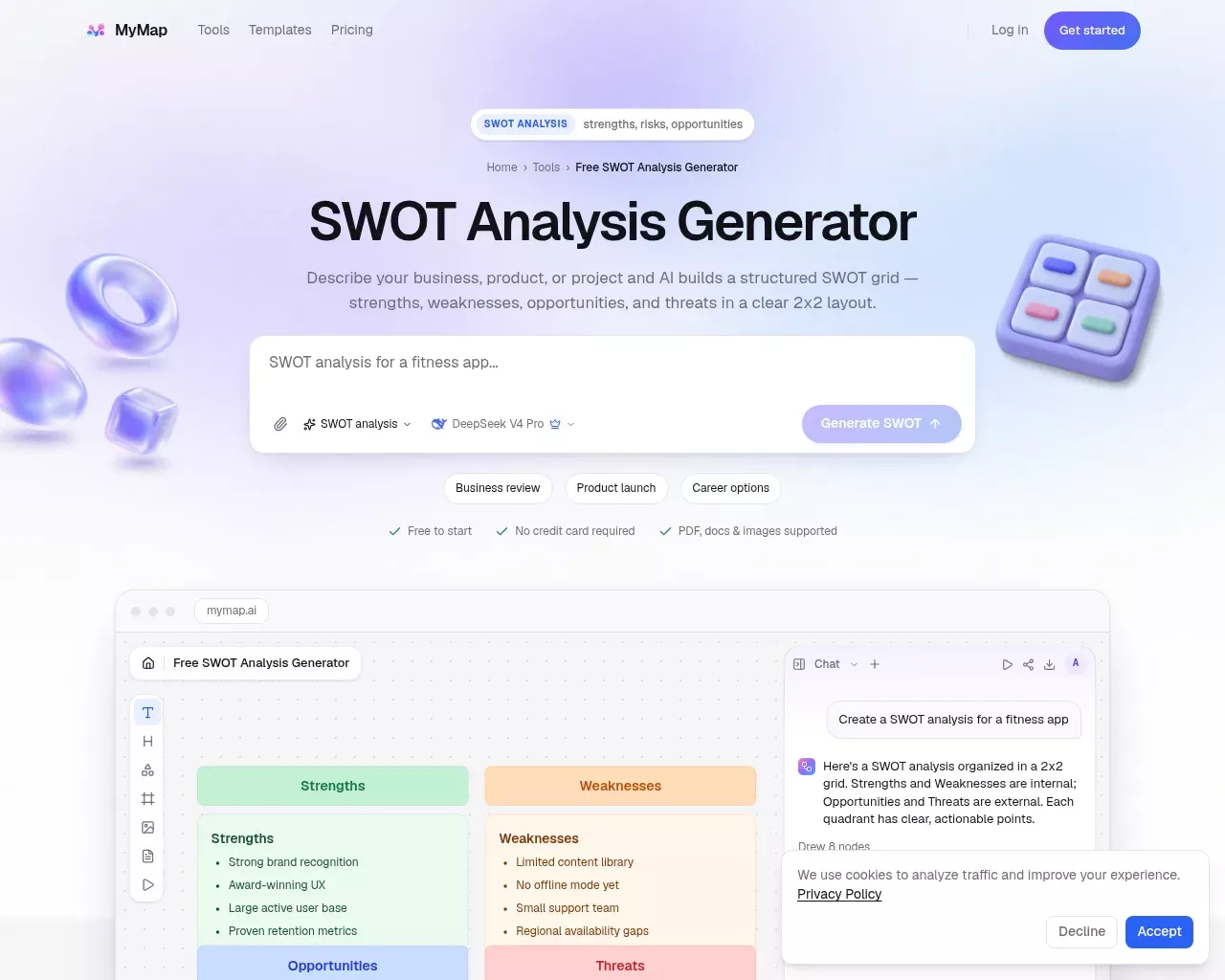
A SWOT analysis is one of those exercises almost everyone can describe and almost nobody enjoys formatting. You have the thoughts; you just don't want to draw four boxes, label them, and keep the internal factors apart from the external ones while you type. MyMap.AI's SWOT Analysis Generator is built for that gap. You describe a business, product or project in a sentence or two, and it assembles a structured strengths, weaknesses, opportunities and threats grid on an editable canvas.
It is a free entry point into MyMap.AI, a larger "AI canvas" product that also makes mind maps, flowcharts, timelines and slide decks. The SWOT tool is one of several single-purpose front doors, so most of what you learn here applies to the wider app.
How the SWOT generator actually works
There is no template to fill in and no shapes to drag. You type something like "SWOT analysis for a fitness app," pick a model, and the assistant drafts eight or so nodes sorted into the standard quadrants. Strengths and weaknesses land on the internal side, opportunities and threats on the external side, in a clean two-by-two layout you keep editing.
The interaction is conversational rather than form-based. After the first pass you can ask for more detail, explore a different angle, or turn the board into a presentation, all from a chat panel beside the canvas. You can attach a PDF, a Word doc, an image or a YouTube link as context, which helps when the raw material for the analysis already lives in a brief or a report. Model choice is exposed directly: the tool defaults to options like DeepSeek V4 Pro and lets you switch to Claude Sonnet for a given generation.
If you want to see the output before committing, the page ships with worked examples, including SWOTs for Disney, Tesla and Amazon, plus a row of starter prompts for students, freelancers and small teams. Exporting a finished grid as a PNG is free; PDF export and a clean, watermark-free image sit behind the paid plan.
Who it fits
This is a drafting aid, and it is honest about that. It suits a student pulling a SWOT out of a case study, a consultant who needs a visual artifact for a deck in the next ten minutes, or a founder sketching a quick strategic snapshot before a meeting. MyMap.AI says it has passed 200,000 users and two million maps, with students, consultants and teams named as the core audience, and a SWOT grid is one of the lower-effort things you can ask it to produce.
It is a weaker fit if you need a rigorous, defensible analysis. The tool will happily write "strong brand recognition" as a strength whether or not that is true for your subject, because it works from your prompt, not from evidence. The quadrants are a starting structure, not a conclusion.
Pricing
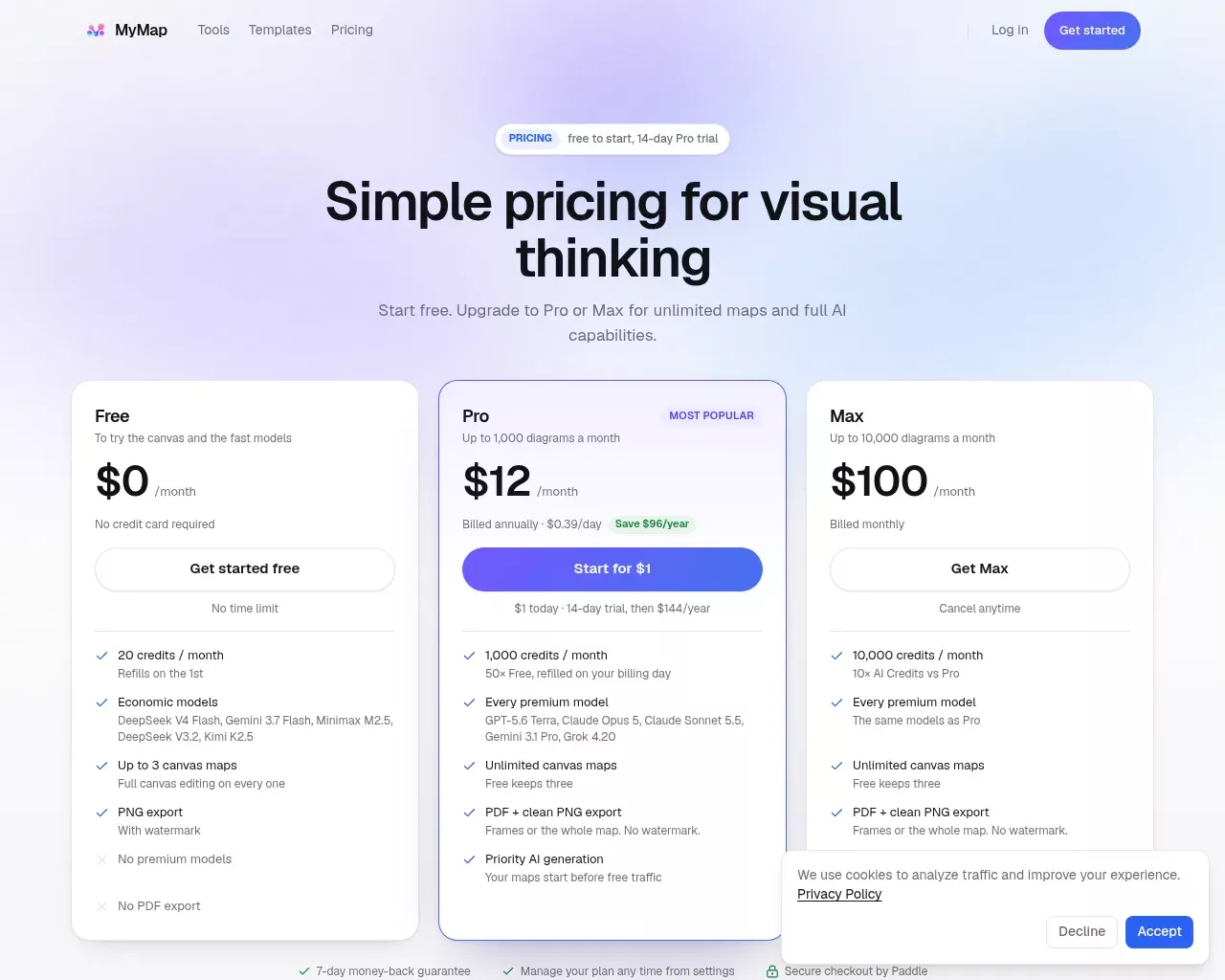
The Free plan needs no credit card and lets you try the canvas with the faster, lower-cost models, up to three maps, on a small monthly credit allowance that refills on the 1st. PNG export works but carries a watermark, and there is no PDF export. Pro is $12 a month billed annually ($144 a year, with a $1 fourteen-day trial), and it unlocks 1,000 credits a month, premium models such as Claude Opus 5 and GPT-5.6, unlimited maps, PDF and clean PNG export, and priority generation. Max is $100 a month for heavier use, with 10,000 credits. Credits are spent only when the AI generates or rewrites something, so editing, exporting and presenting cost nothing, and unused credits do not roll over. There is a seven-day money-back guarantee, and checkout runs through Paddle. (Prices as of November 2026.)
For an occasional SWOT, the free tier is genuinely enough; the watermark is the main nudge toward paying.
Where it falls short
The most consistent criticism across third-party roundups is accuracy. The AI's placements and the connections it draws are not always right, so outputs need a manual check before you share them. That is true of any prompt-to-diagram tool, but it matters more for a SWOT, where one confidently misfiled factor can skew a decision. Reviewers also note that performance slows on large, node-heavy boards, and that the credit model can pinch if you iterate a lot. On the free plan specifically, the watermark and the missing PDF export are real limits for anything client-facing.
Independent signal is thinner than the usage numbers suggest. Product Hunt shows a 4.2 rating across 13 reviews, generally positive about research and brainstorming use, but candid discussion is scarce. Most coverage is curated tool roundups rather than user debate, and some comparison pages are published by competitors, so weigh those accordingly. The product has been around since at least 2023, when the founder wrote about reaching the first thousand paying customers, so it is not a weekend project.
Verdict
As a free, fast way to turn a messy description into a clean, editable SWOT grid, MyMap.AI's generator does the job well, and the broader canvas is a reasonable upgrade if visual thinking becomes a habit. Treat the output as a first draft you refine, not an analysis you trust on sight. Overall: 4/5 for quick visual SWOTs, with the caveat that it structures your thinking rather than doing it for you.
Sources consulted
- MyMap.AI SWOT Analysis Generator — tool features, workflow, model options, export tiers
- MyMap.AI pricing — plan tiers, credits, trial, money-back guarantee, Paddle checkout
- MyMap.AI homepage — product scope, usage stats, canvas workflow
- Product Hunt — MyMap reviews — 4.2/13 rating and positive brainstorming use
- ToolsForHumans — MyMap.AI — accuracy caveat, coverage skewed to roundups
- TopAI.tools — MyMap.AI — pricing cross-check and user complaints
- Hacker News / founder blog — first 1,000 paying customers — longevity signal from 2023
Published on: November 21, 2026
Looking for alternatives to MyMap.AI Swot Analysis Generator? See all MyMap.AI Swot Analysis Generator alternatives →
Have an AI tool of your own? Submit it below and get a free, in-depth product review article — just like this one.
Add your AI tool in seconds
Paste your URL and we'll draft the listing. You review and edit every field before submitting.