Google Sheets Formula Generator
Free Google Sheets Formula Generator (2 Free, No Signup).
- Category
- Coding Assistant
- Pricing
- Paid
- Alternatives
- 6 similar tools
- Last updated
- 5 days ago
- Source
- Official site ↗︎
AI Collection Top Picks

Coding Assistant Category Picks



About Google Sheets Formula Generator
Describe your task. Get a paste-ready Google Sheets formula in seconds. Includes video walkthrough and 500+ formula guides.
Google Sheets Formula Generator's Pricing Plans
Google Sheets Formula Generator may change prices at any time. Here's our latest information:
Pricing
Tutorials + Generators
Watch, Learn, and Generate Unlimited Formulas.
$9
/Month
- 438 tutorials
- 32 courses
- Download each spreadsheet featured in tutorials
- Unlimited Formula Generators
- New tutorials every month
What you get
Additional Information
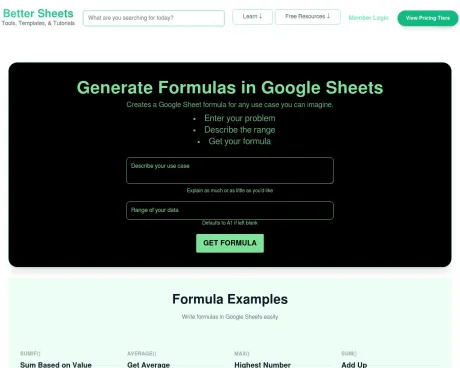
Google Sheets Formula Generator creates a formula for any use case you can imagine. Users describe a problem, declare the range, and then Google Sheets Formula Generator provides a formula solution.
Google Sheets Formula Generator can handle a range of user needs, and formula needs. Can solve simple calculations or figure out complex data manipulation. Some formula combinations can be hard to handle like INDEX/MATCH or using QUERY. This tool helps build the formula exactly as Google Sheets needs it, and just like the syntax needed to operate successfully.
Instead of learning Google Sheets from the ground up, Google Sheets Formula Generator can get you running at top speed right away.
Built by BetterSheets which offers more tools and templates for every day Google Sheets use.
Frequently asked questions
What is Google Sheets Formula Generator used for?
Free Google Sheets Formula Generator (2 Free, No Signup).Is Google Sheets Formula Generator free?
Google Sheets Formula Generator is a paid product. See the Pricing section for current plans.What are alternatives to Google Sheets Formula Generator?
Top alternatives to Google Sheets Formula Generator include JustCopy AI, Dynamiq, Interview Solver, Qodo, Swimm AI.Where can I get Google Sheets Formula Generator?
Google Sheets Formula Generator is available at https://bettersheets.co/google-sheets-formula-generator.What category is Google Sheets Formula Generator in?
Google Sheets Formula Generator is listed in Coding Assistant.What’s included in membership?
Courses, tutorials, unlimited generators (formula, sparkline, regexmatch, regexreplace, and conditional formatting generators), member templates, and one hosted site on a Better Sheets subdomain.Can I cancel monthly or yearly?
Yes. Cancel anytime from your account. Manage subscription when you are signed in.Do you offer refunds?
New members can request a refund during your grace period. Email andrew@bettersheets.co and we will help.What happens to my site if I cancel?
Your saved site data stays on file. Your public site is unpublished when your paid billing period ends. Resubscribe on monthly, yearly, or lifetime to unlock and republish.How many free generator tries do I get?
Free accounts get 2 generations per tool and 2 total tries on the Apps Script Explainer before sign-up. Members get unlimited formula, regex, and formatting generators, plus daily Apps Script comment passes.Is YouTube enough?
YouTube is great for trying one trick. Membership removes ads and unlocks courses, generators, templates, and sites.How do I generate a Google Sheets formula using this tool?
Describe what you need in the text box. Add your data range or leave it blank for A1. Click Generate formula. The result copies to your clipboard; paste it into any cell.Is this Google Sheets formula generator free?
Yes. You get 2 free AI formula generations with no signup. Paste the result into your sheet and keep working. Members get unlimited use plus courses and the full formula directory.How is this different from an AI formula generator for Google Sheets?
Most tools stop at one formula. Better Sheets pairs the generator with a 500+ function directory (each with video), courses, and member support. Same AI speed, more context when you need to learn or debug.Can I use this as an online formula generator without installing anything?
Yes. It runs in your browser. No extension, add-on, or download. Open the page, describe your task, copy the formula, and paste it into Google Sheets.Does this work for Google Spreadsheet formulas?
Yes. Google Spreadsheet and Google Sheets use the same formula syntax. This tool generates formulas for Sheets, which run in Google Spreadsheet files in Drive.What types of formulas can I create with the formula generator?
Common ones: SUMIF, VLOOKUP, COUNTIF, INDEX/MATCH, IF, ARRAYFORMULA, QUERY, and nested combinations. Write the outcome you want; the tool picks functions to match.Can I get help with Apps Script without rewriting my code?
Yes. Paste your script into the Apps Script Explainer at https://bettersheets.co/explainer. It adds comments and explanations. Your runnable code stays as-is.Why should I use Better Sheets instead of other AI formula generators?
You get the generator plus a formula directory (500+ functions with videos) at https://bettersheets.co/formulas, courses at https://bettersheets.co/courses, and direct help from Andrew if you are a member.What is the purpose of the REGEXMATCH generator?
It writes REGEXMATCH formulas: does this cell's text match a pattern? Useful for validation flags and filtering messy text. Try https://bettersheets.co/regexmatcher.How can I visualize trends in my data using the SPARKLINE generator?
The SPARKLINE generator at https://bettersheets.co/sparkliner builds tiny in-cell charts. Describe your data layout and chart style; paste the formula into one cell.What are some examples of formulas I can learn about?
The formula directory at https://bettersheets.co/formulas lists every major Google Sheets function with syntax, examples, and a video for each.How does the QUERY generator simplify data filtering?
The QUERY generator at https://bettersheets.co/query-generator builds the QUERY string for you: select columns, filter rows, sort, group.Can I automate my Google Sheets with Better Sheets?
Yes. Formulas handle cell-level logic; Apps Script at https://bettersheets.co/appsscript handles automation. Courses at https://bettersheets.co/courses walk through both.What resources are available if I get stuck while using the tool?
This page has examples and troubleshooting. Also: https://bettersheets.co/tutorials, https://bettersheets.co/courses, and https://bettersheets.co/formulas. Members can email Andrew directly.How does the formula directory enhance my understanding of Google Sheets formulas?
Each function gets its own page: official syntax, a real example, and a short video showing it in a sheet.What is the benefit of using the Apps Script Explainer?
You inherit a script from a coworker or client and cannot read it. The Explainer documents what each block does in plain language without rewriting the code.How can I validate messy data quickly?
Use REGEXMATCH or REGEXREPLACE generators to flag bad emails, phone numbers, or junk characters. Pair with Data validation so bad input never reaches your formulas.What features do members get that non-members do not?
Members: unlimited generator use, full course library, member tutorials, email support. Non-members: 2 free generations per tool.How can I create multi-function formulas easily?
Put the whole problem in one prompt: which columns, what conditions, what result. The generator assembles IF, SUMIF, or ARRAYFORMULA as needed.
Compare Google Sheets Formula Generator with…
Pick any tool to see a structured side-by-side: pricing, deployment, capabilities, and content policy.