InkStudio.ai
AI Tattoo Generator for Professional Designs | InkStudio.ai.
- Category
- AI Art & Illustration
- Alternatives
- 6 similar tools
- Last updated
- 2 weeks ago
- Source
- Official site ↗︎
AI Collection Top Picks

AI Art & Illustration Category Picks


Supercharge your image and video content creation with unmatched consistency, speed, and quality.
About InkStudio.ai
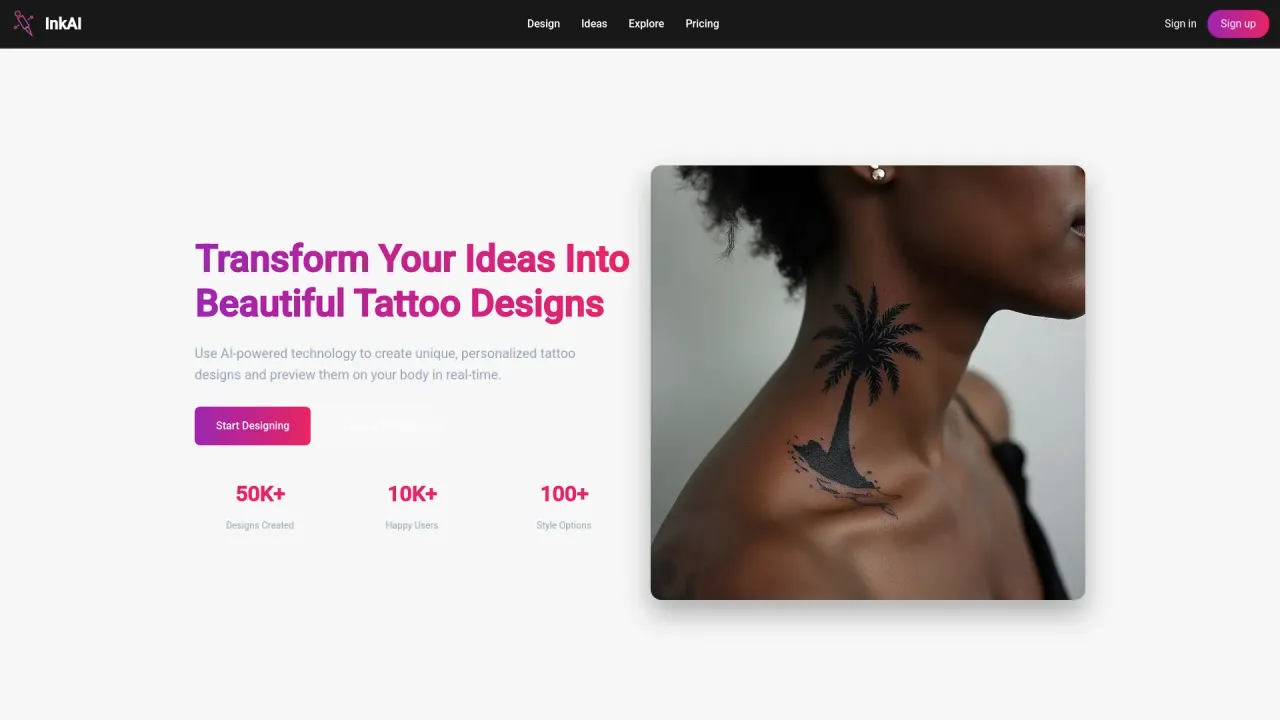
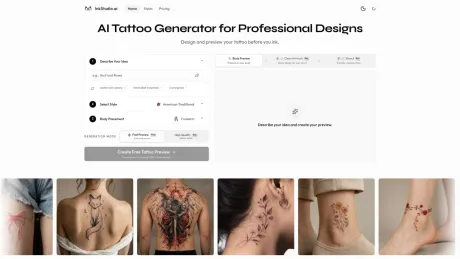
Create and preview your tattoo before you ink. Explore realistic body placement, clean artwork, and stencil linework to review with your tattoo artist.
What you get
Additional Information
InkStudio.ai is a platform that leverages artificial intelligence to help users create and preview tattoo designs. Users can describe their tattoo ideas, select styles, and choose body placements to generate preview images of their potential tattoos directly on skin. The platform not only provides a Body Preview but also allows Pro users to create Clean Artwork and Stencils, which are necessary for professional tattoo artists to implement the designs accurately.
The process begins with users describing their tattoo aspirations, such as themes and placement on the body. Once a Body Preview is generated, it gives users a realistic visualization of how their tattoo will look on their skin before making a permanent decision. This feature is invaluable for individuals looking to explore different tattoo styles and placements without the commitment of actually getting inked.
Pro users gain access to additional functionalities including High Quality Body Previews, Clean Artwork outputs, and Stencil creations, which aid in refining the tattoo design for professional considerations. Each of these outputs uses a credit system, enabling users to manage their resources effectively while planning their tattoo.
InkStudio is ideal for anyone considering a tattoo, from first-timers to those seeking intricate designs, providing tools that facilitate comparisons of styles and adjustments before finalizing their choices.
Frequently asked questions
What is InkStudio.ai used for?
AI Tattoo Generator for Professional Designs | InkStudio.ai.Is InkStudio.ai free?
Pricing for InkStudio.ai varies — see the Pricing section for details.What are alternatives to InkStudio.ai?
Where can I get InkStudio.ai?
InkStudio.ai is available at https://www.inkstudio.ai/.What category is InkStudio.ai in?
InkStudio.ai is listed in AI Art & Illustration.Is this AI tattoo generator free to use?
Yes. You can use this AI tattoo generator in Fast mode with your daily free credit. High Quality Body Preview, Clean Artwork, and Stencil are available with a Pro Pass.What is an AI tattoo generator?
An AI tattoo generator turns your idea, tattoo style, and body placement into visual tattoo concepts. InkStudio focuses on realistic body previews, clean artwork, and stencil linework so you can plan the design before you ink.How accurate is the body preview in this AI tattoo generator?
This AI tattoo generator simulates realistic placement and proportion based on your selected body area. While it helps you visualize size and positioning before you ink, the final result may vary slightly depending on your tattoo artist and individual anatomy.How does InkStudio's AI tattoo generator work?
Describe your tattoo idea, choose a style and placement, then generate a Body Preview. Pro users can continue the same design into Clean Artwork and Stencil outputs for a more complete tattoo plan.Are the tattoo designs generated by this AI tattoo generator unique?
Each design is generated specifically from your prompt and selections. This AI tattoo generator does not reuse template artwork, meaning every tattoo preview is unique to your input.Is the AI tattoo generator free to use?
Yes. Create an account to receive 1 daily credit for Fast Body Preview. High Quality Body Preview, Clean Artwork, and Stencil are Pro features.Can tattoo artists use the stencil files?
Yes. The stencil export creates clean linework suitable for professional tattoo preparation. Most tattoo artists can use these files as a starting reference and refine them before tattooing.What does Pro unlock?
Pro unlocks High Quality Body Preview, Clean Artwork, Stencil, and more credits for exploring different tattoo directions.What's included with a Pro Pass?
A Pro Pass unlocks High Quality Body Preview, Clean Artwork, and professional Stencil output, along with bonus credits and higher daily credits for more detailed tattoo planning.How many credits do I need for a full tattoo plan?
A Body Preview uses 1 credit. Clean Artwork and Stencil each use 1 additional credit, so the full three-output workflow uses 3 credits. Failed generations are refunded automatically.What's the difference between Fast and High Quality in this AI tattoo generator?
Fast Body Preview uses 1 credit. High Quality Body Preview also uses 1 credit and is a Pro feature that provides sharper details, cleaner linework, and improved clarity for real tattoo planning.Can I preview a tattoo on my body before getting it?
Yes. Use the AI Tattoo Generator to create a body preview from your idea, style, and placement. If you already have a tattoo design or reference image, use our AI Tattoo Try On tool to upload the design and a body photo for a more personal preview.Do I get usage rights to my tattoo design?
Paid plans include clear usage rights for personal and commercial use. If you plan to use a design beyond personal tattooing, please review the full terms in your account.Can I create clean artwork and stencil linework for my tattoo artist?
Yes. Pro users can turn a body preview into clean white-background artwork and transfer-style stencil linework that your tattoo artist can review and adjust.Do Pro Passes renew automatically?
No. Pro Passes are one-time purchases. When a pass expires, you can choose to buy another one if you still want Pro access.What if I do not know which tattoo style or placement to choose?
Start with a popular style or choose the closest placement. You can generate multiple previews to compare style, scale, and body flow before committing to one direction.Where are my finished designs saved, and can I download them?
Finished generations are saved to My Designs. You can reopen and download body previews, clean artwork, and stencil linework when you need them.Do I need access to generate a tattoo preview?
AI-generated previews require AI Credits. Credits are included with every access option; existing unexpired Credits can still be used for Fast Preview.What does access unlock?
Access unlocks High-Quality Body Preview, Clean Artwork, Stencil, Template and Personal Photo 3D Try-On, AI Enhanced Preview, and 3D Lettering Preview.Do access options renew automatically?
No. All 3-Day, 7-Day, and 30-Day Access options are one-time purchases with no automatic renewal.
Compare InkStudio.ai with…
Pick any tool to see a structured side-by-side: pricing, deployment, capabilities, and content policy.