- Category
- Email Assistant
- Pricing
- Paid
- Alternatives
- 6 similar tools
- Last updated
- 2 days ago
- Source
- Official site ↗︎
AI Collection Top Picks

Email Assistant Category Picks
About Recurrr
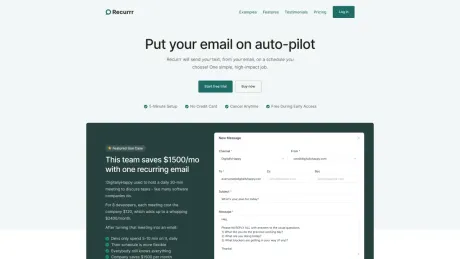
Automate your recurring emails with Recurrr. Save time and headspace by scheduling emails to send on a schedule. Works with Gmail, Outlook, and more.
Recurrr's Pricing Plans
Recurrr may change prices at any time. Here's our latest information:
Recurrr Pricing Plans
FREE while in early access, then:
All of our features are included in one very affordable package
$9
/month
- Free trial, no credit card required
- Send from 3 email addresses you own
- Send to 30 recipients (10 To, 10 Cc, 10 Bcc)
- Smart compose
- Dashboard view
- Calendar view
- List view
What you get
Additional Information
Recurrr provides a missing feature from all major email clients - sending recurring emails. It’s a productivity hack we’ve been using for the past 5 years, now available to everyone as an easy-to-use web app.
What is that productivity hack? It’s simple - sending the same email, again and again.
Think about it:
- you can have recurring events in your calendar
- you can have recurring tasks in your todo app
- but you CANNOT send recurring emails
No email client will help you do that… not Gmail, not Outlook, not Fastmail, not Superhuman, nobody! And it's such a shame, because sending recurring emails can be so useful!
Sending a recurring email can help you:
- clear your schedule, by turning some meetings into emails.
- do things for your business or department on auto-pilot.
Think about something you should be doing every week, month, quarter, year. Well… can’t you send an email to automate it? Or at least force yourself or someone to start it? After all, we all use our email as our to-do list.
There are many more ways people can use this productivity hack. The question is… what can you use it for? Try it now:
Frequently asked questions
What is Recurrr used for?
Send Recurring Emails Automatically - Recurrr.Is Recurrr free?
Recurrr is a paid product. See the Pricing section for current plans.What are alternatives to Recurrr?
Where can I get Recurrr?
Recurrr is available at https://recurrr.com.What category is Recurrr in?
Recurrr is listed in Email Assistant.Think about it:
- you can have recurring events in your calendar - you can have recurring tasks in your todo app - but you CANNOT send recurring emails
No email client will help you do that… not Gmail, not Outlook, not Fastmail, not Superhuman, nobody! And it's such a shame, because sending recurring emails can be so useful!Sending a recurring email can help you:
- clear your schedule, by turning some meetings into emails. - do things for your business or department on auto-pilot.
Think about something you should be doing every week, month, quarter, year. Well… can’t you send an email to automate it? Or at least force yourself or someone to start it? After all, we all use our email as our to-do list.
There are many more ways people can use this productivity hack. The question is… what can you use it for? Try it now: https://recurrr.comIs the free tier time-limited?
No. You can stay on the free tier as long as you want. It just comes with lower limits and the Recurrr signature.Do I need a credit card to start?
No credit card is required to try the Standard plan. Start the free trial whenever you’re ready.What happens when I hit a limit?
We’ll let you know in-app and show you how to upgrade. Your scheduled emails keep running, but you can’t add more until you upgrade.Can I cancel anytime?
Yes. You can cancel from the billing page whenever you want. Your account stays active on the free tier.Do you offer annual billing?
Yes, yearly billing is available in the checkout flow if you want to save. You can switch between monthly and annual anytime.Does Recurrr read my inbox?
No. We only send the emails you schedule. We never read your inbox or access your contacts.
Compare Recurrr with…
Pick any tool to see a structured side-by-side: pricing, deployment, capabilities, and content policy.