- Category
- Text To Speech
- Pricing
- Free
- Alternatives
- 6 similar tools
- Last updated
- 1 months ago
- Source
- Official site ↗︎
AI Collection Top Picks

Text To Speech Category Picks



About TikTok Voice
Generate and download funny TikTok voice online. Enhance your videos with over thousands of styles in 20+ languages funny voice options with the TikTok Voice Generator.
What you get
Additional Information
FAQ
Is TikTok Voice free?
Yes ,it is a free text to speech tool
How to use TikTok Voice?
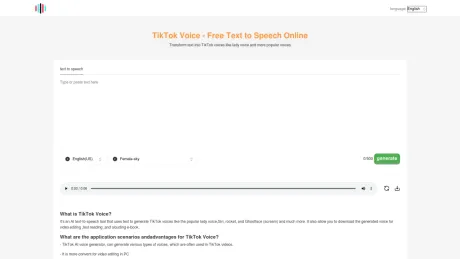
The TikTok Voice is very easy to use,:
- Choose the language and voice accent you want to generate.
- Type the text to be converted to speech in the input box,
- Press the generate button and wait seconds
- Play or download the generated voice.
I can't find popular voice I want
feel free to mail us what you want voice : tiktokaivoicetool@gmail.com
Frequently asked questions
What is TikTok Voice used for?
MoGoFun: TikTok Voice Generator, Generate funny TikTok AI Voice.Is TikTok Voice free?
TikTok Voice is free to use.What are alternatives to TikTok Voice?
Where can I get TikTok Voice?
TikTok Voice is available at https://tiktokvoice.net/.What category is TikTok Voice in?
TikTok Voice is listed in Text To Speech.How to use TikTok Voice?
The TikTok Voice is very easy to use,: - Choose the language and voice accent you want to generate. - Type the text to be converted to speech in the input box, - Press the generate button and wait seconds - Play or download the generated voice.I can't find popular voice I want
feel free to mail us what you want voice : tiktokaivoicetool@gmail.comTikTok Voice Generator - Best TikTok AI Voice & text to speech tool online
It's a tiktok Al generator tool developed by latest tiktok tts technology, it can generate almost all tiktok Al voices. The tiktok AI voices that will be supported soon include: derek, trickster, austin butler , news reporter , adam Additionally, tiktok voice generator will supports more languages and accents. If you need a specific one, please email me.What are the advantages of TikTok Voice Generator?
1. It can generate various voices, which are often used in TikTok videos. 2. TikTok Voice Generator use latest text to speech technology that can generate human-like speech. 3. More convenient for video editing on PC. 4. You can use some voiceover that removed in TikTok APP now.How to use TikTok Voice Generator?
It is very easy to use: 1. Choose the language and accent. 2. Type the text into the text box. 3. Press the generate button and wait a few seconds. 4. Play or download the file.What are the most famous and funny tiktok voices in TikTok Voice Generator?
The most famous one is Deep voice, officially called story teller. For the funniest ones, I recommend ghostface and C3PO 's voice. These are often used for dubbing funny TikTok videos because they are highly recognizable and can quickly immerse viewers.What are the most annoying TikTok voices in TikTok Voice Generator?
There isn't truly an 'annoying' one. It's more about the context and content where the effect is used that may make some people uncomfortable. For instance, some people might find Jessie voice annoying because it appeared too frequently on TikTok during a certain period. However, due to its timbre and quality, it is actually a fantastic tiktok voice effect. Additionally, the tiktok voice actor behind it is very professional and also posts her own videos on TikTok. So, I suggest to listen the audio file from this tool multiple times, and patiently find the best style that suits you.Can TikTok Voice Generator generate jessie voice?
1. In the first dropdown menu of TikTok Voice generator tool, select English (US) accent, then in the other dropdown menu, select Jessie voice (voice lady). 2. Type the text into the input box and click the generate button. 3. After waiting about ten seconds, you will hear Jessie voice. In the operation bar, find the button with a downward arrow and click it to download.Can TikTok Voice Generator generate C3PO voice?
1. Select English (US) accent, then choose C3PO voice (robot voice). 2. Enter the text and click the generate button. 3. After waiting a moment, you will hear the voice.Can TikTok Voice Generator generate ghostface voice?
1. Choose English (US), then choose ghostface voice. 2. Type and click the generate button. 3. The audio file will be generated.How to use TikTok Voice to Generator generate siri voice?
1. Select English (US), then click siri voice. 2. Put the text into the input box and press the generate button. 3. Then the AI audio will be generated.How to add the voice effect on TikTok?
If you want to know how to use the official voice effect on TikTok, I will write a dedicated blog post. Here, I will explain how to publish the generated audio to TikTok with TikTok Voice Generator. 1. If you have generated the audio file on your PC and want to upload it to TikTok or any other video editing app on your phone, you need to transfer the file to your phone. For iPhones, you can use airDrop for the transfer. For Android phones, I am not very familiar with the process, but you will definitely find methods and tools to do so. 2. Once the file is on your phone, you can open TikTok APP A Tap the '+' button at the bottom of the interface, select the video in your phone. B After uploading the video, find a square icon on the right side of the screen to enter the editing page. C At the bottom of the page, find the 'add speech' button and click to select the audio file you just transferred. D In this interface, you can make some adjustments to the video, and then click the button at the top right corner to publish it.Is TikTok Voice Generator free?
It is a free text to speech tool.Where can I generate funnys TikTok Voice into my video?
You can visit https://mogofun.com to use TikTok Voice Generator.
Compare TikTok Voice with…
Pick any tool to see a structured side-by-side: pricing, deployment, capabilities, and content policy.