- Category
- Text to Image
- Alternatives
- 6 similar tools
- Last updated
- 1 weeks ago
- Source
- Official site ↗︎
AI Collection Top Picks

Text to Image Category Picks
About vibeaha
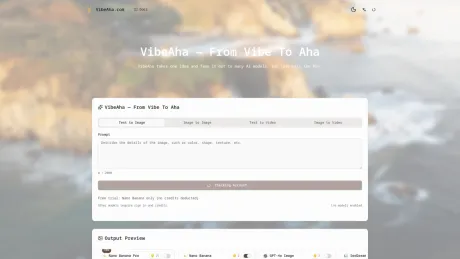
Create images and videos, upscale, edit and translate with 21 models in one VibeAha workspace. Model-specific controls, credit quotes and private history.
What you get
Additional Information
VibeAha is a versatile AI image and video studio designed for creators, marketers, and educators aiming to harness the power of AI in their workflows. By leveraging multiple models, VibeAha enables users to input a single prompt and receive diverse outputs simultaneously, making it easier to select the ideal results without the need for cumbersome tool switching.
The platform is optimized for teams that require rapid production and asset testing, facilitating the creation of consistent and on-brand content for platforms like TikTok, YouTube, and Instagram. With features such as parallel A/B testing, users can refine their creative processes and ensure they deliver the best quality content.
VibeAha also supports various use cases, including brand marketing, education, and multi-channel networks (MCNs). Its streamlined interface allows users to manage multiple accounts and collaborate seamlessly, while integrated tools and credits system ensure flexibility and control over content production.
From generating stunning visuals to creating compelling narratives, VibeAha aims to simplify and enhance the creative journey for individuals and teams, making it an essential tool for modern content creators.
Frequently asked questions
What is vibeaha used for?
AI Image & Video Generator | 21 Models — VibeAha.Is vibeaha free?
Pricing for vibeaha varies — see the Pricing section for details.What are alternatives to vibeaha?
Where can I get vibeaha?
vibeaha is available at https://vibeaha.com/.What category is vibeaha in?
vibeaha is listed in Text to Image.What is VibeAha and why use VibeAha instead of a single-model tool?
VibeAha is a multi-model AI image and video studio where one idea fans out across several top models at once. Inside VibeAha you enter your prompt a single time and compare different model styles, speeds, and detail levels side by side. With VibeAha you spend less time guessing which model fits a project and more time shipping the winning creative.How does multi-model generation work inside VibeAha?
In VibeAha you choose a scene, write your prompt, and then select the image or video models you want to test. When you click Generate, VibeAha sends parallel jobs to multiple providers and shows all the results on a single canvas. Instead of opening several tabs or sites, you stay in VibeAha to run full A/B tests with one prompt across many models.What are the best practices for writing prompts in VibeAha?
When you write prompts in VibeAha, focus on plain language that clearly describes what you want to see, where it happens, and what mood it should have. Start with a simple prompt in VibeAha to lock in composition and subject, then gradually add style, lighting, and camera notes. Because VibeAha reuses the same prompt across multiple models, you can see how each engine responds to the exact same brief.How do credits work for multi-model runs in VibeAha?
Before every run, VibeAha estimates how many credits the current setup will consume and shows the total on screen. If you enable several models, VibeAha sums the cost for each one so you always know the full spend for that click. When credits are low or insufficient, VibeAha warns you in advance instead of wasting your time, and all usage is recorded in your VibeAha billing history.Does VibeAha offer a free trial and how does VibeAha Free Image work?
VibeAha offers a starter free experience so you can feel the multi-model workflow before paying. As a guest you can try a limited number of VibeAha Free Image generations; once you sign in, VibeAha unlocks more models and lets you pay with credits. The idea is simple: learn the flow with free VibeAha runs first, then scale up to more stable, higher-volume usage when you are ready.What if I click Generate in VibeAha and nothing appears right away?
When you click Generate in VibeAha, the button and progress bar move into an active state and show that VibeAha is talking to multiple models. If networks or providers are slow, VibeAha keeps updating status and timeouts instead of freezing silently. Whenever VibeAha shows an error or timeout, you can retry later or switch models, and those signals help us improve stability and feedback for everyone.How does VibeAha handle privacy and rights for uploaded and generated content?
By default VibeAha only uses your uploads and generations to complete the tasks you trigger and does not turn your private assets into public training data. You can review data-retention settings and export options inside VibeAha if you need stricter control. For commercial work, we recommend using team accounts in VibeAha and keeping external collaboration to exported files so every asset is traceable to internal VibeAha audit logs.Which teams and use cases get the most value from VibeAha?
VibeAha is built for teams that need lots of assets and fast testing cycles, such as brand marketing, creative agencies, content studios, MCN organizations, and solo creators. You can treat VibeAha as your multi-model asset engine: once a script or brief is ready, you run many model variations in VibeAha, pick the best look, and move straight into editing or layout. For ongoing campaigns and multi-account matrices, VibeAha also lets you save prompt and model presets so different teammates can reuse the same workflows across the whole account network.Can I compare different AI models in one place?
Yes. Choose an image or video workflow, compare the models available for that mode, and keep the prompt and settings in one workspace.Do I need an account before I start?
No. You can generate one GPT Image 2 image per day as a visitor. Create an account when you want to keep working, use other models, or buy credits.Where are my generated files stored?
Signed-in generations are stored in your private History page. VibeAha does not create public, indexable result pages for individual runs.Is a credit pack a subscription?
No. Air, Pro, and Max are one-time purchases. There is no recurring charge or automatic renewal.Do purchased credits expire?
No. Credits from the current Air, Pro, and Max packs do not expire or reset each month.What happens when a generation fails?
When an eligible generation fails before successful delivery, the reserved credits are automatically restored to your balance.Why can the credit cost change between generations?
Model, resolution, duration, audio, and selected options can change the cost. VibeAha shows the exact credit estimate before you submit.What is an image to video AI generator?
An image to video AI generator uses a source image or keyframes plus motion instructions to create a new video clip. VibeAha keeps the upload, model controls, credit estimate, result, and download in one workspace.Which image formats can I upload?
The default Seedance 2.0 workflow accepts JPG, PNG, and WebP images up to 30MB each and supports up to two references. Other models can have different limits, which the upload control shows after you select a model.Which image-to-video models are available?
VibeAha currently exposes Seedance 2.0, Veo 3.1 Fast, Grok Imagine 1.5, MiniMax H3, Gemini Omni, and Kling 3.0 for image-to-video generation. Available settings come from the selected model’s active capability configuration.Do I need an account to create an AI video?
You can upload references, write a prompt, and prepare the workflow before signing in. An account and enough credits are required to submit an image-to-video generation, and the prepared draft is restored after the sign-in return.Can I use a first and last frame?
Yes, when the selected model supports two keyframes. Upload the starting frame first and the ending frame second; the generator adjusts the upload limit and guidance for the active model.Can I choose the duration, resolution, ratio, or audio?
These controls vary by model. VibeAha only shows combinations supported by the selected workflow, and the exact duration, resolution, ratio, audio option, and credit estimate appear before submission.What happens to my credits if generation fails?
When an eligible generation fails before successful delivery, the reserved credits are automatically restored. The exact estimate is shown before you submit because model and settings change the cost.How does VibeAha maintain face and identity consistency from an image?
VibeAha uses identity-preserving visual conditioning across temporal latent frames rather than generating from scratch, preventing facial drift and structure distortion during camera movements.Which model should I choose for cinematic camera movements vs fast animation?
Seedance 2.0 and Kling are recommended for realistic physical simulations, dynamic camera pans, and lighting consistency, while Grok Imagine is optimal for high-contrast creative concepts and stylized character motion.Are my generated videos public?
No. Signed-in generations are stored in your private History page. VibeAha does not create public, indexable result pages for individual generation runs.What can I create in VibeAha?
Choose from 21 image, video and editing models in one workspace. Generate from text, edit images, animate references, upscale, translate or process existing media with the models shown above.Which files and settings does each model support?
Select a model and operation to see its required files, formats, sizes, resolution, duration and audio settings. The same controls and validation apply on the homepage and the model page.Will signing in or paying start a generation?
No. The workspace saves your model, prompt, settings and compatible files before you leave. After returning, review the restored draft and press Generate yourself. A storage problem is shown before leaving.How are credits calculated?
Each model and setting has a credit quote. Uploaded durations are verified before billing. If the verified price changes, review and confirm the new quote before any credits are charged.What happens when generation fails?
Confirmed eligible failures restore reserved credits. If a submitted request has an unknown outcome, its status stays under investigation to avoid creating duplicate tasks. History shows the recorded outcome and refund status.Are my generations public?
Your signed-in tasks and results are in your private History. Public examples are separately selected outputs approved for display.
Compare vibeaha with…
Pick any tool to see a structured side-by-side: pricing, deployment, capabilities, and content policy.