- Category
- Video Editing
- Alternatives
- 6 similar tools
- Last updated
- 2 weeks ago
- Source
- Official site ↗︎
AI Collection Top Picks

Video Editing Category Picks

About c dance ai
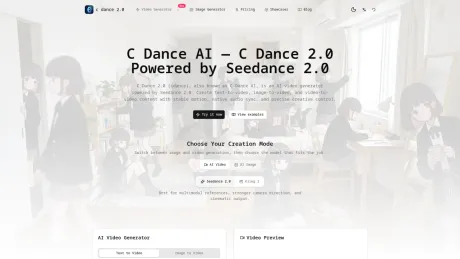
Create AI videos with Seedance 2.0 on C Dance AI. Turn text, images, audio, and video references into cinematic text-to-video and image-to-video clips.
What you get
Additional Information
C Dance AI, also known as C Dance 2.0, is an AI video generation platform that allows users to create high-quality cinematic videos from simple inputs such as text, images, and existing video clips. Powered by the Seedance 2.0 model, it offers advanced features like cinematic motion, multi-style rendering, and director-level control over video production. This platform is designed for creators, marketers, and teams looking to produce engaging video content without the need for extensive video editing experience.
With C Dance AI, the entire process is streamlined. Users start by selecting a format—text-to-video, image-to-video, or video-to-video—and input their desired prompts. The AI then generates clips that feature lifelike motion and carefully crafted audio-visual timing. This makes it ideal for creating promotional materials, storytelling projects, and educational content, enhancing user creativity with minimal effort.
Additionally, C Dance AI supports commercial projects, providing full rights for users to utilize generated content according to their needs. Its flexibility in terms of design enables users to switch styles instantly—including options like pixel art, watercolor, or 3D rendering. The platform is continually evolving, ensuring that it meets the demands of modern video production while maintaining an easy-to-use interface for all skill levels.
C Dance AI also offers various subscription plans, which cater to different production needs while allowing users to choose based on their volume and frequency of video creation. Overall, this tool revolutionizes the way video content is generated, empowering users to unleash their imagination and produce professional-grade videos efficiently.
Frequently asked questions
What is c dance ai used for?
C Dance AI | Seedance 2.0 AI Video Generator.Is c dance ai free?
Pricing for c dance ai varies — see the Pricing section for details.What are alternatives to c dance ai?
Top alternatives to c dance ai include Klap App, AI video editor, Atlabs AI, Topview AI URL to Video, Colossyan.Where can I get c dance ai?
c dance ai is available at https://cdance.ai.What category is c dance ai in?
c dance ai is listed in Video Editing.✨ Key Features
- **Seedance 2.0 Power**: Delivers cinematic, smooth video output with stable motion and natural scene transitions. - **Native Audio-Visual Sync**: Eliminates the need for post-editing, ensuring your audio and visuals align perfectly. - **Multi-Input Support**: Generate videos from text prompts, reference images, or existing clips. - **Cloud-Based Workflow**: No technical setup or local installation required—create videos from any device. - **Flexible Pricing**: Free trial credits for new users, with pay-as-you-go options to scale with your needs. - **Commercial Use**: All generated videos can be used for commercial purposes without restrictions.🎯 Who Is It For?
- **Social Media Creators**: Make engaging Reels/TikToks in minutes without editing software. - **E-commerce Marketers**: Create product demo videos to boost conversion rates and showcase products. - **Online Educators**: Build interactive tutorial videos with visual aids and voiceover sync. - **Small Business Owners**: Craft professional marketing content without hiring a video production team.🚀 Get Started
Try C Dance AI today with free trial credits and see how easy it is to create cinematic AI videos—no advanced editing skills required.Is c dance 2.0 the same as Seedance 2.0?
Yes. c dance 2.0 refers to Seedance 2.0—the same model and technology—so you can use the names interchangeably here.What is c dance 2.0?
c dance 2.0 is an AI video generator brand powered by Seedance 2.0. You can create videos from text prompts, images, or reference clips, then refine camera movement, style, and pacing.What is Seedance 2.0?
Seedance 2.0 is an AI video model and workflow for generating short videos from text, images, audio, video, and other references. C Dance AI turns that capability into a browser-based creation workspace.How does c dance 2.0 ai video generator work?
Start with text, an image, or a source video. c dance 2.0 uses Seedance 2.0 to generate or transform clips, with controls for duration, aspect ratio, motion intensity, and style consistency.How to use Seedance 2.0 on C Dance AI?
Open Create, choose Seedance 2.0, pick text-to-video or image-to-video, write a clear prompt, set duration and aspect ratio, then generate and revise one detail at a time.Is Seedance 2.0 free?
Free access, signup credits, and campaign limits can change. The safest route is to open the generator and check the current Pricing page before starting a larger batch.Is this the official Seedance 2.0 website?
This is the official C Dance AI website and workspace. ByteDance Seed provides the official Seedance 2.0 model information, while C Dance AI focuses on practical generation workflows.Does C Dance AI offer a Seedance 2.0 API?
C Dance AI is primarily a web generator. API availability can depend on account, plan, and product rollout, so check API Keys or contact support if you need programmatic generation.When was Seedance 2.0 released?
ByteDance Seed's official Seedance 2.0 launch post is dated February 12, 2026. Current access can still vary by platform, so check the generator and Updates page for live availability.Is cdance 2.0 the same as cdance2 or cdance2.0?
Yes. cdance 2.0, cdance2, and cdance2.0 are common spelling variants used for c dance 2.0. They refer to the same product experience on this site.Do people mean Seedance 2.0 when they type seendance 2.0?
Usually, yes. seendance 2.0 is a common misspelling of Seedance 2.0, and this page uses the correct Seedance spelling for the AI video model.Can c dance 2.0 create text-to-video and image-to-video?
Yes. c dance 2.0 supports text-to-video, image-to-video, and video-to-video workflows so you can start from a prompt, a still image, or an existing clip.What is the purpose of Seedance 2.0?
The main purpose is to help creators and teams turn ideas, reference images, and existing clips into short-form videos with stronger motion, camera direction, and audio-visual control.What is the latest update of c dance 2.0?
The latest c dance 2.0 updates typically include model quality improvements, better motion consistency, and workflow enhancements. Check the updates section for current release details.Does Seedance 2.0 support porn or NSFW generation?
No. C Dance AI is intended for compliant creative, marketing, education, product, and storytelling workflows, not porn or explicit NSFW generation.What is c dance and how does it differ from other AI video tools?
C dance (also written as cdance, c-dance, or cdance2) is an AI video generation platform powered by Seedance 2.0. Unlike generic editors, c dance focuses on cinematic motion quality, multi-style rendering, and director-level camera control for text-to-video, image-to-video, and video-to-video workflows.Can I use c dance 2.0 outputs for commercial projects?
Yes, commercial use is supported. Make sure you have rights to any uploaded reference assets and follow your brand or platform compliance requirements.Is there a c dance app I can download?
C Dance AI is primarily a web-based c dance ai video generator you can use directly in your browser. A dedicated c dance app may be available depending on your platform — check the homepage for the latest access options.Is c dance ai related to c dance 2.0?
Yes. C Dance AI and c dance 2.0 refer to the same brand experience in current usage. Both names are used to describe Seedance 2.0-powered video generation.Can I make a c dance video for social media?
Yes. C Dance AI supports multiple aspect ratios (16:9, 9:16, 1:1) so you can create c dance video content optimized for TikTok, Instagram Reels, YouTube Shorts, and other social platforms directly from the generator.How does the C Dance AI video generator work?
Start with text, an image, or a source video, then choose Seedance 2.0 or another available model in the C Dance AI workspace. You can control duration, aspect ratio, motion intensity, and style consistency.Can C Dance AI create text-to-video and image-to-video?
Yes. C Dance AI supports text-to-video, image-to-video, and video-to-video workflows so you can start from a prompt, a still image, or an existing clip.Where can I find the latest C Dance AI updates?
Check the Updates page for current model availability, quality improvements, motion consistency changes, and workflow enhancements.Can I use C Dance AI outputs for commercial projects?
Yes, commercial use is supported. Make sure you have rights to any uploaded reference assets and follow your brand or platform compliance requirements.What is C Dance AI and how does it differ from other AI video tools?
C Dance AI is an AI video generation platform that supports Seedance 2.0 and other models. Unlike generic editors, C Dance AI focuses on cinematic motion quality, multi-style rendering, and director-level camera control for text-to-video, image-to-video, and video-to-video workflows.Is there a C Dance AI app I can download?
C Dance AI is a browser-based workspace, so no app download is required. You can use it from a desktop or mobile browser.Can I make social media videos with C Dance AI?
Yes. C Dance AI supports multiple aspect ratios (16:9, 9:16, 1:1) for content on TikTok, Instagram Reels, YouTube Shorts, and other social platforms.What can I create with C Dance AI?
C Dance AI can create short videos from text prompts, still images, or existing clips. It supports product shots, ads, social content, story concepts, explainers, and other compliant creative work.How do I turn text or an image into a video?
Choose text-to-video when starting from an idea, image-to-video when the composition already exists, or video-to-video when restyling a clip. Add a focused prompt, choose a model and settings, review the credit cost, then generate.Which AI video model should I choose?
Compare the model selector's supported inputs, duration, resolution, reference, and audio options. Start with a featured model and switch only if motion, consistency, style, or sound does not match your goal.Can I try C Dance AI before paying, and how do credits work?
Signup or check-in credits may be available under the current promotion. Credit cost varies by model and settings, and C Dance AI shows the exact cost before you submit each generation.Which resolution, duration, aspect ratio, and reference options are available?
Available resolutions, durations, aspect ratios, reference limits, and audio options depend on the selected model. The workspace only shows settings that the current model supports.How long does AI video generation take?
Generation time varies with the model, duration, resolution, audio, and provider queue. You can follow task status in the workspace; a longer wait does not by itself mean the task has failed.Can C Dance AI generate video with sound?
Yes, when the selected model supports audio. Models and modes with native or generated sound display the relevant audio option in the workspace.Can I use generated videos commercially?
You retain ownership of prompts, uploads, and outputs you are legally entitled to create, subject to applicable law and C Dance AI's terms. You must have rights to uploaded people, brands, images, video, and audio.How are my uploads and generated files handled?
C Dance AI stores prompts, uploaded references, and outputs to deliver generations and account history, and does not sell personal information. Data may be processed by trusted service providers under the Privacy Policy.What should I do if the first result is not right?
Change one variable at a time. Simplify competing actions and camera moves, strengthen the most important constraint, try image-to-video for composition control, or compare another model.What content is not allowed on C Dance AI?
C Dance AI does not allow illegal, harmful, sexually explicit, exploitative, deceptive, or rights-infringing content. See the Safety and Terms pages for complete rules.
Compare c dance ai with…
Pick any tool to see a structured side-by-side: pricing, deployment, capabilities, and content policy.