Camisual
Professional Design Tool for Designers, Teams & Business Owners.
- Category
- AI Art & Illustration
- Alternatives
- 6 similar tools
- Last updated
- 1 weeks ago
- Source
- Official site ↗︎
AI Collection Top Picks

AI Art & Illustration Category Picks

Supercharge your image and video content creation with unmatched consistency, speed, and quality.


About Camisual
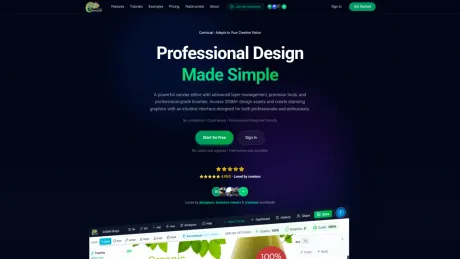
Create stunning designs, illustrations, and digital art with Camisual - a free, professional-grade design tool. Features AI-assisted editing, 200M+ design assets, advanced brushes, layer management, and more. No download required, works in your browser.
What you get
Additional Information
Camisual is a professional design tool that operates entirely in your web browser, making it accessible on any device without the need for downloads or installations. It features a robust canvas editor equipped with advanced layer management, precision tools, and a vast library of over 200 million design assets. Whether you are a beginner or a seasoned professional, Camisual offers an intuitive drag-and-drop interface that allows you to create stunning graphics quickly and efficiently.
The platform provides various AI-powered tools to streamline your design workflow. Notable features include AI background removal, which simplifies the editing process, enabling you to enhance images with precision and ease. Other tools, such as pressure-sensitive brushes and bezier curve editing, cater to the needs of professional designers, allowing for intricate and detailed artwork creation.
Camisual supports team collaboration by enabling users to invite team members to designs, share feedback, and manage projects within folders. The platform's flexibility makes it suitable for business owners who require marketing materials without the complexity and cost associated with traditional design software. It offers a seamless experience, ensuring that every user remains in control of their creative process.
With its commitment to enhancing creativity through AI assistance rather than replacement, Camisual is designed to make professional-quality design accessible to everyone. The platform is ideal for a wide range of users, including casual creators, social media marketers, and businesses looking to produce high-quality visuals efficiently.
Frequently asked questions
What is Camisual used for?
Camisual - Professional Design Tool for Designers, Teams & Business Owners.Is Camisual free?
Pricing for Camisual varies — see the Pricing section for details.What are alternatives to Camisual?
Where can I get Camisual?
Camisual is available at https://camisual.com/.What category is Camisual in?
Camisual is listed in AI Art & Illustration.Is Camisual free to use?
Yes. Camisual offers a free forever plan with access to core design tools: the canvas editor, layers, brushes, shapes, text tools, and background removal. Premium plans unlock more AI credits, higher export quality, and full team collaboration. No credit card required to start.Do I need to download or install anything to use Camisual?
No. Camisual runs entirely in your web browser (Chrome, Safari, Firefox, or Edge). No installation, no plugins. Open a tab and start designing instantly on any device, including Mac, Windows, and tablets.Can I remove image backgrounds for free?
Yes. AI background removal is available on the free plan. Upload your image, click remove background, and download the result with a transparent background. No selection tools or manual masking needed.Is Camisual good for beginners with no design experience?
Absolutely. The interface is built to be intuitive from day one. Drag-and-drop elements, pre-made templates, and context-aware toolbars mean you can create professional-looking designs without any design training or prior experience.How does Camisual compare to Canva or Photoshop?
Camisual bridges the gap between the two. It's as easy to start as Canva but includes deeper creative tools: professional pressure-sensitive brushes, bezier curve editing, pixel-level object removal, and full layer management. Features typically reserved for Photoshop or Illustrator, available in a browser for free.What file formats can I export from Camisual?
You can export your designs as PNG, JPG, SVG, and PDF. High-DPI / retina-quality export is supported for print-ready output. PNG with transparent background is available on all plans.Does Camisual support team collaboration?
Yes. You can invite team members to your designs, share read-only preview links with clients, leave comments for feedback, and manage all projects in shared folders. No separate file-sharing tools needed.
Compare Camisual with…
Pick any tool to see a structured side-by-side: pricing, deployment, capabilities, and content policy.