- Category
- Video Editing
- Pricing
- Freemium
- Alternatives
- 6 similar tools
- Last updated
- 1 weeks ago
- Source
- Official site ↗︎
AI Collection Top Picks

Video Editing Category Picks

About Descript
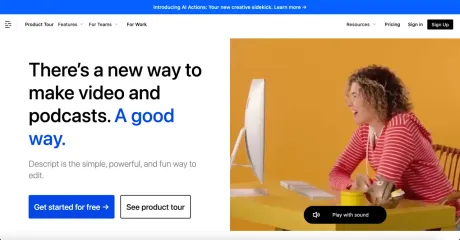
Descript is the AI video and audio editor that makes editing as easy as editing text. Record, transcribe, edit, and publish in one tool. Try it free.
Descript's Pricing Plans
Descript may change prices at any time. Here's our latest information:
Save 20% with annual billing
Free
$0
- 1 hr / month Transcription hours (per editor)
- 1 / month Watermark-free video export
- 720p Video export resolution
- Filler word removal: um & uh
- Overdub: 1,000 word vocabulary
- AI-Green Screen: Up to 10 min file
- Studio Sound: Up to 10 min file
- Stock library: First 5 results per search
Creator
$15
per user / month
- 10 hr / month Transcription hours (per editor)
- Unlimited Watermark-free video export
- 4K Video export resolution
- Filler word removal: um & uh
- Overdub: 1,000 word vocabulary
- AI-Green Screen: Up to 60 min file
- Studio Sound: Up to 60 min file
- Stock library: First 12 results per search
Pro
$30
per user / month
- 30 hr / month Transcription hours (per editor)
- Unlimited Watermark-free video export
- 4K Video export resolution
- Filler word removal: 18 filler words and repeated words
- Overdub: Unlimited
- AI-Green Screen: Unlimited
- Studio Sound: Unlimited
- Stock library: Unlimited
Enterprise
Custom
- Everything in pro, plus...
- Dedicated account representitive
- Single sign on (SSO)
- Overdub Enterprise
- Descript Service Agreement
- Security Review
- Invoicing
- Onboarding & training
What you get
Additional Information
Descript allows users to edit video and audio content simply by editing text. This unique approach enables a seamless workflow where recordings can be captured, transcribed, and edited without complex video editing skills. It offers a range of features including multi-track audio editing, a screen recorder, and tools for automatic transcription with high accuracy.
Users can also create captions instantly, generate custom media from prompts, and leverage AI-driven tools like voice cloning and avatars. Whether for marketing, training, or individual creators, Descript helps streamline content creation, making it accessible to teams of all sizes.
Particularly useful for marketers, educators, and content creators on platforms like YouTube and TikTok, Descript includes features tailored to enhance production quality. The platform supports collaboration, making it ideal for teams that need to work efficiently without extensive resources devoted to video production.
From removing filler words in recordings to advanced capabilities like automatic multicam editing and real-time transcription, Descript covers a wide array of use cases that empower creators to produce polished content without requiring a full video production team.
Frequently asked questions
What is Descript used for?
Descript: AI Video & Audio Text-based Editor — Try Free.Is Descript free?
Descript has a free tier; paid plans unlock additional features.What are alternatives to Descript?
Top alternatives to Descript include Klap App, AI video editor, Atlabs AI, Topview AI URL to Video, Colossyan.Where can I get Descript?
Descript is available at http://www.descript.com?lmref=xru03g.What category is Descript in?
Descript is listed in Video Editing.What is Descript?
Descript is an AI video and audio editor that lets you edit by editing text. You record or upload, Descript's AI transcribes it, then you cut, trim, and rearrange the video by changing the transcript.How does editing by text work?
You edit video the way you edit a doc. Descript's AI transcribes your recording, so deleting a word deletes that moment of video and moving a sentence moves the footage with it.Is Descript good for beginners?
You edit by deleting words in a transcript, so most people make their first cuts within minutes. The timeline is there for fine control when you want it, but you can make a whole video without touching it.What files can I bring into Descript?
Drag in video, audio, or a recording from a Zoom call; Descript's AI transcribes it so you can start editing right away. There is nothing to convert or migrate first.Will the AI edits look obviously AI?
They shouldn’t. The goal is footage that looks like you shot it in the room, not something that looks processed. you control how far the AI goes, or turn it off.Is it secure enough for my team or company?
SOC 2 Type II, SAML SSO and SCIM, and GDPR compliance, plus admin controls for users, permissions, and separate drives. Security reviews welcome — book a demo and we'll walk through it.
Compare Descript with…
Pick any tool to see a structured side-by-side: pricing, deployment, capabilities, and content policy.