
Image Animator AI
Animate Image to Video Online with AI.
- Category
- Video Editing
- Alternatives
- 6 similar tools
- Last updated
- 6 days ago
- Source
- Official site ↗︎
AI Collection Top Picks

Video Editing Category Picks



About Image Animator AI
Use Image Animator AI, Animate your 2D image into dynamic video online. Perfect for product ads, social media, and creative content — no design skills needed.
What you get
Additional Information
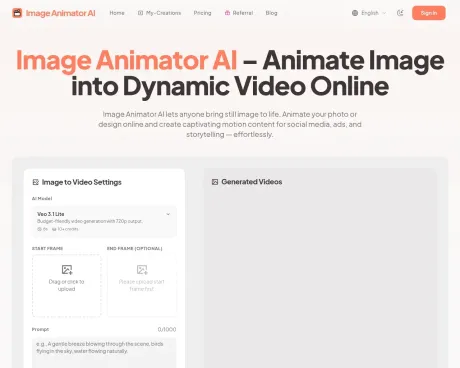
Image Animator AI is an online AI-powered tool designed to convert still images and photos into dynamic motion videos. It employs advanced animation models such as Veo3.1, Sora 2, and Kling, delivering professional-quality results suitable for various uses like marketing and creative projects. Users can effortlessly create animations by simply uploading their image and inputting a descriptive prompt.
The platform is entirely browser-based, meaning there’s no need for any software installation. Users can generate videos directly from the web interface, which is designed for convenience and ease of use. This service does not provide unlimited free generation; however, it offers affordable credit packages for users who wish to create animated videos online.
Users retain full commercial-use rights for videos generated through paid plans, except for trial credits, allowing for usage in advertising, social media, and other business endeavors. The output is in high-quality MP4 format, which can be downloaded and shared without watermarks or resolution loss.
With features optimized for online sharing, users can easily post their animated videos across multiple platforms. Each video is stored in the user’s My-Creations page, ensuring easy access for viewing, downloading, or permanent deletion whenever needed.
Frequently asked questions
What is Image Animator AI used for?
Animate Image to Video Online with AI.Is Image Animator AI free?
Pricing for Image Animator AI varies — see the Pricing section for details.What are alternatives to Image Animator AI?
Top alternatives to Image Animator AI include Klap App, AI video editor, Atlabs AI, Topview AI URL to Video, Colossyan.Where can I get Image Animator AI?
Image Animator AI is available at https://imageanimatorai.org.What category is Image Animator AI in?
Image Animator AI is listed in Video Editing.What is Image Animator AI?
Image Animator AI is an online AI-powered tool that turns a still image or photo into a dynamic motion video. Using cutting-edge animation models such as Veo3.1, Sora 2, and Kling, Image Animator AI delivers professional-quality results suitable for marketing, creative, and commercial use.Do I need to install any software to use Image Animator AI?
No. Image Animator AI runs entirely online in your browser. You can upload your image, enter a prompt, and generate your animated video directly without downloading or installing any additional software.Is Image Animator AI free to use?
Image Animator AI is a professional AI animation platform and does not offer unlimited free generation. You can try the service with very affordable credit packages, making it easy to create animated videos online.Does Image Animator AI provide commercial rights?
Yes. All videos generated through Image Animator AI are granted full commercial-use rights for paid users, except for Trial credit package products. You can use your downloaded MP4 for advertising, social media, product marketing, or other business purposes.What file format does Image Animator AI export?
All outputs from Image Animator AI are exported as high-quality MP4 files. You can preview, download, and share them directly from your My-Creations page without watermark or resolution loss.Can I share my animated video on social media?
Yes. After generation, you can easily post your animated MP4 video from Image Animator AI to Instagram, TikTok, YouTube, or any other platform. All videos are optimized for online sharing and playback.Are my uploaded images and generated videos public?
By default, creations generated on Image Animator AI are public and may be displayed in community or showcase pages. However, you can choose to make your creation private during generation. This setting ensures your image and video remain visible only to you.Can I permanently delete my creations?
Yes. In your My-Creations page, you can permanently delete any uploaded image or generated video from Image Animator AI. Deletion is irreversible, so we recommend downloading your file first if you wish to keep a copy.How can I create high-quality video with Image Animator AI?
To generate the best results with Image Animator AI, choose the latest suitable model and carefully craft your prompt. You may need to refine and test your prompt multiple times, then select the video output you find most satisfying from the generated options.Who should I contact for support or suggestions?
If you have any questions, feedback, or technical issues, please contact our support team at support@imageanimatorai.org. The Image Animator AI team will assist you as soon as possible.
Compare Image Animator AI with…
Pick any tool to see a structured side-by-side: pricing, deployment, capabilities, and content policy.








