
- Category
- Image Editing
- Pricing
- Free
- Alternatives
- 6 similar tools
- Last updated
- 2 weeks ago
- Source
- Official site ↗︎
AI Collection Top Picks

Image Editing Category Picks



About Image Editor
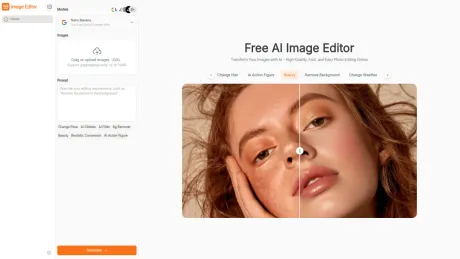
Image Editor Online is an AI-powered tool to edit, crop, and enhance photos in one click. Free to use, easy for beginners, and export images with no watermark.
What you get
Additional Information
Description
Image Editor is an AI-powered online photo editing tool that lets you transform images simply by writing prompts. Instead of spending hours on manual adjustments, you can describe the edit you want — such as “remove background,” “change shirt color to red,” or “restore photo” — and the editor instantly delivers professional-quality results. No sign-up, no downloads, just fast and intuitive AI editing in your browser.
Features
- Prompt-Based Editing – Edit images by typing natural language prompts for quick and precise results.
- AI Image Restoration – Revive old, damaged, or low-quality photos with enhanced clarity and color.
- Object Removal – Instantly erase unwanted objects, people, or blemishes without leaving traces.
- Background Removal & Replacement – Isolate subjects and swap backgrounds effortlessly.
- Object Recoloring – Change the color of clothes, products, or objects using simple prompts.
- Generative Fill – Expand or add elements to your image with AI-driven creativity.
- No Sign-Up, 100% Online – Edit directly in your browser, accessible anytime without registration.
- Free & Premium Options – Use the free editor or upgrade for advanced features and higher limits.
Use Cases
- E-commerce & Marketing – Clean backgrounds, recolor products, and polish images with AI prompts for professional product listings.
- Social Media Creators – Generate creative edits, remove distractions, or enhance photos quickly for eye-catching posts.
- Design & Branding – Align visuals with brand colors by recoloring objects or expanding layouts using generative fill.
- Personal Photo Restoration – Repair old family photos, remove scratches, and revive faded colors with just a few clicks.
- Education & Research – Clean scanned documents, isolate illustrations, and prepare visuals for reports or presentations.
FAQs of Image Editor
1. What is Image Editor?
Image Editor Online is an AI-powered online tool that allows you to edit and enhance photos directly in your browser. You can simply type prompts (e.g., “remove background” or “change shirt color to blue”) and get instant, professional-quality results.
2. Do I need to sign up to use Image Editor?
No. Image Editor works 100% online and requires no sign-up or downloads. You can start editing images right away.
3. How does prompt-based editing work?
You just type what you want — for example, “remove the person in the background” or “make the sky sunset orange” — and the AI automatically applies the requested edit.
4. Is Image Editor free?
Yes. Image Editor offers free usage with basic features. For advanced options and higher limits, premium plans are available.
5. What types of edits can I do with Image Editor?
You can remove or replace backgrounds, erase unwanted objects, recolor items, restore old photos, and use generative fill to add or expand content in images.
6. Can I use Image Editor on mobile devices?
Yes. Since it is browser-based, Image Editor works on desktops, tablets, and smartphones without installation.
7. Is my data safe when using Image Editor?
Yes. Your uploaded images are processed securely and are not shared with third parties.
Frequently asked questions
What is Image Editor used for?
Free AI Image Editor Online: Edit Photo with Text, No Sign-Up.Is Image Editor free?
Image Editor is free to use.What are alternatives to Image Editor?
Top alternatives to Image Editor include ProductScope AI, PicTools.AI, AI Photos Editor, AVCLabs PhotoPro AI, Fotor.Where can I get Image Editor?
Image Editor is available at https://imageeditor.online/.What category is Image Editor in?
Image Editor is listed in Image Editing.Features
* **Prompt-Based Editing** – [Edit images](https://imageeditor.online/) by typing natural language prompts for quick and precise results. * **AI Image Restoration** – Revive old, damaged, or low-quality photos with enhanced clarity and color. * **Object Removal** – Instantly erase unwanted objects, people, or blemishes without leaving traces. * **Background Removal & Replacement** – Isolate subjects and swap backgrounds effortlessly. * **Object Recoloring** – Change the color of clothes, products, or objects using simple prompts. * **Generative Fill** – Expand or add elements to your image with AI-driven creativity. * **No Sign-Up, 100% Online** – Edit directly in your browser, accessible anytime without registration. * **Free & Premium Options** – Use the free editor or upgrade for advanced features and higher limits.Use Cases
1. **E-commerce & Marketing** – Clean backgrounds, recolor products, and polish images with AI prompts for professional product listings. 2. **Social Media Creators** – Generate creative edits, remove distractions, or enhance photos quickly for eye-catching posts. 3. **Design & Branding** – Align visuals with brand colors by recoloring objects or expanding layouts using generative fill. 4. **Personal Photo Restoration** – Repair old family photos, remove scratches, and revive faded colors with just a few clicks. 5. **Education & Research** – Clean scanned documents, isolate illustrations, and prepare visuals for reports or presentations.FAQs of [Image Editor](https://imageeditor.online/)
**1. What is Image Editor?** **[Image Editor Online](https://imageeditor.online/)** is an AI-powered online tool that allows you to edit and enhance photos directly in your browser. You can simply type prompts (e.g., “remove background” or “change shirt color to blue”) and get instant, professional-quality results. **2. Do I need to sign up to use [Image Editor](https://imageeditor.online/)?** No. Image Editor works 100% online and requires no sign-up or downloads. You can start editing images right away. **3. How does prompt-based editing work?** You just type what you want — for example, “remove the person in the background” or “make the sky sunset orange” — and the AI automatically applies the requested edit. **4. Is Image Editor free?** Yes. [Image Editor](https://imageeditor.online/) offers free usage with basic features. For advanced options and higher limits, premium plans are available. **5. What types of edits can I do with [Image Editor](https://imageeditor.online/)?** You can remove or replace backgrounds, erase unwanted objects, recolor items, restore old photos, and use generative fill to add or expand content in images. **6. Can I use Image Editor on mobile devices?** Yes. Since it is browser-based, [Image Editor](https://imageeditor.online/) works on desktops, tablets, and smartphones without installation. **7. Is my data safe when using [Image Editor](https://imageeditor.online/)?** Yes. Your uploaded images are processed securely and are not shared with third parties.What is Image Editor Online and how does it work for photo editing?
Image Editor Online is an AI-powered online tool that allows users to enhance, edit, and transform images quickly. By using AI models and preset prompts, you can adjust colors, remove backgrounds, and apply creative effects without professional software.Can I use Image Editor Online without technical or design skills?
Yes, Image Editor Online is designed to be simple and intuitive. Users can describe their needs with natural language or select preset prompts. The AI models handle the editing automatically, allowing even beginners to generate high-quality visuals for social media, posters, or learning materials without learning complex software like Photoshop.Which AI models are supported by Image Editor Online?
Image Editor Online supports multiple AI models, including Nano Banana, Flux Kontext, Seedream, and GPT. Each model has unique strengths, allowing users to enhance photos, apply creative filters, remove backgrounds, or generate style references.Is Image Editor Online free to use, and are there any limitations?
Yes, Image Editor Online offers free access to its core features. Users can edit images, apply AI prompts, and download high-quality results without payment.How fast can Image Editor Online process images?
Image Editor Online uses AI to process images quickly. Depending on image complexity, it can take a few seconds to under a minute to enhance, apply filters, or remove backgrounds.Can I merge multiple images into a single image for editing?
Yes, Image Editor Online allows you to merge multiple images into one for editing.Does Image Editor Online support style transfer and creative effects?
Absolutely. Image Editor Online includes AI models that can apply style transfer, filters, and various creative effects.Can I download high-resolution images from Image Editor Online?
Yes, Image Editor Online allows users to download high-quality, high-resolution images.Is Image Editor Online suitable for educational materials or learning content?
Yes, Image Editor Online works well for educational purposes.Do I need to install any software to use Image Editor Online?
No installation is required. Image Editor Online is fully online and works in a web browser.Can Image Editor Online handle product photos for e-commerce?
Yes, Image Editor Online is ideal for e-commerce.How do I choose the right AI model in Image Editor Online?
Choosing the right AI model depends on your editing needs.
Compare Image Editor with…
Pick any tool to see a structured side-by-side: pricing, deployment, capabilities, and content policy.








