
Photoshop AI Plugin - Nano Banana
Photoshop Nano Banana Plugin (Free | No Sign Up).
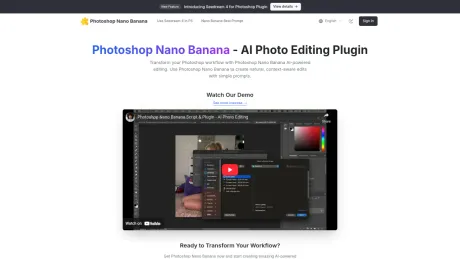
- Category
- Image Editing
- Alternatives
- 6 similar tools
- Last updated
- 3 weeks ago
- Source
- Official site ↗︎
AI Collection Top Picks

Image Editing Category Picks



About Photoshop AI Plugin - Nano Banana
Photoshop Nano Banana plugin transforms your photo editing workflow. Provide One Time Free Download. Create natural, context-aware edits with simple prompts in Photoshop.
What you get
Additional Information
Photoshop Nano Banana is a lightweight AI-assisted Photoshop plugin designed to create realistic, natural image edits. It integrates seamlessly into the Photoshop workflow, allowing users to generate photorealistic results that align with lighting, materials, and perspective. The main features include the ability to inpaint or replace selected areas, enhance image parts using short prompts, and speed up creative iteration without needing to leave Photoshop.
The plugin is particularly useful for designers, photographers, and retouchers, providing them with a tool that simplifies complex editing tasks. Users can create and edit images efficiently by issuing succinct commands that the AI interprets to generate results that blend well with the original images. This not only saves time but also enhances productivity by aligning with the natural workflows Photoshop users are accustomed to.
Furthermore, Photoshop Nano Banana supports cracked or offline installations of Photoshop, making it more accessible for users who may not have access to an Adobe subscription. The one-time purchase price of $4.9 contrasts with ongoing subscriptions of similar tools, making it a cost-effective solution for image editing.
For first-time users, the setup process has been simplified with a step-by-step guide that covers everything from account creation on Replicate for API access to plugin installation in Photoshop. This straightforward approach ensures that users can quickly start creating their AI-powered edits, maximizing the benefits of this powerful plugin.
Frequently asked questions
What is Photoshop AI Plugin - Nano Banana used for?
Photoshop Nano Banana Plugin (Free | No Sign Up).Is Photoshop AI Plugin - Nano Banana free?
Pricing for Photoshop AI Plugin - Nano Banana varies — see the Pricing section for details.What are alternatives to Photoshop AI Plugin - Nano Banana?
Top alternatives to Photoshop AI Plugin - Nano Banana include ProductScope AI, PicTools.AI, AI Photos Editor, AVCLabs PhotoPro AI, Fotor.Where can I get Photoshop AI Plugin - Nano Banana?
Photoshop AI Plugin - Nano Banana is available at https://www.psnanobanana.site.What category is Photoshop AI Plugin - Nano Banana in?
Photoshop AI Plugin - Nano Banana is listed in Image Editing.
Compare Photoshop AI Plugin - Nano Banana with…
Pick any tool to see a structured side-by-side: pricing, deployment, capabilities, and content policy.








