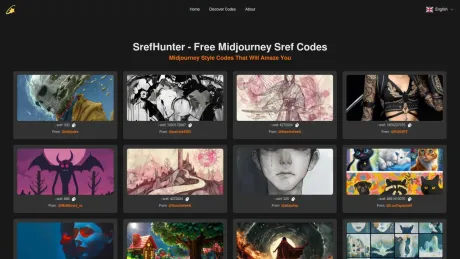
SrefHunter- Free Midjourney Sref Codes
Midjourney --sref codes.
- Category
- Entertainment & Novelty
- Pricing
- Free
- Alternatives
- 6 similar tools
- Last updated
- 3 days ago
- Source
- Official site ↗︎
AI Collection Top Picks

Entertainment & Novelty Category Picks
About SrefHunter- Free Midjourney Sref Codes
Discover 5676 Midjourney --sref codes and style references to improve the aesthetic of your images generated using for Midjourney.
What you get
Additional Information
I've been collecting sref codes shared by various creators on Twitter and have gathered over 400 so far. To help the Midjourney community, I've created a dedicated website to showcase these codes.
Frequently asked questions
What is SrefHunter- Free Midjourney Sref Codes used for?
Midjourney --sref codes.Is SrefHunter- Free Midjourney Sref Codes free?
SrefHunter- Free Midjourney Sref Codes is free to use.What are alternatives to SrefHunter- Free Midjourney Sref Codes?
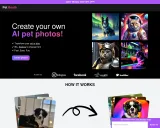
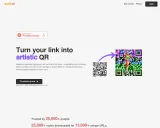
Top alternatives to SrefHunter- Free Midjourney Sref Codes include Pet Booth, Creative QR codes using AI, MemeGenAI, DreamGen: AI role-playing and strory-writing, Langame card game.Where can I get SrefHunter- Free Midjourney Sref Codes?
SrefHunter- Free Midjourney Sref Codes is available at https://srefhunter.top/.What category is SrefHunter- Free Midjourney Sref Codes in?
SrefHunter- Free Midjourney Sref Codes is listed in Entertainment & Novelty.What are Midjourney Sref Codes?
Midjourney Sref Codes are unique identifiers used in prompts to easily apply specific visual styles to generated images. They help users maintain a consistent style without needing lengthy, detailed prompts.How are Midjourney Sref Codes generated?
Midjourney Sref Codes are created using the "--sref random" feature in prompts. When this feature is applied, Midjourney selects a random style, generates an image, and assigns a specific number between 1 and 4294967295 as the style reference code. This code can be reused in future prompts to replicate the same visual style.How to use Sref Codes in Midjourney?
To use Sref Codes in Midjourney, simply add "--sref" followed by the code number in your prompt. For example, you could use "--sref 20240622" in your prompt to apply a specific style.Where can I find a large collection of Sref Codes with visual examples of each style?
You can explore a large collection of Sref Codes at https://srefhunter.top/. The website compiles Sref Codes from Twitter and updates them weekly, providing visual examples of various styles associated with different codes.What is a Midjourney Style Reference?
To use style references in Midjourney, add the "--sref" parameter followed by the URL of an online image in your prompt. For example: "--sref URL". You can include multiple URLs for several style references, like "--sref URL1 URL2 URL3". Additionally, you can use descriptive text in your prompt to reinforce the desired style, which is useful for complex styles. This feature works with both Midjourney and Niji Version 6.What is SrefHunter.top?
SrefHunter.top is a website dedicated to discovering and showcasing extraordinary Midjourney Sref Codes. The site gathers trending codes from social media, providing an extensive collection for users to explore and apply in their projects. The site is free to use and offers easy access to Midjourney Sref Codes with a single click. Users can view larger images and detailed prompts (if available) to gain inspiration for their next masterpiece. SrefHunter.top is designed to spark creativity by helping users discover unique image styles and fresh ideas for their work.
Compare SrefHunter- Free Midjourney Sref Codes with…
Pick any tool to see a structured side-by-side: pricing, deployment, capabilities, and content policy.