- Category
- Text To Speech
- Pricing
- Free
- Alternatives
- 6 similar tools
- Last updated
- 4 weeks ago
- Source
- Official site ↗︎
AI Collection Top Picks

Text To Speech Category Picks


About Vatis Tech
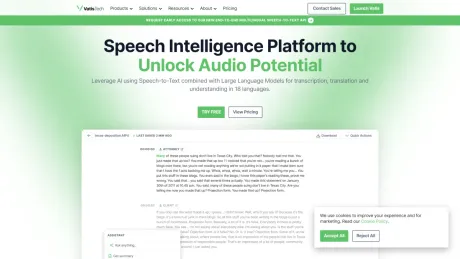
Transcribe audio and video to text with 95%+ accuracy in 50+ languages. Fast and secure, MP3, WAV, M4A and 25 more formats. Try it free.
What you get
Additional Information
Key Features:
- Transcribe in 40+ languages and translate in 30+ languages
- Advanced features: speaker diarization, entity detection, punctuation, numeral conversion
- Audio intelligence: summarization, virtual assistant, sentiment analysis, topic detection
- Real-time or pre-recorded file transcription
- In-app text editing capabilities
- Compatible with any programming language
- Scalable infrastructure
Frequently asked questions
What is Vatis Tech used for?
Transcribe Audio to Text with 95% Accuracy in 50+ Languages.Is Vatis Tech free?
Vatis Tech is free to use.What are alternatives to Vatis Tech?
Where can I get Vatis Tech?
Vatis Tech is available at https://vatis.tech.What category is Vatis Tech in?
Vatis Tech is listed in Text To Speech.How do I convert audio to text online for free?
Upload your audio file to Vatis Tech — no signup or credit card required. Our AI converts speech to text with 90%+ accuracy in about 2 minutes per hour of audio. You get 60 free minutes. We support MP3, WAV, M4A, FLAC, AAC, OGG and more. Edit the text and export as TXT, DOCX, PDF, or SRT.What audio and video formats are supported?
Vatis Tech supports 30+ formats. Audio: MP3, WAV, M4A, FLAC, AAC, OGG, AIFF, WMA. Video: MP4, MKV, AVI, MOV, WebM, WMV, FLV, MPEG. You can also import from YouTube, Google Drive, Facebook, Instagram, and Twitch by pasting a link. Export transcripts as TXT, DOCX, PDF, SRT, or VTT.How accurate is AI transcription?
Vatis Tech AI transcription achieves over 90% accuracy across all supported languages. For English and major European languages, accuracy typically exceeds 95% with high-quality audio. The AI handles background noise, accents, and multiple speakers.Can it transcribe audio with multiple speakers?
Yes. Vatis Tech includes automatic speaker diarization — it identifies and labels different speakers in your recordings. Each segment is tagged with the speaker, making it ideal for interviews, meetings, focus groups, and podcasts.What languages are supported for transcription?
Vatis Tech supports 50+ languages including English, Spanish, French, German, Italian, Portuguese, Dutch, Russian, Arabic, Japanese, Korean, Chinese, Hindi, Turkish, Polish, Romanian, Swedish, Danish, Norwegian, Finnish, Czech, Greek, Hungarian, Indonesian, Thai, Vietnamese, Hebrew, and more. Translate transcripts into 30+ languages with one click.How long does transcription take?
A 1-hour audio file is transcribed in approximately 2 minutes. Shorter files are processed in seconds. This is significantly faster than manual transcription, which takes 4-6 hours per hour of audio.Can I transcribe YouTube videos?
Yes. Paste any public YouTube URL and the video is automatically transcribed. No download needed. Also works with Google Drive, Facebook, Instagram, and Twitch links. Generate a transcript from any YouTube video and export as text, PDF, or subtitles.Is my data secure?
Vatis Tech uses end-to-end encryption and is fully GDPR compliant. Files are never shared with third parties. For organizations with strict security requirements, we offer on-premise deployment where transcription runs entirely on your own servers.Do you have an API for developers?
Yes. The Vatis Tech Speech-to-Text API supports transcription, speaker diarization, audio intelligence, and real-time streaming in 50+ languages. Available for Python, JavaScript, and REST. Features include character-level timestamps, audio-event tagging, and custom model training.Can I generate a transcript from a video?
Yes. Vatis Tech works as a video transcript generator and video transcriber. Upload any video file (MP4, MKV, AVI, MOV, WebM) or paste a YouTube link. The AI generates a complete video transcript with timestamps and speaker labels. Export as TXT, DOCX, PDF, or SRT for subtitles.Can I convert a video to a script or extract text from a video?
Yes. Vatis Tech extracts all spoken content from any video and converts it into a readable script or transcript. Works with any video format. You can also translate the video transcript into 30+ languages with one click.Can I convert voice recordings to text?
Yes. Vatis Tech is a voice to text converter — upload voice memos, phone recordings, or dictation files and get an accurate transcript in minutes. Supports M4A, MP3, WAV, AAC and works as a complete speech to text converter for personal and professional use.How do I transcribe audio to text?
Upload your audio file to Vatis Tech; no signup or credit card required. Our AI automatically converts speech to text with 95%+ accuracy, in about a minute per hour of audio. You get 10 free minutes of transcription. We support all major audio formats including MP3, WAV, M4A, FLAC, AAC and OGG. After transcription, edit the text in our built-in editor and export as TXT, DOCX, PDF or SRT. You can also convert MP4 to a transcript, generate transcripts from any video format, and export as PDF, Word or subtitle files.How accurate is Vatis audio and video to text transcription?
Our AI transcription achieves 95%+ accuracy on clear audio across all supported languages. The AI handles background noise, accents and multiple speakers. For the highest accuracy, upload clear audio with minimal background noise. By proofreading and fine-tuning the transcript you can reach a 100% accurate result.How can I transcribe audio files for free?
We offer 10 minutes of free transcription. Upload your audio or video file to test our transcription software, then edit the transcript in the online editor — add speaker labels and fix mistakes. Start your free trial today.Can I edit and search within transcripts?
Yes. You can search for specific parts of a transcript and proofread or correct it directly in the editor.Does the transcript show when each speaker is talking?
Yes. Transcripts carry timestamps so you can find specific moments in the audio or video, and they show when each speaker is talking.How can I create subtitles for my audio files?
Upload your files and Vatis Tech automatically transcribes them. It can also translate transcripts and generate subtitles in 30+ languages, making your content accessible to a wider audience. Export subtitles as SRT — the format most video platforms expect — or as plain TXT, then add them to your videos on YouTube, Facebook and elsewhere.Is my data secure and are my files confidential?
Yes. Vatis Tech uses end-to-end encryption and is fully GDPR compliant. Your files are processed securely and are never shared with third parties. For organizations with strict security requirements we offer on-premise deployment: transcription runs entirely on your own servers and no data leaves your infrastructure.
Compare Vatis Tech with…
Pick any tool to see a structured side-by-side: pricing, deployment, capabilities, and content policy.