
- Category
- Image Editing
- Pricing
- Free
- Alternatives
- 6 similar tools
- Last updated
- 2 weeks ago
- Source
- Official site ↗︎
AI Collection Top Picks

Image Editing Category Picks



About VisualGPT
VisualGPT's AI Creative Suite turns ideas into product photos, AI portraits, and brand videos. 20+ AI models, watermark-free output, and commercial use with eligible paid plans. Start free.
What you get
Additional Information
VisualGPT Overview
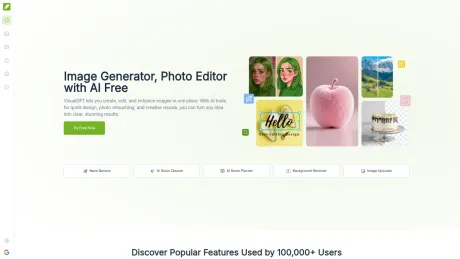
VisualGPT is an all-in-one AI-powered creative platform that helps users generate, edit, and enhance visuals with ease. It combines advanced image generation models with intuitive editing tools, making it possible for anyone—whether a beginner or professional—to create high-quality visual content quickly and efficiently.
Core Functions
- AI Image Generater: Convert text prompts into detailed, realistic, or artistic images in seconds.
- AI Image Editing: Modify, retouch, or restyle existing photos without the complexity of traditional editing software.
- AI Background Remover: Instantly remove or replace image backgrounds, with support for batch processing.
- AI Room Planner: Transform room photos into styled, lifelike interior design previews.
- AI Infographic Generator: Generate flowcharts, mind maps, or visual reports to support presentations and educational content.
Key Features
- Multiple AI Models: Powered by advanced engines like Stable Diffusion, Ideogram, Flux, Nano Banana, and more, offering different artistic and realistic outputs.
- High-Resolution Outputs: Generate visuals with professional quality suitable for marketing, e-commerce, or personal projects.
- User-Friendly Interface: Clean, intuitive design with no steep learning curve—ideal for beginners.
- Fast, Browser-Based Access: Works directly online without downloads or installations.
- Style Diversity: Supports a wide range of visual styles, from modern realism to abstract art and professional diagrams.
- Free & Premium Access: Free version available for testing, with paid plans offering advanced features and higher limits.
Main Use Cases
- Marketing & Social Media: Quickly generate ad creatives, social posts, or branded visuals.
- E-commerce: Create product photos with clean backgrounds and consistent styling.
- Design & Art: Explore creative ideas, experiment with styles, or prototype visual concepts.
- Interior Planning: Preview renovation ideas and home decoration styles with the Room Planner.
- Education & Research: Generate infographics, flowcharts, and visual aids for teaching or presentations.
- Content Creation: Bloggers, influencers, and digital creators can enrich content with unique, AI-generated visuals.
Why VisualGPT?
VisualGPT saves time, reduces costs, and lowers the barrier to creating professional-quality visuals. Instead of juggling multiple tools, users get everything in one platform—image generation, editing, design, and visualization—powered by AI.
Frequently asked questions
What is VisualGPT used for?
Free AI Creative Suite for E-Commerce & Creators | VisualGPT.Is VisualGPT free?
VisualGPT is free to use.What are alternatives to VisualGPT?
Top alternatives to VisualGPT include ProductScope AI, PicTools.AI, AI Photos Editor, AVCLabs PhotoPro AI, Fotor.Where can I get VisualGPT?
VisualGPT is available at https://visualgpt.io/.What category is VisualGPT in?
VisualGPT is listed in Image Editing.Core Functions
* [**AI Image Generater**](https://visualgpt.io/ai-models/nano-banana): Convert text prompts into detailed, realistic, or artistic images in seconds. * [**AI Image Editing**](https://visualgpt.io/ai-models/nano-banana): Modify, retouch, or restyle existing photos without the complexity of traditional editing software. * [**AI Background Remover**](https://visualgpt.io/background-remover): Instantly remove or replace image backgrounds, with support for batch processing. * [**AI Room Planner**](https://visualgpt.io/room-planner): Transform room photos into styled, lifelike interior design previews. * [**AI Infographic Generator**](https://visualgpt.io/ai-flowchart-generator): Generate flowcharts, mind maps, or visual reports to support presentations and educational content.Key Features
* **Multiple AI Models**: Powered by advanced engines like Stable Diffusion, Ideogram, Flux, [Nano Banana](https://visualgpt.io/ai-models/nano-banana), and more, offering different artistic and realistic outputs. * **High-Resolution Outputs**: Generate visuals with professional quality suitable for marketing, e-commerce, or personal projects. * **User-Friendly Interface**: Clean, intuitive design with no steep learning curve—ideal for beginners. * **Fast, Browser-Based Access**: Works directly online without downloads or installations. * **Style Diversity**: Supports a wide range of visual styles, from modern realism to abstract art and professional diagrams. * **Free & Premium Access**: Free version available for testing, with paid plans offering advanced features and higher limits. ---Main Use Cases
* **Marketing & Social Media**: Quickly generate ad creatives, social posts, or branded visuals. * **E-commerce**: Create product photos with clean backgrounds and consistent styling. * **Design & Art**: Explore creative ideas, experiment with styles, or prototype visual concepts. * **Interior Planning**: Preview renovation ideas and home decoration styles with the Room Planner. * **Education & Research**: Generate infographics, flowcharts, and visual aids for teaching or presentations. * **Content Creation**: Bloggers, influencers, and digital creators can enrich content with unique, AI-generated visuals. ---Why VisualGPT?
VisualGPT saves time, reduces costs, and lowers the barrier to creating professional-quality visuals. Instead of juggling multiple tools, users get everything in one platform—image generation, editing, design, and visualization—powered by AI.How can I start using VisualGPT for image creation and editing?
VisualGPT is designed to be simple and user-friendly. You can start by uploading an image or typing a description of what you want. The AI will generate or edit images instantly.Do I need to install any software to use VisualGPT?
No installation is needed. VisualGPT is fully web-based, which means you can access it directly from your browser.Can beginners use VisualGPT without prior experience?
Absolutely. VisualGPT is built for users of all skill levels. Beginners can easily create and edit images using plain language or by uploading photos.What types of images can VisualGPT create or edit?
VisualGPT supports a wide range of images, including portraits, landscapes, product photos, social media graphics, infographics, and more.Which AI models does VisualGPT use for editing and generation?
VisualGPT integrates advanced AI models such as Nano Banana, Flux Kontext Pro, Ideogram, and Stable Diffusion.Can I remove backgrounds from multiple images at once with VisualGPT?
Yes. VisualGPT offers a batch background removal feature that works quickly and precisely.How fast does VisualGPT generate images or edits?
VisualGPT is optimized for speed and efficiency. Most images are generated or edited in seconds after you submit a prompt or upload a photo.Does VisualGPT support interior design and room visualization?
Yes. VisualGPT includes an AI Interior Design feature.Can VisualGPT generate product images, banners, and promotional visuals?
Absolutely. VisualGPT offers AI tools specifically for e-commerce, allowing you to create high-quality product images, banners, and promotional visuals with ease.Is VisualGPT free to use?
Yes, you can start creating for free with daily credits — no credit card required and no time limit. Free users get access to core AI models and standard-resolution exports.Can I use VisualGPT images for commercial purposes?
Absolutely. Every image you generate on VisualGPT comes with full commercial rights and no watermark.What AI models does VisualGPT support?
VisualGPT gives you access to the world's top AI models — including GPT Image 2, Nano Banana Pro, Seedance, Seedream, and Kling — all from one platform.Can I generate product photos for my online store?
Yes, product photography is one of the most popular use cases on VisualGPT.Do I need design or photography experience to use VisualGPT?
Not at all. VisualGPT is designed for people who need professional visuals without design or photography skills.What makes VisualGPT different from other AI image generators?
VisualGPT brings together the world's top AI models in one platform, built for production: batch processing for catalogs, full commercial rights, and high-resolution exports.
Compare VisualGPT with…
Pick any tool to see a structured side-by-side: pricing, deployment, capabilities, and content policy.








