
- Category
- Video Editing
- Pricing
- Freemium
- Alternatives
- 6 similar tools
- Last updated
- today
- Source
- Official site ↗︎
AI Collection Top Picks

Video Editing Category Picks



About bigmp4
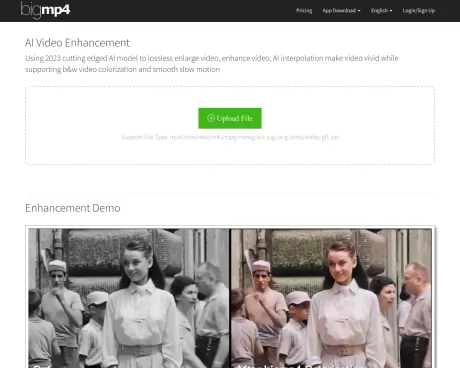
bigmp4.com - Using 2026 cutting edged AI model to lossless enlarge video, enhance video, AI interpolation make video vivid while supporting b&w video colorization and smooth slow motion
bigmp4's Pricing Plans
bigmp4 may change prices at any time. Here's our latest information:
bigmp4 Pricing Plans
Free
- Num: 30 GPU point
- Expiry: 1 Month
- Prioritize: NO
- Upload Limit: 10M
- AI Interpolation: NO
- Batch Mode: NO
$6
/ 300 GPU point
- Expiry: 1 Year
- Prioritize: YES
- Upload Limit: 500M
- AI Interpolation: YES
- Batch Mode: YES
$18
/ 1080 GPU point
- Expiry: 1 Year
- Prioritize: YES
- Upload Limit: 500M
- AI Interpolation: YES
- Batch Mode: YES
$24
/ 1560 GPU point
- Expiry: 1 Year
- Prioritize: YES
- Upload Limit: 500M
- AI Interpolation: YES
- Batch Mode: YES
What you get
Additional Information
Features
Video AI Enlarge
Lossless enlarge video to 2k/4k/8k with enhanced video quality and AI noise reduction
Video Colorization
Colorize b&w videos with AI to natural and vibrant
Video AI Interpolation
AI interpolation increases video fps to 60,120,240fps, making the video vivid and smooth and lifelike
Video Slow Motion
Keep the video fps unchanged after AI interpolation, realize the video silky smooth slow motion
Support batch mode
Upload a large number of images as a zip file for AI lossless HD enlargement or AI Colorization
Support gif
Upload gif for AI HD lossless enlargement, AI Colorization, AI Interpolation or Slow motion
Frequently asked questions
What is bigmp4 used for?
BigMP4 - AI Video Enhancement.Is bigmp4 free?
bigmp4 has a free tier; paid plans unlock additional features.What are alternatives to bigmp4?
Top alternatives to bigmp4 include Klap App, AI video editor, Atlabs AI, Topview AI URL to Video, Colossyan.Where can I get bigmp4?
bigmp4 is available at http://bigmp4.com.What category is bigmp4 in?
bigmp4 is listed in Video Editing.Video AI Enlarge
Lossless enlarge video to 2k/4k/8k with enhanced video quality and AI noise reductionVideo Colorization
Colorize b&w videos with AI to natural and vibrantVideo AI Interpolation
AI interpolation increases video fps to 60,120,240fps, making the video vivid and smooth and lifelikeVideo Slow Motion
Keep the video fps unchanged after AI interpolation, realize the video silky smooth slow motionSupport batch mode
Upload a large number of images as a zip file for AI lossless HD enlargement or AI ColorizationSupport gif
Upload gif for AI HD lossless enlargement, AI Colorization, AI Interpolation or Slow motionHow does it work?
Our cutting-edge AI model for 2023 is employed to seamlessly enhance video quality through lossless enlargement, vivid colorization of black and white videos, and the creation of smooth slow-motion effects. It achieves these enhancements while supporting various file types.What types of files are supported?
Video files in formats such as mp4, mov, m4v, mkv, and avi are supported. Additionally, image files in jpg, png, bmp, webp, and gif formats, as well as zip files, are also accommodated.What is the processing time like?
The progress bar doesn''t accurately reflect the time required. The actual processing time depends on the number of frames in your file and the specific task settings. AI interpolation, for instance, increases the number of frames, which in turn extends the processing time.What about privacy and file retention?
Uploaded files and resulting files are automatically deleted within a week to prioritize user privacy and data security.Will GPU points be deducted for processing failures?
No, GPU points deducted for failed tasks will be refunded after the removal of such tasks.Why does the video exhibit a jelly effect after AI interpolation?
Jelly effects can occur due to two scenarios: lens transitions and motion blur. AI calculates the frames between these scenarios, and high frame rates may accentuate the jelly effect. Future updates to bigmp4 will enhance the detection of lens transitions. In the meantime, manual video cropping and reduced AI interpolation multipliers can mitigate the issue.Why is there a charge for the service?
To sustain high GPU server expenses and offer a prioritized service with fewer restrictions on file size, we provide a fee-based service.Are bigmp4 web demo videos manually processed?
No, web demo videos are automatically processed by bigmp4 AI and then cropped to fit the webpage. You can download the original video used on our webpage for reference.How can I contact bigmp4?
For any inquiries, feel free to reach out to us via email at help@bigmp4.com.How it works?
By using 2026 cutting edged AI model to lossless enlarge video, enhance video, AI interpolation make video vivid while supporting b&w video colorization and smooth slow motion.What file type are supported?
Video supports mp4/mov/m4v/mkv/avi, picture supports jpg/png/bmp/webp/gif, and zip file.How long does it take to process?
The progress bar does not represent the actual progress, the real time required depends on the number of frames of your file and the task settings, AI interpolation will double the number of frames and double the time.What about privacy? What happens to my uploaded files and result files?
Your uploaded files and results files will be automatically deleted within a week.Why the video have a jelly effect after the AI interpolation?
There are two kinds of scenarios that will cause jelly effect, lens transitions and motion blur, AI will calculate the frames between these two scenarios, and the final high fps will show jelly effect. bigmp4 will increase the judgment of lens transitions in the future.Why charge?
In order to maintain high GPU server expenses, we offer a fee-based service.Are bigmp4 web demo videos processed manually?
No, the web demo video is all processed automatically by bigmp4 AI and then we crop it to the right size for the web page.How to contact bigmp4?
Feel free to emailing us help@bigmp4.com.What file types are supported?
Video supports mp4/mov/m4v/mkv/avi, picture supports jpg/png/bmp/webp/gif, and zip file.Why does the video have a jelly effect after the AI interpolation?
There are two kinds of scenarios that will cause jelly effect, lens transitions and motion blur, AI will calculate the frames between these two scenarios, and the final high fps will show jelly effect. bigmp4 will increase the judgment of lens transitions in the future.
Compare bigmp4 with…
Pick any tool to see a structured side-by-side: pricing, deployment, capabilities, and content policy.








