
- Category
- Video Editing
- Pricing
- Paid
- Alternatives
- 6 similar tools
- Last updated
- 2 weeks ago
- Source
- Official site ↗︎
AI Collection Top Picks

Video Editing Category Picks



About PDF to Video
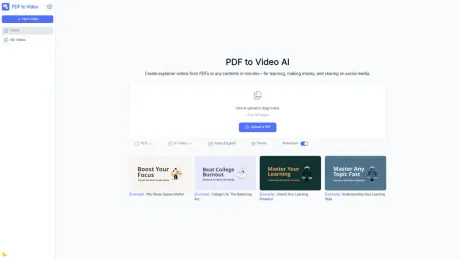
PDF to Video AI converts PDF, URLs, documents, long text, and prompts into videos online for learning, social media, and marketing. Free AI PDF to Video Converter, no sign-up required, Free online AI video maker, fast and easy.
PDF to Video's Pricing Plans
PDF to Video may change prices at any time. Here's our latest information:
Free
Free
All Free with PDF to Video
$0/monthly
What you get
Additional Information
PDF to Video – Transform PDFs into Stunning Explainer Videos
PDF to Video is an AI-powered online tool that instantly converts your static PDF documents into professional, engaging videos. Whether you want to educate, market, or share ideas, this tool makes your content more dynamic and accessible.
With just a few clicks, you can upload your PDF and get a ready-to-share video enhanced with AI voiceovers, transitions, and customizable visuals—no design or editing skills required.
🌟 Key Features
- Instant Conversion – Upload your PDF and get a video in minutes.
- AI Narration – Natural voiceovers available in multiple languages and accents.
- Customizable Styles – Adjust themes, timing, background music, and fonts.
- Multi-Format Export – Download in HD or share directly to YouTube, TikTok, or social media.
- Multi-Language Support – Create videos in English, Spanish, Chinese, and more.
- Free to Use – No registration required, start converting instantly.
🎯 Use Cases
- Education – Teachers can convert lessons into explainer videos for online or classroom use.
- Business Presentations – Transform reports, proposals, and whitepapers into professional video presentations.
- Marketing – Repurpose brochures and product PDFs into eye-catching promotional videos.
- Social Media Content – Quickly create short, shareable clips from long documents.
- Training & Tutorials – Simplify manuals and guides into easy-to-digest videos.
- Personal Projects – Turn resumes, portfolios, or research into creative video formats.
❓ FAQs
Q1: Do I need to sign up to use PDF to Video?
No. The tool is completely free and requires no registration.
Q2: Can I edit the video after conversion?
Yes. You can customize background, timing, voice style, and other design elements.
Q3: What languages are supported?
Multiple languages are supported, including English, Spanish, French, Chinese, and more.
Q4: Can I share videos directly to social media?
Yes. You can export your video and upload it to platforms like YouTube, TikTok, Instagram, or share via a link.
Q5: Is it really free?
Yes. The core features are free, with no hidden costs or required downloads.
👉 Try it now at PDF to Video and turn your PDFs into captivating explainer videos within minutes.
Frequently asked questions
What is PDF to Video used for?
PDF to Video AI – Convert PDF & Any Contents to Video Online Free.Is PDF to Video free?
PDF to Video is a paid product. See the Pricing section for current plans.What are alternatives to PDF to Video?
Top alternatives to PDF to Video include Klap App, AI video editor, Atlabs AI, Topview AI URL to Video, Colossyan.Where can I get PDF to Video?
PDF to Video is available at https://pdftovideo.ai/.What category is PDF to Video in?
PDF to Video is listed in Video Editing.🌟 Key Features
* **Instant Conversion** – Upload your PDF and get a video in minutes. * **AI Narration** – Natural voiceovers available in multiple languages and accents. * **Customizable Styles** – Adjust themes, timing, background music, and fonts. * **Multi-Format Export** – Download in HD or share directly to YouTube, TikTok, or social media. * **Multi-Language Support** – Create videos in English, Spanish, Chinese, and more. * **Free to Use** – No registration required, start converting instantly. ---🎯 Use Cases
* **Education** – Teachers can convert lessons into explainer videos for online or classroom use. * **Business Presentations** – Transform reports, proposals, and whitepapers into professional video presentations. * **Marketing** – Repurpose brochures and product PDFs into eye-catching promotional videos. * **Social Media Content** – Quickly create short, shareable clips from long documents. * **Training & Tutorials** – Simplify manuals and guides into easy-to-digest videos. * **Personal Projects** – Turn resumes, portfolios, or research into creative video formats. ---❓ FAQs
**Q1: Do I need to sign up to use PDF to Video?** No. The tool is completely free and requires no registration. **Q2: Can I edit the video after conversion?** Yes. You can customize background, timing, voice style, and other design elements. **Q3: What languages are supported?** Multiple languages are supported, including English, Spanish, French, Chinese, and more. **Q4: Can I share videos directly to social media?** Yes. You can export your video and upload it to platforms like YouTube, TikTok, Instagram, or share via a link. **Q5: Is it really free?** Yes. The core features are free, with no hidden costs or required downloads. --- 👉 Try it now at **[PDF to Video](https://pdftovideo.ai/)** and turn your PDFs into captivating explainer videos within minutes.Is PDF to Video free to use?
Yes, PDF to Video is completely free to use online, with no sign-up required.Do I need video editing experience?
No, our AI does all the hard work. You can customize your video, but it’s optional.Can I add voice narration to my video?
Yes, PDF to Video supports AI-generated voiceovers in multiple languages.What file types are supported?
Currently, we support PDF files. Other document formats may be added in the future.How long does it take to convert a PDF into a video?
Most videos are ready within a few minutes, depending on file size.Can I use PDF to Video for commercial purposes?
Yes, you can use the generated videos for personal, educational, or commercial purposes.
Compare PDF to Video with…
Pick any tool to see a structured side-by-side: pricing, deployment, capabilities, and content policy.








