- Category
- Animation & 3D Modeling
- Alternatives
- 6 similar tools
- Last updated
- 1 months ago
- Source
- Official site ↗︎
AI Collection Top Picks

Animation & 3D Modeling Category Picks

About plask
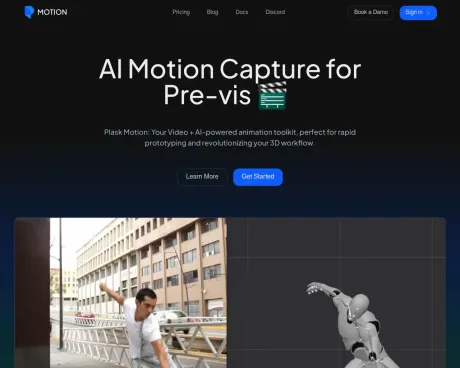
Plask offers AI motion capture from video, transforming your videos into stunning animations. Dive into our step-by-step guide and learn how to use our motion capture camera for the best results.
plask's Pricing Plans
plask may change prices at any time. Here's our latest information:
Pricing
Pricing
- Plask is free to use as a starting point.
Frequently asked questions
What is plask used for?
Plask Motion: AI-powered Mocap Animation Tool.Is plask free?
Pricing for plask varies — see the Pricing section for details.What are alternatives to plask?
Where can I get plask?
plask is available at https://plask.ai/.What category is plask in?
plask is listed in Animation & 3D Modeling.What is the pricing for using Plask?
Plask Motion offers two pricing options: the Freeium Plan, which is free of charge, and the Mocap Pro Plan, a paid subscription available on a monthly or annual basis.Can I upload my own 3D model to Plask?
To use your 3D models in Plask, they must meet the following requirements: Supported formats: FBX, GLB The file name should be in English letters. A model can be imported if it has a skeletal mesh with both mesh and bone components. The root bone should be named "Armature." It is recommended to include only bones that can be matched with the source bones. Loading a model with a T-Pose is recommended. Plask motion capture is based on 24 source bones, including: * rightShoulder * rightArm * rightForeArm * rightHand * rightHandIndex1 * leftShoulder * leftArm * leftForeArm * leftHand * leftHandIndex1 * Head * Neck * Spine2 * Spine1 * Spine * Hips * rightUpLeg * rightLeg * rightFoot * rightToeBase * leftUpLeg * leftLeg * leftFoot * leftToeBase You can add more bones to your character, but only 24 bones will be used for retargeting animation. If extra bones are not related to the applied animation, you can add as many additional bones as needed (e.g., extra finger bones or bones for accessories).Can I use Plask animations for commercial purposes?
Subscribers retain intellectual property rights for content created in Plask. Copyright and intellectual property rights for animations created by Plask subscribers belong to the users themselves. For more details on your rights as a user, please refer to our additional information.How can I extract motion from a video in Plask?
There are two methods for using video to extract motion in Plask: you can record video using your own device or record motion directly from the Plask platform. Here are instructions for importing videos you''ve recorded on your own device: 1. First, you need to add your video to Plask''s library. 2. Change the editing mode to MoCap mode by toggling the switch at the top. This will allow you to work with your recorded videos in Plask.How much does it cost to use Plask?
Information about pricing is not provided on the page.Can I use my Plask animations for commercial use?
Details regarding commercial use of Plask animations are not specified.Can I upload my own 3D model?
The platform does support the upload of personal 3D models.How can I restore a deleted default model again?
Instructions for restoring deleted default models are not included on the page.How do you extract multi-person and include the initial pose?
The method for extracting multi-person data and including initial poses is not discussed.How can I cancel my plan?
Cancellation procedures are not detailed in the available information.How do I redeem a discount coupon on Plask?
Information on redeeming discount coupons is not provided.Can I do finger tracking?
Finger tracking capabilities are not mentioned in the details.How do I get an academic discount?
Details on obtaining an academic discount are not specified.Why does my video stop loading?
Information on video loading issues is not provided.Verification issues in Sign Up
Specifics regarding sign-up verification issues are not included.What is the difference between MoCap V1 and V2?
The differences between MoCap V1 and V2 are not explained.
Compare plask with…
Pick any tool to see a structured side-by-side: pricing, deployment, capabilities, and content policy.