- Category
- Chat Bot
- Pricing
- Paid
- Alternatives
- 6 similar tools
- Last updated
- 5 days ago
- Source
- Official site ↗︎
AI Collection Top Picks

Chat Bot Category Picks
About RabbitHoles AI
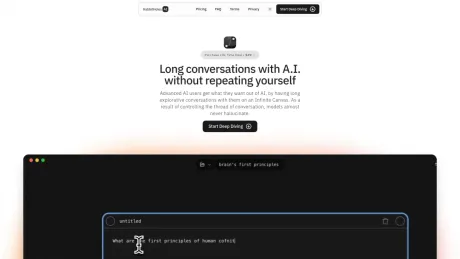
Branch any AI chat on an infinite canvas. Use ChatGPT, Claude, Gemini or local models with your keys or plan. Mac, Windows, Linux. Formerly RabbitHoles AI.
RabbitHoles AI's Pricing Plans
RabbitHoles AI may change prices at any time. Here's our latest information:
Pricing
Default
$89.00
per month
Frequently asked questions
What is RabbitHoles AI used for?
Slashspace: Branching AI Canvas for ChatGPT, Claude & Gemini.Is RabbitHoles AI free?
RabbitHoles AI is a paid product. See the Pricing section for current plans.What are alternatives to RabbitHoles AI?
Where can I get RabbitHoles AI?
RabbitHoles AI is available at https://www.rabbitholes.ai.What category is RabbitHoles AI in?
RabbitHoles AI is listed in Chat Bot.What is Slashspace?
Slashspace is an AI canvas for deep work. Instead of juggling a million chat sessions and apps, you do all your thinking in one place, with multiple connected AI conversations, files, and agents that share context across the canvas.How does Slashspace work?
Each canvas is scoped to a single agenda or project. You add files, run multiple AI chats, and use agents that can see everything on the canvas. Conversations branch and share context, so your AI always has the full picture.What AI models can I use?
You can use any model from OpenAI, Anthropic, Google, Perplexity, xAI, OpenRouter, or run local models via Ollama.Can I control the system prompt and model settings?
Yes. System prompts and model settings can be configured per conversation or at the provider level.Where is my data stored?
Your data stays on your device. Slashspace is local-first, so conversations and files are stored on your computer, unless you opt-in for rag indexing.What was RabbitHoles AI?
We rebranded from RabbitHoles AI to Slashspace. It's the same product underneath, but with a new name the captures our vision for the product.Why can't I just use Claude Code, Cursor, or Codex?
Those tools are great, but they're built around a single linear session and a single vendor. Slashspace is different in a few ways that matter: - **No spatial canvas.** Your thinking is trapped in one long chat. There's no space to lay out, connect, and revisit ideas. - **You're at the mercy of one provider's limits and pricing.** Intelligence should be pluggable, not rented from a single vendor. - **You can't easily switch models mid-session.** Moving to another provider's model in the middle of your work isn't simple. - **You lose your data if you lose or cancel your subscription.** Slashspace is local-first, so your work stays yours.Doesn't this use more tokens?
Not really, and over time you'll likely use fewer. - The difference per session is small. Across your work you tend to use fewer tokens overall, because you lose less to context rot and re-prompting for the same thing. - Nodes can be scoped to precise context by connecting only the nodes that matter. That gives you far better context engineering, so the model spends tokens on what's actually relevant.Why do I need past chats once I'm done with them?
- Past chats pay off over time. You often solve similar problems across different projects, or across different phases of the same project. - You also save time and tokens by not regenerating what you've already generated.Why is a canvas better?
Research and exploration don't move in a straight line. In a chat, every new question pushes the last one out of view, and starting a fresh thread throws its context away. On a canvas you lay out chats, files, web pages and notes side by side, branch a conversation to chase a tangent without losing the main thread, and connect exactly the nodes each chat should see. Your work stays visible as a map you can come back to, not a scroll you have to dig through.Do I need to use ChatGPT?
No. ChatGPT is one option among many. You can: Use Slashspace's built-in models, paid from your Slashspace Wallet credits. Bring your own API key for OpenAI, Anthropic, Google, xAI, OpenRouter and more. Use the Claude or ChatGPT subscription you already pay for, through the Claude Code and Codex apps. Run local models on your own computer with Ollama. Mix them freely on the same canvas.Do you support all the latest models?
Yes. Slashspace's built-in models include current frontier models, and the default Auto model picks a suitable one for each message. You can also use any model from OpenAI, Anthropic, Google, Perplexity, xAI, DeepSeek, Groq or OpenRouter with your own API key, the models your Claude or ChatGPT subscription includes, or local models via Ollama.Is there a free trial?
No. Instead, both plans are refundable within 7 days, no questions asked, so you can buy, use Slashspace on a real project and ask for a refund if it is not for you. There are two ways to buy: $89 a year, or $249 once for lifetime. You enter your email on the site, answer three quick questions and pay on Stripe. Then you download the desktop app and sign in with that same email.Should I choose yearly or lifetime?
Both include every feature, 500 Wallet credits and 2 device seats. The difference is how you pay and how long it lasts: Yearly is $89 a year. You use Slashspace and get every update while you subscribe. It renews every year, and you can cancel any time from your account page. Lifetime is $249 once. Slashspace is yours to keep, with every update we ever ship. Both are refundable within 7 days. From the third year on, lifetime costs less than yearly. If you bought yearly and then buy lifetime, the yearly subscription ends at the close of the period you paid for, so it does not renew.Can I get a refund?
Yes. Ask within 7 days of a lifetime purchase or of any yearly payment, and you get a refund with no questions asked. Email support@slashspace.ai with your purchase details. A refund ends the access it paid for, and transaction fees are deducted as set out in the Terms of Use. Wallet top-ups are not refundable.What does the Slashspace Wallet pay for?
Slashspace's hosted AI models and AI tools: the built-in models, including Auto, and hosted image generation. 1 credit is 1 cent of usage. Your own API keys (including your own OpenRouter key for images), your Claude or ChatGPT subscription, and local models through Ollama don't use the wallet.Which platforms does Slashspace run on?
Slashspace is a desktop app for macOS (Apple Silicon and Intel), Windows and Linux. Each plan covers 2 computers. Download it here.What about data privacy?
Slashspace is local-first. Your canvases, conversations and files are saved in a SlashspaceOS folder on your own computer. When you chat, your message goes to the model you picked: straight to the provider when you use your own API key, or through Slashspace's hosted service for built-in models. Claude Code and Codex run through the apps you installed, on your own subscription, and local models through Ollama keep the chat on your machine. Documents, web pages and YouTube videos you add to a canvas are processed on Slashspace's servers so the AI can read and search them. The app sends usage analytics to PostHog: the features you use and, for each AI request, the model, provider, token counts and timing, linked to your account when you are signed in. It never sends your prompts, the AI's replies or your files to PostHog. Error reports and occasional screen recordings, with all text masked, go to Sentry. No setting turns analytics off completely at the moment.Why can't I just use ChatGPT, Claude, or Gemini?
You can, and you can keep using their models inside Slashspace. The difference is where your work lives: One long thread. A chat app keeps your thinking in a single scroll, with no space to lay out, connect, and revisit ideas. One provider. You are tied to one company's models, limits and pricing. In Slashspace you pick the model for each chat and switch whenever you like. Their servers. Your history lives in their app. Slashspace keeps your work in files on your own computer.Do you have any student discounts?
There is no separate student plan right now. Yearly is $89 a year, lifetime is $249 once at a limited-time 2.8x the yearly price, and both are refundable within 7 days. If price is what holds you back, email us at support@slashspace.ai.What is RabbitHoles AI?
RabbitHoles AI is the previous name of Slashspace. It is the same product under a new name. If you bought RabbitHoles, your lifetime deal, your data and your bring-your-own-key access carry over: see the migration guide.Does it support integrating with other apps?
Yes. Ask a chat to work with Gmail, GitHub, Slack, Notion, Linear, Google Calendar and many more, and Slashspace connects the account through Composio the first time it is needed. You can also add any MCP server, local or remote, to give the AI your own tools. Both are in beta.
Compare RabbitHoles AI with…
Pick any tool to see a structured side-by-side: pricing, deployment, capabilities, and content policy.