ScreenApp
AI Notetaker, Transcription, Summarizer and Recorder for Audio and Video.
- Category
- Translation & Transcript
- Pricing
- Paid
- Alternatives
- 6 similar tools
- Last updated
- today
- Source
- Official site ↗︎
AI Collection Top Picks

Translation & Transcript Category Picks
About ScreenApp
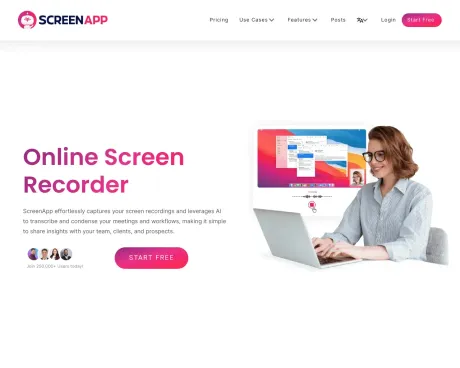
Transform your productivity with ScreenApp's AI-powered screen recording, transcription, and video analysis tools. Perfect for teams, educators, and professionals.
ScreenApp's Pricing Plans
ScreenApp may change prices at any time. Here's our latest information:
Simple, Transparent Pricing (Annual plan saves ~20%)
Growth
For Individuals - Perfect for recording and storing personal videos.
$9/user
/mo
- Up to 100 Videos
- Downloads
- Transcriptions
- 20 ChatGPT Prompts /mo
Business
For Teams - Perfect for teams and businesses for powerful screen recording and AI
$19/user
/mo
- Up to 1000 Videos
- Unlimited Downloads
- Premium support
- 100 ChatGPT Prompts /mo
Ultimate
For Enterprises - Host ScreenApp locally on your own servers an control your security.
Contact
- Self Hosted
- Code Components
- Platform SDK and Plugin
- Whitelabeled
What you get
Additional Information
ScreenApp is an AI-powered meeting assistant that enables users to automatically record, transcribe, and summarize meetings, lectures, and conversations. It captures audio and video effortlessly, allowing users to search through their recordings instantly. The platform provides features such as generating professional PDFs, translating recordings, and analyzing content, making it ideal for anyone looking to enhance their productivity and streamline their workflow.
With ScreenApp's technology, users can absorb information faster by generating structured notes with key points and action items in real-time. This is beneficial for professionals who need to keep track of important discussions without the hassle of manually sifting through hours of content. The AI ensures over 99% accuracy in transcription, providing reliable summaries and insights.
ScreenApp is designed for ease of use, requiring no installations, as it operates directly within browsers or through available mobile and desktop apps. This accessibility makes it suitable for a wide range of users including project managers, educators, and content creators, who need a reliable tool for recording and summarizing insights.
The platform supports integration with major video conferencing tools like Zoom and Google Meet, allowing seamless import of recordings. Security is prioritized with encrypted data storage and transfer, ensuring users maintain control over their content while benefiting from AI capabilities to enhance productivity.
Frequently asked questions
What is ScreenApp used for?
ScreenApp - AI Notetaker, Transcription, Summarizer and Recorder for Audio and Video.Is ScreenApp free?
ScreenApp is a paid product. See the Pricing section for current plans.What are alternatives to ScreenApp?
Where can I get ScreenApp?
ScreenApp is available at https://screenapp.io/.What category is ScreenApp in?
ScreenApp is listed in Translation & Transcript.How does the AI Notetaker work?
ScreenApp automatically captures, transcribes, and transforms your conversations into structured notes with key points, action items, and decisions - all in real-time.What makes the AI Summarizer different?
Our AI extracts the most important insights from hours of content in seconds. Get executive summaries, key decisions, and action items without watching entire recordings.How accurate is the transcription and summarization?
ScreenApp delivers up to 99% transcription accuracy with clear audio. Summaries capture key points, action items, and decisions.Do I need to install anything?
No. You can use ScreenApp directly in your browser. If you prefer, you can also install our mobile app or Chrome extension.Can I use ScreenApp for dictation and document creation?
Yes. Convert any audio or video recording into formatted documents, PDFs, or text files. Perfect for creating meeting minutes, interview transcripts, and professional reports.Can I import from Zoom, Google Meet, or YouTube?
Yes. Upload recordings from any platform, import directly via URL, or use our meeting bots to automatically capture sessions.Is my data secure?
Yes. All recordings and transcripts are encrypted during transfer and storage. You control who can access your content.What's included in the free plan?
The free plan includes limited transcription minutes, basic summaries, and core recording and upload features.Can I cancel anytime?
Yes. You can cancel or downgrade your plan anytime in your account settings.
Compare ScreenApp with…
Pick any tool to see a structured side-by-side: pricing, deployment, capabilities, and content policy.