
- Category
- Image Editing
- Pricing
- Paid
- Alternatives
- 6 similar tools
- Last updated
- 1 weeks ago
- Source
- Official site ↗︎
AI Collection Top Picks

Image Editing Category Picks



About Unblur Image AI
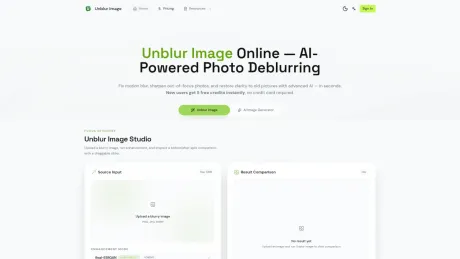
Unblur Image lets you fix blurry photos free in your browser with Local AI, no login required. Use cloud AI models after sign-in for higher-fidelity restoration.
Unblur Image AI's Pricing Plans
Unblur Image AI may change prices at any time. Here's our latest information:
Unblur Image AI Pricing Plans
Pro
100credits/month
9.9
9.9/month
What you get
Additional Information
Unblur Image provides an AI-powered tool to enhance and restore blurry photos. It addresses various blurring issues including motion blur, out-of-focus images, and old photographs. With its advanced algorithms, the tool automatically detects the type of blur and applies the suitable restoration technique, delivering improved clarity and detail with minimal user input.
The service allows users to upload images without the need for an account. By using the Local model, individuals can enjoy quick processing speeds and the comfort of having their images remain on their device. Users can upload images up to 12MB and try the service out easily in a few simple steps: upload an image, let AI deblur it automatically, and download the improved result.
Unblur Image also has special features for different types of restoration, including text clarity for scanned documents, low-light enhancements for photos taken in poorly lit conditions, and even batch processing options for subscribed users who need to handle multiple images at once. This makes it suitable for a wide audience ranging from casual users to professionals in need of advanced image processing.
Freemium and subscription models are available, providing users the ability to choose based on their needs. The free Local model works well for light usage while paid plans offer additional credits and enhanced features for more demanding projects.
Frequently asked questions
What is Unblur Image AI used for?
Unblur Image Free Online — Local AI Photo Deblurring, No Login.Is Unblur Image AI free?
Unblur Image AI is a paid product. See the Pricing section for current plans.What are alternatives to Unblur Image AI?
Top alternatives to Unblur Image AI include ProductScope AI, PicTools.AI, AI Photos Editor, AVCLabs PhotoPro AI, Fotor.Where can I get Unblur Image AI?
Unblur Image AI is available at https://unblur-image.io/.What category is Unblur Image AI in?
Unblur Image AI is listed in Image Editing.
Compare Unblur Image AI with…
Pick any tool to see a structured side-by-side: pricing, deployment, capabilities, and content policy.








