YouTube-to-Transcript.ai
YouTube to Transcript with AI — Free Converter & AI Summary.
- Category
- Translation & Transcript
- Pricing
- Free
- Alternatives
- 6 similar tools
- Last updated
- 1 months ago
- Source
- Official site ↗︎
AI Collection Top Picks

Translation & Transcript Category Picks
About YouTube-to-Transcript.ai
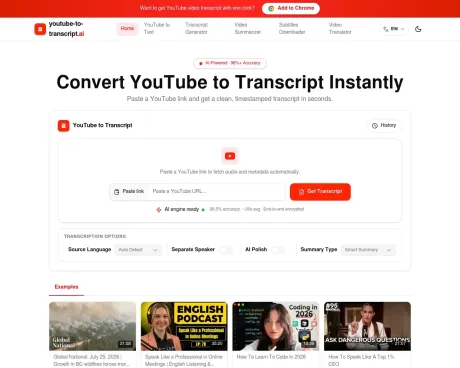
Just paste a YouTube link, and you can obtain a transcript in seconds, translated into 100+ languages. You can also generate AI summaries.
YouTube-to-Transcript.ai's Pricing Plans
YouTube-to-Transcript.ai may change prices at any time. Here's our latest information:
YouTube-to-Transcript.ai Pricing Plans
Free
for everyday use
$0
free
- Transcription with timestamps
- Auto-detect language
- Translate to 100+ languages
- AI summaries
- Export: TXT, DOCX, SRT, VTT, CSV
- Speaker labels
- Browser extension available
- up to 10 transcriptions per day (site offer)
- paid quota packages planned for high-volume users
Frequently asked questions
What is YouTube-to-Transcript.ai used for?
YouTube to Transcript with AI — Free Converter & AI Summary.Is YouTube-to-Transcript.ai free?
YouTube-to-Transcript.ai is free to use.What are alternatives to YouTube-to-Transcript.ai?
Top alternatives to YouTube-to-Transcript.ai include BiRead, Rephrasely, RIVERSIDE, Rythmex, Deciphr AI.Where can I get YouTube-to-Transcript.ai?
YouTube-to-Transcript.ai is available at https://youtube-to-transcript.ai/.What category is YouTube-to-Transcript.ai in?
YouTube-to-Transcript.ai is listed in Translation & Transcript.Is the youtube to transcript converter free?
Yes. Our transcription, translation and summarization features are free for everyday use. Simply paste a YouTube video link, and you can get practical results with no upfront payment required. We will also launch expanded quota packages for users processing large volumes of videos or with higher usage demands within one month. Limited-time offers will be available upon release — stay tuned!What formats can I download?
You can download your transcript in several useful formats depending on your goal. TXT is ideal for plain text notes, DOCX works well for editing and document workflows, SRT and VTT are useful for subtitles, and CSV is helpful when you wantCan I use timestamps?
Yes. You can generate transcripts with timestamps so each line stays aligned with the video timeline. This makes it easier to scan long videos, find exact moments, verify quotes, and turn the transcript into subtitles or chapter-style notes. Timestamps are especially useful for interviews, lectures, and tutorials where precision matters.Can I show speaker names?
Yes. When a video has multiple speakers, you can choose to show speaker names so the transcript is easier to follow and far more practical for meetings, podcasts, interviews, and panel discussions. Speaker labels make it simpler to identify who said what, which is useful for editing, quoting, and repurposing content. This also improves readability when you are reviewing long conversations.What if a video has no captions?
Rest assured. If a video does not come with captions, we leverage our advanced AI speech recognition model to generate transcripts directly from the audio track. This enables you to obtain subtitle text for YouTube videos even when no subtitle files are available. Transcription quality is subject to audio quality. Still, this feature offers a practical solution to extract spoken content from videos and eliminates the tedious work of manual transcription.What languages can I translate the captions into?
We support translation into over 100 widely spoken global languages. Once the transcript is generated, you can copy it into your own translation workflow, reformat it for publishing, or use it as source material for notes and summaries. This is especially useful for multilingual content teams, researchers, and creators who need to repurpose video content across different languages or platforms. The transcript is flexible enough to support editing, localization, and content reuse.
Compare YouTube-to-Transcript.ai with…
Pick any tool to see a structured side-by-side: pricing, deployment, capabilities, and content policy.