Image to 3D Model
Converter Free | No Sign-up Needed.
- Category
- Animation & 3D Modeling
- Alternatives
- 6 similar tools
- Last updated
- 1 weeks ago
- Source
- Official site ↗︎
AI Collection Top Picks

Animation & 3D Modeling Category Picks
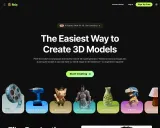
About Image to 3D Model
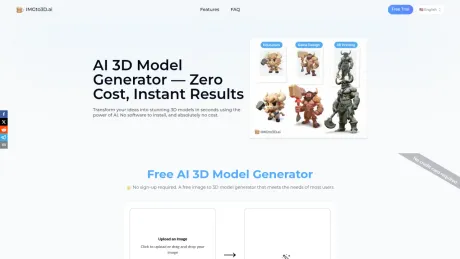
Turn any photo into a 3D model in 30 seconds. Free OBJ export, no registration or credit card. Trusted by 19,000+ creators. Try it now →
What you get
Additional Information
ImgTo3D.ai: Transform Static Images into Dynamic 3D Assets
What is ImgTo3D.ai?
ImgTo3D.ai is an innovative generative AI platform designed to bridge the gap between two-dimensional concepts and three-dimensional reality. By utilizing sophisticated deep learning algorithms, this tool automates the complex process of 3D modeling. It allows users to turn a single 2D photograph or illustration into a fully textured 3D asset in a matter of seconds.
Whether you are looking to speed up asset creation for a video game or need a rapid prototype for 3D printing, ImgTo3D.ai provides a robust, user-friendly image to 3d AI solution that eliminates the steep learning curve of traditional modeling software.
Key Features
- Instant Conversion: Drastically reduce production time by converting images to 3D meshes in seconds rather than hours.
- High-Quality Texture Mapping: The AI automatically generates and maps textures from the source image onto the 3D geometry, preserving the visual style of the original art.
- Multiple File Formats: Supports industry-standard exports (such as
.obj,.glb, and.stl) ensuring compatibility with major 3D software like Blender, Unity, Unreal Engine, and Maya. - Cloud-Based Processing: No need for expensive hardware or heavy software installation; all processing is handled efficiently in the cloud.
- PBR Material Support: Generates not just the mesh, but standard material maps to ensure your object reacts realistically to lighting environments.
Who is it For?
ImgTo3D.ai is designed to serve a wide spectrum of creators:
- Game Developers: Rapidly populate game worlds with props and background assets without dedicating hours to manual modeling.
- 3D Printing Enthusiasts: Convert sketches or photos into printable files (
.stl) for physical creation. - Graphic Designers: Add depth to 2D designs by converting logos or icons into 3D objects for rendering.
- AR/VR Creators: Quickly generate lightweight assets suitable for Augmented and Virtual Reality environments.
How to Use ImgTo3D.ai
Getting started is straightforward. Follow these steps to perform an image to 3d model conversion:
- Upload: Navigate to the platform and drag-and-drop your high-quality 2D image (JPG or PNG) into the upload area.
- Configure: Select your desired output settings or style preferences if available (e.g., stylized vs. realistic).
- Generate: Click the "Generate" button. The AI analyzes the image depth and structure to construct the mesh.
- Preview & Download: View your model in the interactive 3D viewer. Once satisfied, download the file in your preferred format (GLB, OBJ, or USDZ).
FAQ
Q: Does the AI handle complex geometries? A: ImgTo3D.ai is highly capable of handling organic shapes and standard props. For extremely complex, interlocking mechanical parts, manual refinement may be required after generation.
Q: Can I use the generated models commercially? A: Yes, models generated on the platform are generally available for commercial use, making it an excellent tool for professional game development and design projects.
Q: What is the best type of image to use? A: For the best results, use an image with a clear subject, good lighting, and a neutral background. This helps the image to 3d AI algorithms accurately distinguish the object from the environment.
Q: Is it compatible with Blender?
A: Absolutely. The downloadable files (specifically .obj and .glb) are fully compatible with Blender, Maya, Cinema 4D, and most game engines.
Frequently asked questions
What is Image to 3D Model used for?
Image to 3D Model Converter Free | No Sign-up Needed.Is Image to 3D Model free?
Pricing for Image to 3D Model varies — see the Pricing section for details.What are alternatives to Image to 3D Model?
Where can I get Image to 3D Model?
Image to 3D Model is available at https://www.imgto3d.ai.What category is Image to 3D Model in?
Image to 3D Model is listed in Animation & 3D Modeling.What is ImgTo3D.ai?
**ImgTo3D.ai** is an innovative generative AI platform designed to bridge the gap between two-dimensional concepts and three-dimensional reality. By utilizing sophisticated deep learning algorithms, this tool automates the complex process of 3D modeling. It allows users to turn a single 2D photograph or illustration into a fully textured 3D asset in a matter of seconds. Whether you are looking to speed up asset creation for a video game or need a rapid prototype for 3D printing, ImgTo3D.ai provides a robust, user-friendly **[image to 3d AI](https://www.imgto3d.ai)** solution that eliminates the steep learning curve of traditional modeling software. ---Key Features
* **Instant Conversion:** Drastically reduce production time by converting images to 3D meshes in seconds rather than hours. * **High-Quality Texture Mapping:** The AI automatically generates and maps textures from the source image onto the 3D geometry, preserving the visual style of the original art. * **Multiple File Formats:** Supports industry-standard exports (such as `.obj`, `.glb`, and `.stl`) ensuring compatibility with major 3D software like Blender, Unity, Unreal Engine, and Maya. * **Cloud-Based Processing:** No need for expensive hardware or heavy software installation; all processing is handled efficiently in the cloud. * **PBR Material Support:** Generates not just the mesh, but standard material maps to ensure your object reacts realistically to lighting environments. ---Who is it For?
ImgTo3D.ai is designed to serve a wide spectrum of creators: 1. **Game Developers:** Rapidly populate game worlds with props and background assets without dedicating hours to manual modeling. 2. **3D Printing Enthusiasts:** Convert sketches or photos into printable files (`.stl`) for physical creation. 3. **Graphic Designers:** Add depth to 2D designs by converting logos or icons into 3D objects for rendering. 4. **AR/VR Creators:** Quickly generate lightweight assets suitable for Augmented and Virtual Reality environments. ---How to Use ImgTo3D.ai
Getting started is straightforward. Follow these steps to perform an **[image to 3d model](https://www.imgto3d.ai)** conversion: 1. **Upload:** Navigate to the platform and drag-and-drop your high-quality 2D image (JPG or PNG) into the upload area. 2. **Configure:** Select your desired output settings or style preferences if available (e.g., stylized vs. realistic). 3. **Generate:** Click the "Generate" button. The AI analyzes the image depth and structure to construct the mesh. 4. **Preview & Download:** View your model in the interactive 3D viewer. Once satisfied, download the file in your preferred format (GLB, OBJ, or USDZ). ---FAQ
**Q: Does the AI handle complex geometries?** A: ImgTo3D.ai is highly capable of handling organic shapes and standard props. For extremely complex, interlocking mechanical parts, manual refinement may be required after generation. **Q: Can I use the generated models commercially?** A: Yes, models generated on the platform are generally available for commercial use, making it an excellent tool for professional game development and design projects. **Q: What is the best type of image to use?** A: For the best results, use an image with a clear subject, good lighting, and a neutral background. This helps the **[image to 3d AI](https://www.imgto3d.ai)** algorithms accurately distinguish the object from the environment. **Q: Is it compatible with Blender?** A: Absolutely. The downloadable files (specifically `.obj` and `.glb`) are fully compatible with Blender, Maya, Cinema 4D, and most game engines.What does IMGto3D.ai actually do?
We turn flat images into 3D files you can use. Upload a photo, and you get a mesh with textures in OBJ format. Free tier works for most hobby projects. Pro adds higher resolution, more formats (GLB, STL), and skips the queue.Do I need to know 3D modeling to use this?
No. The system handles the technical parts — depth estimation, mesh creation, and texture mapping. You just upload and pick a quality level.How long does 3D conversion take?
Most models generate in under 30 seconds. Complex designs (e.g., detailed mechanical parts) may take up to 2 minutes.Is my uploaded data secure?
Yes, your data is secure. We do not store any of your uploaded images or generated models.Can I use the output for commercial projects?
Commercial use is only allowed with the Pro plan. Free outputs are for personal testing only.Why does the free version have a queue?
GPU time costs money. Free users share limited compute resources. After each generation, you may hit a 'GPU limited' cooldown.What photos work best?
The tool works best with clear, well-lit images of single objects. High-resolution photos or detailed sketches are recommended for the best results.What formats do you support?
We accept JPG/PNG images as input. For exports, our Premium version supports OBJ, STL and GLB formats.
Compare Image to 3D Model with…
Pick any tool to see a structured side-by-side: pricing, deployment, capabilities, and content policy.