- Category
- Data Analysis
- Alternatives
- 6 similar tools
- Last updated
- 1 weeks ago
- Source
- Official site ↗︎
AI Collection Top Picks

Data Analysis Category Picks



About JPG To Excel Converter
Convert JPG or JPEG table images to editable Excel online. Free to start with AI OCR that detects rows and columns, then download XLSX, XLS, or CSV.
What you get
Additional Information
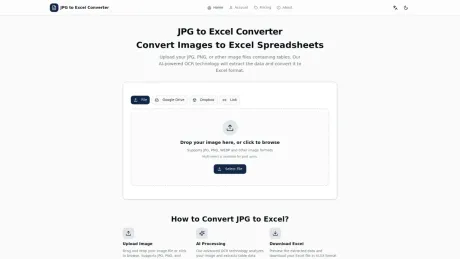
The JPG to Excel Converter allows users to easily transform JPG or JPEG table images into editable Excel files. With AI-driven OCR technology, it accurately detects rows, columns, and headers, enabling seamless conversion into formats like XLSX, XLS, and CSV. The service is free for up to 10 single-image conversions per day without requiring users to create an account or install software.
The converter supports not only JPG images but also other formats like PNG, BMP, TIF, and TIFF, catering to a wide range of users. The process involves uploading an image, letting the OCR analyze it, and then downloading the resulting Excel sheet, which remains editable for future use. Users can utilize this tool on any device without installation, making it convenient for both desktop and mobile access.
Moreover, the OCR engine supports a wide variety of languages—109 in total—ensuring that users across the globe can utilize the tool effectively. While the system is built for optimal accuracy, users are advised to consider factors such as image resolution, glare, and layout for the best results. The converter emphasizes security by ensuring that uploaded files are deleted immediately after conversion, maintaining user confidentiality.
This converter is particularly useful for professionals needing to convert invoices, receipts, inventory lists, and other tabular data into an editable format, making it an essential tool for data management and processing.
Frequently asked questions
What is JPG To Excel Converter used for?
JPG to Excel Converter | Free Online JPEG OCR.Is JPG To Excel Converter free?
Pricing for JPG To Excel Converter varies — see the Pricing section for details.What are alternatives to JPG To Excel Converter?
Top alternatives to JPG To Excel Converter include LLM-Powered Invoice & Receipt Extractor (OSS), AutoPredict, Genius Sheets, NewsDeck from OneSub, Decile.Where can I get JPG To Excel Converter?
JPG To Excel Converter is available at https://jpg2excel.app.What category is JPG To Excel Converter in?
JPG To Excel Converter is listed in Data Analysis.Can I convert a photo of a table to Excel?
Yes. Upload a clear photo containing a table and the OCR will extract rows and columns into an Excel file.What image formats are supported?
Common formats like JPG and PNG work best. If the table is readable, OCR can usually extract it.Why are some cells incorrect after conversion?
Low resolution, glare, skew, and merged cells can reduce accuracy. Try a clearer crop and keep the table straight.Is my data safe?
Your file is only used to perform the conversion. Avoid uploading sensitive documents if you’re unsure.Will the exported Excel be editable?
Yes. The output is a standard spreadsheet so you can edit cells, formulas, and formatting like normal.How can I improve OCR accuracy?
Use a high-resolution image, crop to the table area, avoid shadows, and keep text sharp and horizontal.Will the Excel file preserve colors, fonts, and the original layout?
The converter focuses on table structure and cell data. It does not guarantee a pixel-perfect copy of the original colors, fonts, borders, or page layout, so final formatting may need manual edits.Can I use JPG to Excel on a phone?
Yes. You can open the site in a mobile browser and upload a photo, screenshot, cloud file, or image link. For best results, keep the table flat, sharp, and free of glare.How is this different from Excel’s built-in From Picture feature?
Excel’s From Picture feature is useful inside Excel. This site is browser-based, so you can upload from local files, cloud pickers, or image links, preview the extracted table, and download an XLSX file.Can I use the converted spreadsheet for accounting or business records?
Yes, but treat OCR output as a data-entry aid, not a final record. Review amounts, dates, tax fields, IDs, and totals before using the spreadsheet for accounting, legal, or operational decisions.Do I need to install software or create an account?
No. The converter runs in your browser with no installation and no registration required. Free and signed-out users get 10 single-image conversions per day.Which OCR languages are supported?
The OCR engine supports 109 languages, including Chinese, English, Korean, Japanese, Thai, Greek, Tamil, Telugu, Arabic-script, Latin-script, Cyrillic-script, and Devanagari-script table content.Can I convert JPEG to Excel?
Yes. Upload a clear JPEG table image and convert it to editable Excel cells. JPEG to Excel uses the same OCR workflow as JPG to Excel.Can I convert JPG to XLS or XLSX?
Yes. After OCR extracts the table, you can download both a modern XLSX spreadsheet and a legacy XLS file, plus CSV for simple data workflows.Can I convert a JPG into an Excel sheet?
Yes. Upload the JPG table image and the converter rebuilds the visible rows and columns as an editable Excel sheet or spreadsheet.
Compare JPG To Excel Converter with…
Pick any tool to see a structured side-by-side: pricing, deployment, capabilities, and content policy.