Taskade
Build, Train, Automate - AI Apps, Agents & Workflows | Taskade Genesis.
- Category
- Content Generation & Seo
- Pricing
- Freemium
- Alternatives
- 6 similar tools
- Last updated
- 1 months ago
- Source
- Official site ↗︎
AI Collection Top Picks

Content Generation & Seo Category Picks


About Taskade
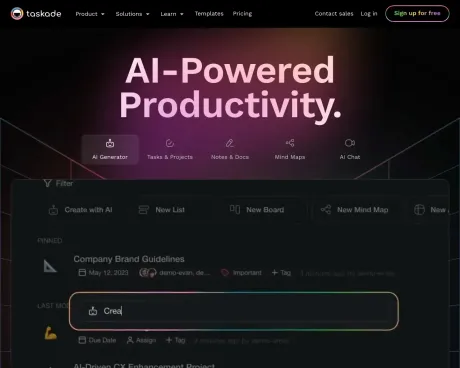
One prompt to a live app - CRMs, dashboards, client portals run by AI agents and workflow automations. Build free with Taskade Genesis, no credit card.
Taskade's Pricing Plans
Taskade may change prices at any time. Here's our latest information:
Personal & Family
Free
Get started with Taskade
Free
Free forever for you
- 1 Workspace
- 3 Members
- 250 MB Storage
- 7 day project history
- 1000 AI generations / month
- Access to 500+ free AI templates
- Task lists
- mind maps
- meeting notes
- team calendars and more
Starter
Best for personal use
$4
per month for 3 members - billed annually or $8 billed monthly
- Everything in Free, plus:
- 1 Workspace
- 3 Members
- 2 GB Storage
- 1 month project history
- 5,000 AI generations / month
- 3 attendees per video meeting
- Calendar Integration & Syncing
- Guest sharing and links
Plus
Unlock all essential features
$8
per month for 5 members - billed annually or $16 billed monthly
- Everything in Starter, plus:
- 2 Workspaces
- 5 Members
- 5 GB file storage
- 3 month project history
- 10,000 AI generations / month
- 5 attendees per video meeting
- Cloud Upload Integration with Google Drive, Dropbox, and more
Teams & Business
Pro
Best for small teams
$19
per month for 20 members - billed annually or $39 billed monthly
- Everything in Free, plus:
- 5 Workspaces
- 20 Members
- 20 GB Storage
- 6 month project history
- 50,000 AI generations / month
- 20 attendees per video meeting
- Calendar Integration & Syncing
- Advanced Team Permissions
- Guest sharing and links
Business
Best for multiple teams
$49
per month for 50 members - billed annually or $99 billed monthly
- Everything in Pro, plus:
- 20 Workspaces
- 50 Members
- 100 GB file storage
- 1 year project history
- 250,000 AI generations / month
- 100 attendees per video meeting
- External team collaboration
- 5,000+ Automations and Integrations in Embedded Zapier
- Cloud Upload Integration with Google Drive, Dropbox, and more
Ultimate
Work across your entire organization
$99
per month for 100 members - billed annually or $199 billed monthly
- Everything in Business, plus:
- Unlimited Workspaces
- 100 Members
- 1,000 GB Storage
- 5 year project history
- Unlimited AI generations / month
- 300 attendees per video meeting
- Secure and simplify access with Single Sign On (SSO) through OKTA, Google, Azure, and more
Frequently asked questions
What is Taskade used for?
Build, Train, Automate - AI Apps, Agents & Workflows | Taskade Genesis.Is Taskade free?
Taskade has a free tier; paid plans unlock additional features.What are alternatives to Taskade?
Top alternatives to Taskade include XXAI, Content Raptor, BurstyAI, MyMap.AI YouTube Summarizer, MyMap.AI Idea Generator.Where can I get Taskade?
Taskade is available at http://www.taskade.com/?via=beth0.What category is Taskade in?
Taskade is listed in Content Generation & Seo.What does Taskade offer?
Taskade is a platform that transforms the way you work by streamlining task organization, outlining detailed project specifications, automating workflows, and enabling collaboration through video chat, all within a unified platform. It provides tools to bring your ideas and team goals to life, collaborate in real-time through shared projects and workspaces, and tailor Taskade to fit your unique team structure.Is Taskade free to use?
Yes, Taskade offers a free version with essential features unlocked for individuals and teams. Users have the option to upgrade to premium plans, which offer advanced features, multiple team workspaces, and more.Can I change my Taskade plan from the Free Plan later?
Yes, Taskade allows flexibility in managing plans. Users can easily upgrade or downgrade their premium subscription plan at any time. The billing area provides options to manage account details and customize plans and billing cycles as needed.In what ways can I use Taskade to be more productive?
Taskade can be used for a wide range of purposes, such as structured task lists, weekly agendas, team meetings, project outlines, product roadmaps, and more. Users can find inspiration from the templates gallery, which offers over 500 free AI templates.Can I collaborate with others on Taskade?
Yes, Taskade serves as a unified team workspace for organizing ideas, managing tasks, and facilitating collaboration. Users can create workspaces and invite team members to work together in real-time, assign tasks, and communicate via chat.Can I manage multiple teams using Taskade?
Absolutely. Taskade supports the creation and management of multiple teams with multi-workspace support. Users can set up separate team folders or workspaces for various projects, control access with customized permissions, and maintain secure projects and workspaces.Is there a limit to the number of guests or workspace members?
Taskade offers unlimited project sharing with generous workspace limits. Users can find more details on the pricing page.What is a workspace in Taskade?
A workspace in Taskade acts as an organization that brings together projects, folders, and team members for seamless collaboration. Users can invite others to join their workspace and work on multiple projects simultaneously in real-time.How do I invite someone to join my Taskade workspace?
To invite others to a workspace, users can access the workspace and click on the "Share" button. They can customize the invitation by sending a share link or email to intended members, granting full access or setting up advanced roles and permissions.Can I share an individual project in Taskade?
Yes, users can share individual projects. For multiple projects within the same folder or workspace, users can invite others to the folder or workspace. External projects and folders shared with users will appear in the Recent tab.How do I assign a task to someone else in Taskade?
Assigning a task to someone else in Taskade is easy. Users can click on the assign icon above each task or tag members by typing "@" followed by their username. They can also assign members to the entire project by clicking on "Assign" near the title.Can I set deadlines and due dates for tasks in Taskade?
Yes, users can set due dates for any task in Taskade. They can click on the calendar icon to select a due date.Who can see my projects in Taskade?
By default, projects in Taskade are hidden and invisible to others. Users can share a project or create a workspace to collaborate with their team. For more privacy, they can create a new workspace for themselves.Are there Taskade mobile and desktop apps?
Yes, Taskade offers apps for Web, iOS, Android, Chrome, Firefox, Linux, Windows, and Mac. Users can download the apps for a seamless experience across different devices.What is Taskade''s background as a company?
Taskade was founded in 2017 with roots in both New York and Singapore and is now headquartered in San Francisco. With the support of renowned Y-Combinator, Taskade aims to revolutionize collaboration for remote teams by providing a unified platform for tasks, notes, and communication.Does Taskade have a public roadmap?
Yes, Taskade provides a public roadmap that offers a sneak peek of upcoming updates. Users can stay informed through weekly updates and monthly newsletters featuring product announcements and enhancements. The company welcomes user feedback and suggestions to continually improve the platform.How does Taskade compare to competitors?
Users can access a full list of Taskade comparisons and competitor reviews for more information.What is Taskade?
Taskade is an AI-powered workspace where you can build apps, deploy agents, and automate workflows from a single prompt. It transforms ideas into living software that runs 24/7 without code.How do I build an AI app with Taskade?
Simply describe what you want to build in one prompt. Taskade generates a complete working app with AI agents, databases, and automations. No coding required. Apps are ready in minutes.What can I build with Taskade?
You can build AI dashboards, CRMs, client portals, internal tools, chatbots, websites, and automated workflows. Any business application you can imagine, from one prompt.How is Taskade different from other AI app builders?
Taskade uses Workspace DNA - your existing projects, documents, and knowledge become the foundation for new apps. Unlike others that start blank, every app inherits your context and gets smarter over time.What is Taskade Genesis?
Taskade Genesis is an AI app builder. One prompt can become a live business app such as a CRM, dashboard, or client portal. The app can include project data, AI agents, and automations. You do not need to write code. Every Taskade Genesis app runs on Workspace DNA, a self-reinforcing loop of three pillars: Pillar What It Powers -------- --------------- Memory Projects and databases that give agents context across multiple views Intelligence AI Agents with custom tools, persistent memory, and a built-in toolkit Execution Automations with durable execution and 100+ integrations Memory feeds Intelligence, Intelligence triggers Execution, Execution writes back to Memory. Create your first app →What can I build with Taskade Genesis?
Describe the work you need. Taskade Genesis can build a full-stack app with AI agents, data, and automations. Type Examples ------ --------- Dashboards Finance trackers, analytics hubs, capacity boards Portals Branded client dashboards with auth and custom domains Booking Class schedules, appointments, event RSVPs E-commerce Storefronts, inventory, Stripe + Shopify invoicing Content YouTube monitors, RSS-to-blog, multi-platform publishing Internal CRMs, support desks, license managers, trackers Browse live examples in the community gallery, clone apps whose creators enabled Share as Template, or build your own →How is Taskade Genesis different from other AI tools?
Code-focused builders emphasize generated source. Automation-only tools emphasize workflow steps. Taskade Genesis can combine the app, the data, the agents, and the workflows in one workspace. Feature Other Tools Taskade Genesis --------- ------------ ----------------- Apps Frontend code, you deploy Full-stack living apps, hosted Agents None Deployable with persistent memory Data No database or external Workspace data powers every app Workflows None or static rules 100+ integrations, durable execution Learning Static output Self-improving systems One prompt. One platform. Apps, agents, and automations wired together. Create your first app →Can I deploy AI agents on my website?
Yes. Taskade AI Agents can be published publicly and embedded on any website with no code required. Feature Details --------- --------- Public pages Share a link, anyone can chat with your agent Embed Drop a script tag to add an AI assistant to any site Branding Your brand colors, avatars, conversation starters, domains Inbox View and manage all customer conversations in one place Training Train on files, URLs, Google Drive, Dropbox, or project data Models Assign OpenAI, Anthropic Claude, or Google Gemini per agent Each agent runs custom tool schemas you define and maintains persistent memory across sessions. Build your first agent →How do automations and integrations work?
Taskade Automations are workflows with durable execution. Failed steps can retry instead of failing silently. Build workflows with branching, looping, and filtering logic across 100+ integrations: Category Examples ---------- --------- Payments Stripe invoicing, subscriptions, Shopify orders Messaging Slack, email, Discord notifications Content YouTube monitoring, RSS feeds, multi-platform publishing Dev tools GitHub, webhooks, HTTP requests Data Google Sheets, Airtable, database sync Agents can also trigger automations conversationally. Ask "What orders came in today?" and your agent calls the right tools automatically. Explore all integrations →Who is Taskade Genesis built for?
Taskade Genesis is for anyone who knows what they would build but lacks the engineering team to build it. Who What They Build ----- ---------------- Founders MVPs, client portals, internal tools via the AI App Builder Marketing Content agents, SEO research pipelines, campaign workflows Agencies Branded dashboards with custom domains and white-labeling Teams Shared projects, AI teammates, and automations Developers Natural language prototypes, API connectors, embeddable agents See what others are building in the community gallery or start creating →Can I start for free?
Yes. Taskade's free plan includes everything you need to get started. Feature Free Pro ($10/mo, billed annually) --------- ------ ------------- AI agents Included Unlimited Automations Up to 3 Unlimited Integrations Basic 100+ AI credits Limited 50,000/month Views Basic views All views Apps Web, desktop, mobile Web, desktop, mobile Most users start free and upgrade when their agents become essential. Start free →What AI models does Taskade support?
Taskade runs on TSK-1, the intelligence layer of your workspace. Use Auto to let Taskade choose a model, or pick a rung per agent: Mode Best for ------ --------- TSK-Instant Fast edits and quick answers TSK-Standard Everyday building and writing TSK-Thinking Multi-agent planning TSK-Reasoning Complex workflows and systems TSK-1 uses 15+ frontier models from OpenAI, Anthropic, Google, and open-weight providers. Explore AI agents →
Compare Taskade with…
Pick any tool to see a structured side-by-side: pricing, deployment, capabilities, and content policy.