Remove Bg
Remove Background from Images for Free Online | Removebg.
- Category
- Background Remover
- Pricing
- Free
- Alternatives
- 6 similar tools
- Last updated
- 4 months ago
- Source
- Official site ↗︎
AI Collection Top Picks

Background Remover Category Picks


About Remove Bg
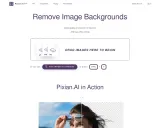
Removebg is a 100% free background removal tool, supports removing backgrounds from images of people, products, animals, cars, and logos, etc.
What you get
Additional Information
Remove Bg is a 100% free AI image cutout tool that supports removing backgrounds from images of people, products, animals, cars, and logos.
Product Features and Advantages
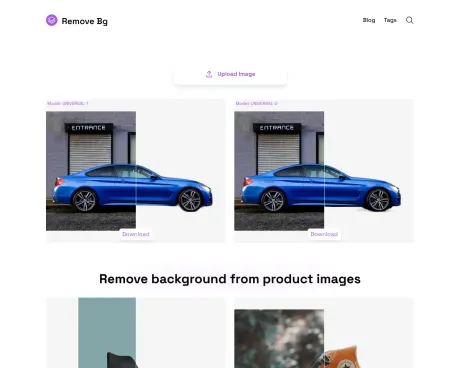
Dual Model Operation for Cutouts
Each time a cutout is performed, two different models are used simultaneously. This allows for the selection of the best result for download after the cutout is completed.
High-Quality Output
Maintains the integrity and quality of the foreground subject, producing professional-level results, with support for free original image downloads.
Supports Multiple Formats
Compatible with popular image formats including JPG and PNG.
Application Scenarios
Remove Bg is suitable for a variety of use cases:
- Product photography: Ideal for e-commerce, allowing sellers to showcase their products against a clean, distraction-free background.
- Portrait photos: Enhances portrait photos by separating the subject from cluttered or unwanted backgrounds.
- Design projects: Assists in creating composite images, marketing materials, and other design elements.
- Social media content: Perfect for creating engaging posts, profile pictures, and other visual content for social media.
User Guide
- Upload an Image: Open Remove Bg in your browser and click the "Upload Image" button, then select the image you want to cut out.
- Wait for the Background Removal Result: After selecting an image, the site will use the UNIVERSAL-1 and UNIVERSAL-2 models to complete the background removal online, with no complex operations or expert knowledge required.
- Save the Background Removal Result: After the background removal is complete, you can click the "Download" button to save the cutout photo to your computer.
Pricing
100% Free.
Frequently asked questions
What is Remove Bg used for?
Remove Background from Images for Free Online | Removebg.Is Remove Bg free?
Remove Bg is free to use.What are alternatives to Remove Bg?
Where can I get Remove Bg?
Remove Bg is available at https://removebg.one/.What category is Remove Bg in?
Remove Bg is listed in Background Remover.Dual Model Operation for Cutouts
Each time a cutout is performed, two different models are used simultaneously. This allows for the selection of the best result for download after the cutout is completed.High-Quality Output
Maintains the integrity and quality of the foreground subject, producing professional-level results, **with support for free original image downloads**.Supports Multiple Formats
Compatible with popular image formats including JPG and PNG.Application Scenarios
[Remove Bg](https://removebg.one/) is suitable for a variety of use cases: - Product photography: Ideal for e-commerce, allowing sellers to showcase their products against a clean, distraction-free background. - Portrait photos: Enhances portrait photos by separating the subject from cluttered or unwanted backgrounds. - Design projects: Assists in creating composite images, marketing materials, and other design elements. - Social media content: Perfect for creating engaging posts, profile pictures, and other visual content for social media.User Guide
1. **Upload an Image**: Open [Remove Bg](https://removebg.one/) in your browser and click the "Upload Image" button, then select the image you want to cut out. 2. **Wait for the Background Removal Result**: After selecting an image, the site will use the UNIVERSAL-1 and UNIVERSAL-2 models to complete the background removal online, with no complex operations or expert knowledge required. 3. **Save the Background Removal Result**: After the background removal is complete, you can click the "Download" button to save the cutout photo to your computer.Pricing
100% Free.How to use Removebg?
Visit https://removebg.one in your browser to use Removebg for background removal.Can I use Removebg without registering?
Of course. Removebg can be used online for free.What types of image files does Removebg support?
Removebg supports PNG, JPG, JPEG, and WEBP image file formats.Are there any image size or dimension limitations with Removebg?
The maximum width and height cannot exceed 6400px, and the maximum size cannot exceed 10MB.How is the quality of background removal ensured by Removebg?
After removing the background with Removebg, you can perform secondary edits on the cutout results to eliminate any imperfections.How long does it take for Removebg to process an image?
Typically, it takes around 8 seconds to complete, but during peak times, it may take around 28 seconds.Does Removebg support batch processing?
Currently, batch processing is not supported.On what devices can I use Removebg?
Removebg is supported on both Windows and macOS systems. We have also adapted it for mobile devices, so as long as your phone has a browser, you can enjoy the free background removal service by visiting our website.In what scenarios can I use Removebg?
You can use Removebg in scenarios such as product showcasing, personal photo editing, advertising design, social media profile creation, and creative design.
Compare Remove Bg with…
Pick any tool to see a structured side-by-side: pricing, deployment, capabilities, and content policy.