Background Blur
Blur background of photo online free.
- Category
- Background Remover
- Pricing
- Paid
- Alternatives
- 6 similar tools
- Last updated
- 5 days ago
- Source
- Official site ↗︎
AI Collection Top Picks

Background Remover Category Picks

About Background Blur
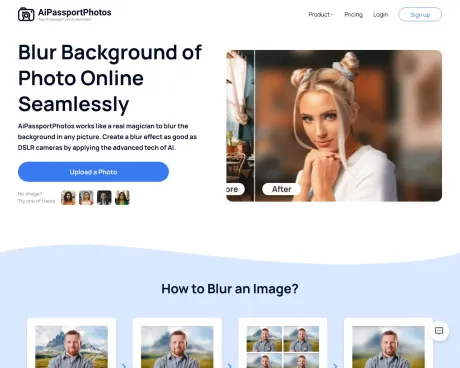
Use background blur tool to enhance your virtual presence! Simply upload a photo, adjust blur intensity and get unique pictures in seconds.
Background Blur's Pricing Plans
Background Blur may change prices at any time. Here's our latest information:
Background Blur Pricing Plans
Free Account
Free previews forever
2 free credits
- 1 image=1 credit for image backoround removal and blurring, face cutout, and photo retoucher
- 1 image=2 credits for passport photo, old photo restoration, cartoon selfie, color correction and enhancer
Subscription plan
Roll up to 5× your monthly credit budget
from $0.058
/credit
- 1 image=1 credit for image backoround removal and blurring, face cutout, and photo retoucher
- 1 image=2 credits for passport photo, old photo restoration, cartoon selfie, color correction and enhancer
Pay as you go
Credit available for use forever
from $0.140
/credit
- 1 image=1 credit for image backoround removal and blurring, face cutout, and photo retoucher
- 1 image=2 credits for passport photo, old photo restoration, cartoon selfie, color correction and enhancer
Frequently asked questions
What is Background Blur used for?
Blur background of photo online free.Is Background Blur free?
Background Blur is a paid product. See the Pricing section for current plans.What are alternatives to Background Blur?
Where can I get Background Blur?
Background Blur is available at https://www.aipassportphotos.com/blur-background.What category is Background Blur in?
Background Blur is listed in Background Remover.Can I Blur Background on iPhone without Portrait Mode?
Yes, if you don''t have an iPhone with portrait mode, you still can get a blurred background simply by getting closer to your subject. Or you can use a free photo blurrer to blur photo background and create a stunning portrait.Why Utilize a Blurring Effect?
Applying a blurring effect to your photos serves multiple purposes. Firstly, it directs more attention to the primary subject of the image. Additionally, the blur effect can gently soften object edges, lending them a more enigmatic and transient appearance. Furthermore, image blurring can convey a sense of motion and dynamism.What''s the Optimal Approach for Adding Image Blur?
Adding a blur effect to images, such as incorporating a stylish blur to your images online with AiPassportPhotos, is a straightforward process. Additionally, AiPassportPhotos can function as a robust and user-friendly tool for removing photo backgrounds. This feature proves invaluable when you need to create a transparent background.What Kinds of Photos Suit the Background Tool?
In most cases, photos with clearly defined subjects that stand out from their background are more suitable. When the subject lacks clarity, the blurring effect may not yield the expected results.Can This Tool Produce a Bokeh Blur?
To clarify, blur effects are sometimes referred to as "bokeh," a Japanese term meaning "blur." Bokeh is frequently associated with circular, out-of-focus points of light. Therefore, our blurring tool cannot replicate a bokeh-style blur.How Many Blur Effects Can I Choose?
You can select from six distinct levels of blur effects to obscure unwanted elements in the background. This allows you to customize the blur effect''s intensity for photos you''ve already taken, whether they feature portraits, products, animals, or landscapes.Will This Tool Blur the Photo''s Subject?
No, the background blur effect exclusively affects the image''s background, leaving the subject untouched. There''s no need to worry about the subject becoming blurred, as it remains isolated and unaffected.Can I Achieve a Shallow Depth of Field with AiPassportPhotos?
Yes, AiPassportPhotos integrates tilt-shift technology, enabling you to easily blur the background of a picture. It''s user-friendly and facilitates the creation of a shallow depth of field effect, making your subject stand out.How Can I Blur a Photo Background?
To achieve this, follow these steps: 1. Open the photo background editor and select "upload a photo." 2. Choose the blur model and adjust the blur size and intensity. 3. Save and download the edited image. That''s all it takes.How Can I Enhance My Portrait with a Blur Effect?
Simply launch the blur background tool and designate the area you wish to highlight while blurring out unnecessary elements in the image. After a few minutes, you''ll have a professional and high-quality portrait image.How Can I Blur Part of an Image on an iPhone?
AiPassportPhotos'' image blurrer is accessible to both Android and iOS users. You can effortlessly blur a portion of an image with just a few clicks. Upload your photo, adjust the desired blur areas, and a blurred background image is readily achievable.Is Online Background Blurring Possible Without Photoshop?
Absolutely. Your best option is to utilize an online photo editor to fine-tune your image. Employ AiPassportPhotos'' background blur tool to control the blur intensity, resulting in an image with a blurred background.Why Do You Need a Blurring Effect?
A blurred background brings more emphasis to the main subject of your photo. It can soften edges of objects, creating a mysterious look, and add a sense of speed and dynamics.How to Blur the Background in a DSLR Camera?
Use a wide aperture, a longer focal length lens, and get closer to your subject. Ensure good separation between your subject and background to emphasize the blur.What Type of Photos is Ideal for Using the Background Tool?
Photos with stand-out subjects, easily distinguished from their background, work best. Blurring may not present well if there is no clear subject.Can I Use This Tool to Create a Bokeh Blur?
No, the blurring tool cannot create the specific bokeh effect, which involves circular out-of-focus points of light.Will This Tool Blur the Subject of the Photo?
No, the background blur effect only works on the image background; the subject remains clear and unblurred.Can I Create a Shallow Depth of Field with AiPassportPhotos?
Yes, the tool allows you to create a shallow depth of field effect easily.How Do I Blur a Photo Background?
Select the blur background option, upload your photo, adjust the blur intensity if needed, and download your edited photo.Is It Possible to Blur the Background Online without Using Photoshop?
Yes, using AiPassportPhotos’ blur tool is a great alternative to Photoshop for adjusting image backgrounds.
Compare Background Blur with…
Pick any tool to see a structured side-by-side: pricing, deployment, capabilities, and content policy.