Avis sur Picture to Drawing : un convertisseur photo-en-dessin rapide dans un marché encombré
By: AI Collection
At a glance
3.0 / 5Picture to Drawing
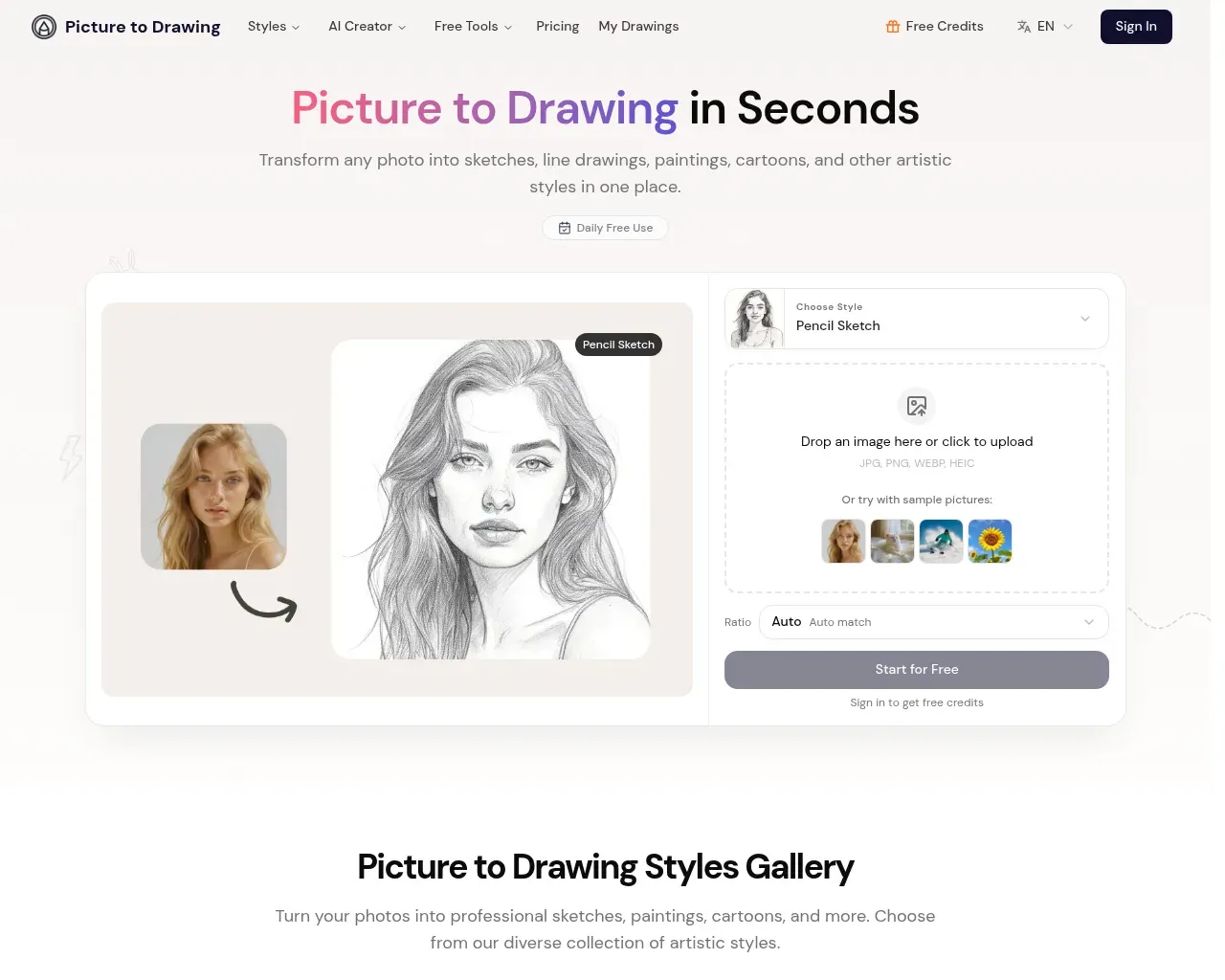
PaidTapez « photo to drawing AI » dans une barre de recherche et vous obtenez un mur de sites quasi identiques, dont la plupart ont été lancés au cours de la dernière année. Picture to Drawing, sur picturetodrawing.com, en fait partie : téléchargez une photo, choisissez un style, et quelques secondes plus tard vous obtenez un croquis au crayon, un dessin au trait ou une version aquarelle de votre image. L'interface est épurée, le résultat est genuinement correct, et il y a une conversion gratuite quotidienne pour que vous puissiez le tester avant de payer. La question plus difficile, et celle sur laquelle cette critique revient sans cesse, est de savoir s'il fait quelque chose que la douzaine d'imitateurs ne fait pas.
Ce qu'il fait
La boucle de base est simple. Vous déposez un fichier JPG, PNG, WEBP ou HEIC (ou vous commencez à partir de l'une des images d'exemple), choisissez un style artistique, définissez un rapport d'aspect et appuyez sur convertir. Le résultat revient en haute résolution, prêt à télécharger pour l'impression, l'encadrement ou la publication. Aucun compte n'est nécessaire pour l'essayer, et le site indique que les photos téléchargées sont automatiquement supprimées après la conversion plutôt que stockées, ce qui est une position raisonnable pour quelque chose dans lequel vous pourriez insérer des photos de famille.
Au-delà des styles en un clic, il y a un mode AI Style Transfer où vous téléchargez une deuxième image comme référence et l'outil reproduit cet aspect sur votre photo. Une section AI Creator plus petite ajoute la génération de texte en image et d'image en image, de sorte que le site évolue clairement vers un outil d'image général plutôt qu'un simple convertisseur.
Les styles et le fonctionnement d'une conversion
La liste des styles couvre la gamme attendue : croquis au crayon, dessin au trait, crayon de couleur, aquarelle, fusain et encre, ainsi que bande dessinée, anime et caricature. Chacun est réglé différemment. Le croquis au crayon s'appuie sur l'ombrage et les détails fins, tandis que le dessin au trait réduit une image à des contours nets, ce qui est le mode qui tend à paraître le mieux pour les logos, les pages à colorier ou tout ce que vous prévoyez d'imprimer en noir et blanc.
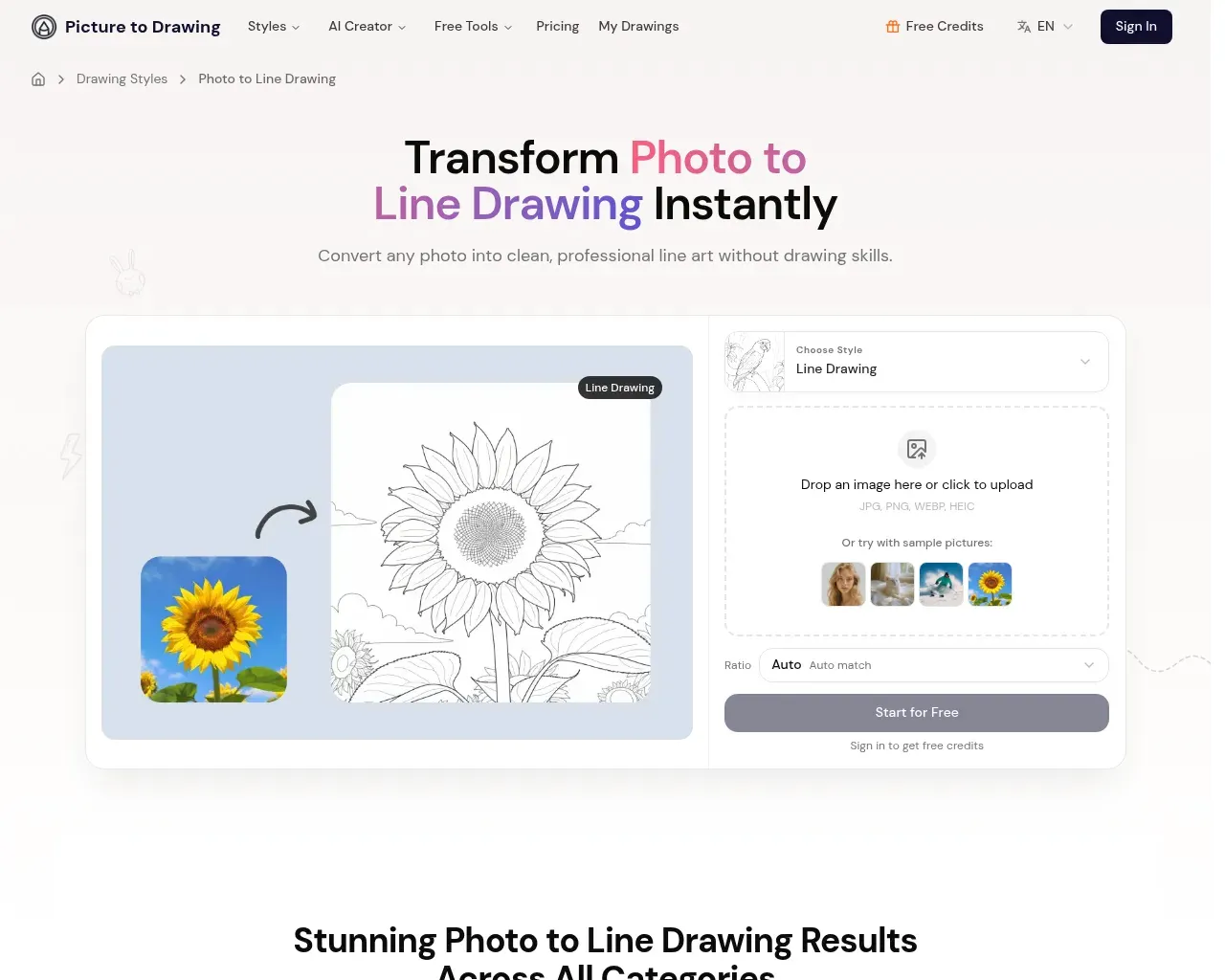
Une seule transformation coûte deux crédits, et le site donne aux utilisateurs connectés une conversion gratuite par jour. La FAQ est claire sur le fait que les résultats dépendent de votre entrée : les photos claires et bien éclairées se convertissent mieux que les photos chargées ou peu contrastées. Cela correspond au comportement général de ces convertisseurs, et c'est bon à savoir avant de juger l'outil sur un seul téléchargement de mauvaise qualité.
Ce que ça coûte
La tarification est basée sur des crédits, avec des options mensuelles, annuelles et à la demande. Avec la facturation annuelle, les niveaux sont Basic à $8.99 par mois (250 crédits mensuels, soit environ 125 conversions), Standard à $13.99 (400 crédits, marqué « Popular ») et Premium à $27.99 (1,000 crédits). La facturation mensuelle coûte plus cher par mois : $12.99, $19.99 et $39.99 respectivement, et les packs à la demande ont des fenêtres d'expiration de deux à douze mois selon la taille.
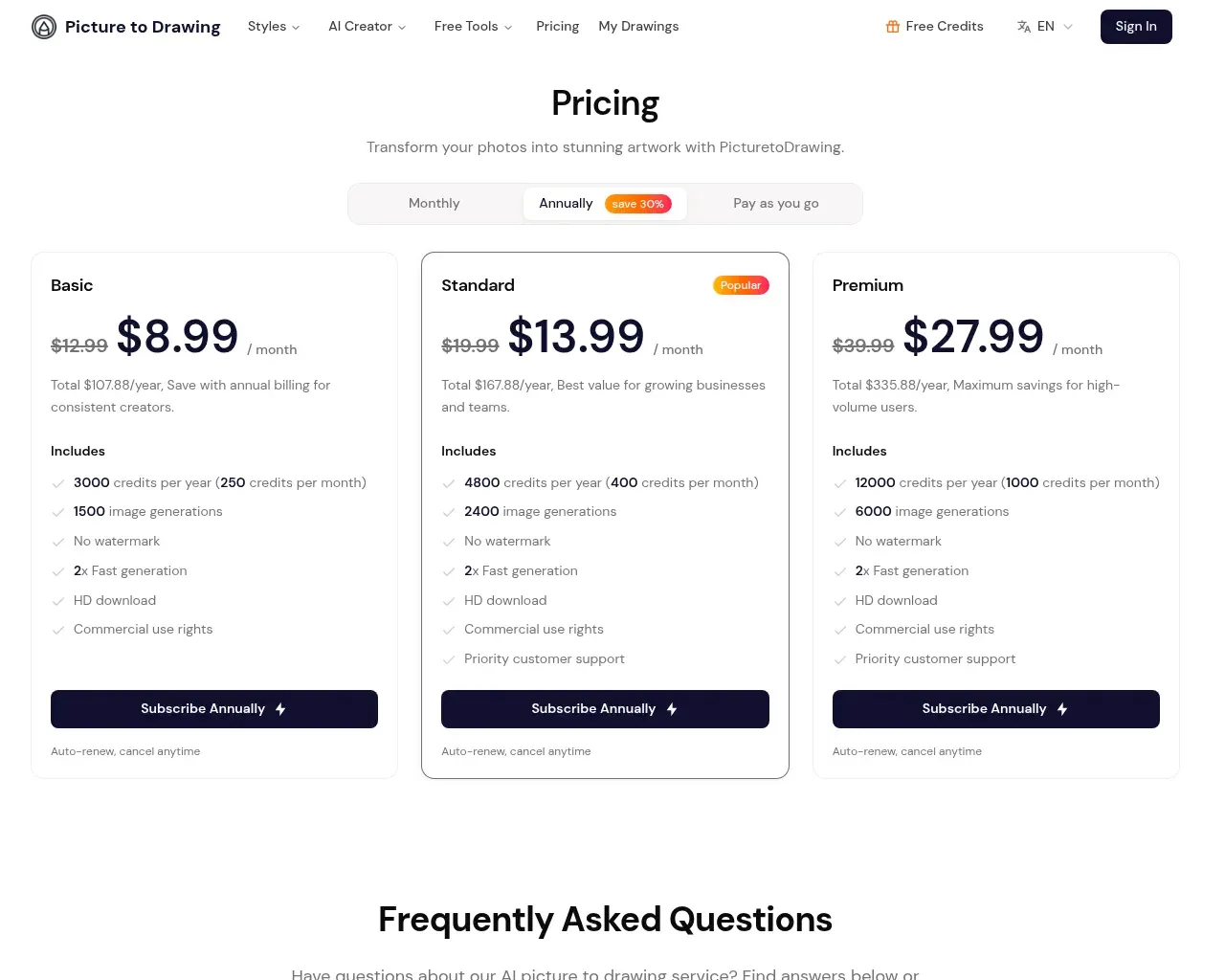
Deux choses méritent d'être vérifiées avant de vous abonner. La sortie sans filigrane et les droits d'utilisation commerciale ne viennent qu'avec les plans payants, donc la conversion gratuite quotidienne est vraiment un essai plutôt qu'un niveau gratuit utilisable. Et la politique de remboursement est un non catégorique : les crédits ne sont pas remboursables une fois achetés, ce que le site attribue au coût de calcul de chaque génération. L'annulation arrête les futurs frais mais ne récupérera pas les crédits inutilisés.
À qui ça s'adresse
Cela convient aux travaux occasionnels et ponctuels : un cadeau d'anniversaire à partir d'une photo de famille, un avatar style croquis, un lot de pages à colorier, quelques publications sur les réseaux sociaux avec un aspect dessiné à la main. Le calcul des crédits fonctionne bien à cette échelle, et la conversion gratuite quotidienne est suffisante pour voir si vous aimez le résultat avant de vous engager. Les illustrateurs professionnels et les studios qui ont besoin de contrôle sur l'épaisseur des traits, les calques ou les vecteurs modifiables atteindront rapidement sa limite, car c'est un convertisseur en un seul passage, pas un éditeur.
Le problème : un nom générique et un historique mince
La plus grande réserve n'est pas l'outil, c'est tout ce qui l'entoure. « Picture to Drawing » est aussi générique qu'un nom de produit peut l'être, et le marché est plein de variantes : picturetodrawing.org, .io et .app, ainsi que pictodrawing.com, tous offrant presque la même chose. Les publications Show HN qui remontent pour le nom pointent vers ces autres domaines, pas celui-ci, donc le bilan indépendant de picturetodrawing.com spécifiquement est mince. La plupart des témoignages positifs que vous trouvez sont le propre texte du site, et le produit ne date que du début 2026.
Rien de tout cela n'en fait un mauvais outil. Cela signifie que vous faites confiance à un jeune service sans véritable historique d'avis tiers, dans une catégorie où passer à un concurrent ne vous coûte rien. Achetez des crédits en petites quantités d'abord, et ne supposez pas que les avis que vous lisez concernent le site exact sur lequel vous êtes.
Verdict
Picture to Drawing fait ce qu'il promet. Les conversions sont belles, les styles sont variés, les prix sont clairs et la gestion de la confidentialité est sensée. Ce qu'il lui manque, c'est la différenciation et un historique : c'est une entrée compétente dans un domaine encombré plutôt qu'un outil remarquable. Pour un travail photo-en-art occasionnel et personnel, c'est un oui facile au niveau gratuit ou avec un plan mensuel bon marché. Pour tout ce qui est à fort volume ou critique pour l'activité, testez-le à fond d'abord. Dans l'ensemble : 3/5, un outil casual solide qui n'a pas encore gagné de raison claire de le choisir plutôt que ses nombreux clones.
Sources consultées
- Page d'accueil de Picture to Drawing — fonctionnalités principales, styles, flux de travail et déclarations de confidentialité
- Tarification de Picture to Drawing — niveaux, montants de crédits, politique de remboursement et d'utilisation commerciale
- Page de style Photo to Line Drawing — cas d'utilisation de l'art linéaire et exemples
- Recherche Hacker News pour « picture to drawing » — a montré que le nom entre en collision avec des variantes .io et .org, avec peu de discussion
- CyberLink : meilleurs convertisseurs photo-en-dessin — paysage concurrentiel et alternatives quasi identiques
Published on: August 30, 2026
Vous cherchez des alternatives à Picture to Drawing ? Voir toutes les alternatives à Picture to Drawing →
Have an AI tool of your own? Submit it below and get a free, in-depth product review article — just like this one.
Ajoutez votre outil IA en quelques secondes
Collez votre URL et nous préparerons la fiche. Vous relisez et modifiez chaque champ avant l'envoi.