- 类别
- 翻译和成绩单
- 定价
- Paid
- 替代品
- 6 个类似工具
- 最后更新
- 3 周前
- 来源
- 官方网站 ↗︎
AI Collection 热门精选

翻译和成绩单 类别精选

关于 ScreenApp
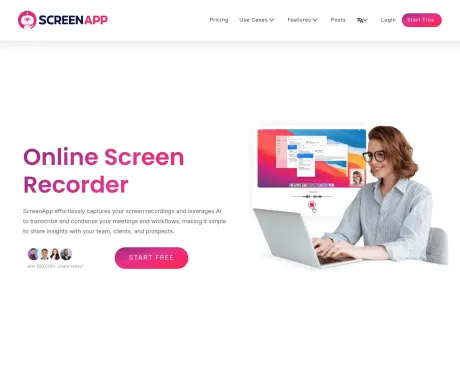
只需点击几下,您就可以录制您的屏幕,将其转录并将您的内容转化为有价值的知识。告别繁琐的记笔记,迎接生产力。立即试用 ScreenApp,彻底改变您的学习和工作方式
ScreenApp's 定价计划
ScreenApp 可能随时更改价格。 这是我们的最新信息:
简单、透明的定价(年度计划节省 ~20%)
生长
对于个人 - 非常适合录制和存储个人视频。
$9/user
/月
- 最多 100 个视频
- 下载
- 转录
- 20 ChatGPT 提示/月
商业
对于团队 - 非常适合团队和企业,提供强大的屏幕录制和 AI
$19/user
/月
- 最多 1000 个视频
- 无限下载
- 高级支持
- 100 ChatGPT 提示/月
最终的
对于企业 - 在您自己的服务器上本地托管 ScreenApp 以控制您的安全性。
Contact
- 自托管
- 代码组件
- 平台SDK和插件
- 白标
你能获得什么
附加信息
ScreenApp is an AI-powered meeting assistant that enables users to automatically record, transcribe, and summarize meetings, lectures, and conversations. It captures audio and video effortlessly, allowing users to search through their recordings instantly. The platform provides features such as generating professional PDFs, translating recordings, and analyzing content, making it ideal for anyone looking to enhance their productivity and streamline their workflow.
With ScreenApp's technology, users can absorb information faster by generating structured notes with key points and action items in real-time. This is beneficial for professionals who need to keep track of important discussions without the hassle of manually sifting through hours of content. The AI ensures over 99% accuracy in transcription, providing reliable summaries and insights.
ScreenApp is designed for ease of use, requiring no installations, as it operates directly within browsers or through available mobile and desktop apps. This accessibility makes it suitable for a wide range of users including project managers, educators, and content creators, who need a reliable tool for recording and summarizing insights.
The platform supports integration with major video conferencing tools like Zoom and Google Meet, allowing seamless import of recordings. Security is prioritized with encrypted data storage and transfer, ensuring users maintain control over their content while benefiting from AI capabilities to enhance productivity.
常见问题
What is ScreenApp used for?
在线屏幕录像机 - 录制屏幕并提取强大见解、分享和总结的最快、最有效的方式。.Is ScreenApp free?
ScreenApp is a paid product. See the Pricing section for current plans.What are alternatives to ScreenApp?
Where can I get ScreenApp?
ScreenApp is available at https://screenapp.io/.What category is ScreenApp in?
ScreenApp is listed in 翻译和成绩单.How does the AI Notetaker work?
ScreenApp automatically captures, transcribes, and transforms your conversations into structured notes with key points, action items, and decisions - all in real-time.What makes the AI Summarizer different?
Our AI extracts the most important insights from hours of content in seconds. Get executive summaries, key decisions, and action items without watching entire recordings.How accurate is the transcription and summarization?
ScreenApp delivers up to 99% transcription accuracy with clear audio. Summaries capture key points, action items, and decisions.Do I need to install anything?
No. You can use ScreenApp directly in your browser. If you prefer, you can also install our mobile app or Chrome extension.Can I use ScreenApp for dictation and document creation?
Yes. Convert any audio or video recording into formatted documents, PDFs, or text files. Perfect for creating meeting minutes, interview transcripts, and professional reports.Can I import from Zoom, Google Meet, or YouTube?
Yes. Upload recordings from any platform, import directly via URL, or use our meeting bots to automatically capture sessions.Is my data secure?
Yes. All recordings and transcripts are encrypted during transfer and storage. You control who can access your content.What's included in the free plan?
The free plan includes limited transcription minutes, basic summaries, and core recording and upload features.Can I cancel anytime?
Yes. You can cancel or downgrade your plan anytime in your account settings.
将 ScreenApp 与其他工具比较…
选择任意工具,查看结构化的并排对比:定价、部署、功能和内容政策。