
RoomStaging
Mise en scène virtuelle basée sur l'IA pour les professionnels de l'immobilier.
- Catégorie
- Retouche d'images
- Tarifs
- Paid
- Alternatives
- 6 outils similaires
- Mis à jour
- il y a 2 semaines
- Source
- Site officiel ↗︎
AI Collection Meilleurs choix

TheFluxTrain
Studio de production d'IA agentic pour des personnages, des flux de travail et des vidéos cohérents
Retouche d'images Choix de catégories

ProductScope AI propose deux outils essentiels aux marques de commerce électronique et aux spécialistes du marketing : un outil de prise de photos de produits basé sur l''IA et un optimiseur de listes.


À propos de RoomStaging
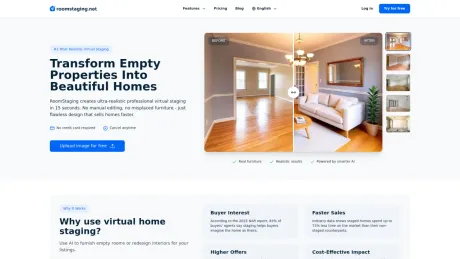
RoomStaging aide les agents immobiliers, les gestionnaires immobiliers et les architectes d'intérieur à créer des mises en scène virtuelles professionnelles à l'aide de l'IA. Ajoute une photo, choisis un style et obtiens un intérieur photoréaliste en quelques secondes. Pas de designer, pas de délais et pas de frais élevés.
RoomStaging's Forfaits tarifaires
RoomStaging peut modifier ses prix à tout moment. Voici nos dernières informations :
Plans tarifaires de RoomStaging
Basique
Parfait pour les particuliers
$19
Standard
Le plus populaire auprès des agents
$39
Professionnelle
Pour les professionnels de l'immobilier
$79
Entreprise
Pour les grandes équipes
$149
Foire aux questions
What is RoomStaging used for?
Mise en scène virtuelle basée sur l'IA pour les professionnels de l'immobilier.Is RoomStaging free?
RoomStaging is a paid product. See the Pricing section for current plans.What are alternatives to RoomStaging?
Top alternatives to RoomStaging include ProductScope AI, PicTools.AI, AI Photos Editor, AVCLabs PhotoPro AI, Fotor.Where can I get RoomStaging?
RoomStaging is available at https://roomstaging.net.What category is RoomStaging in?
RoomStaging is listed in Retouche d'images.What is virtual staging?
Virtual staging is a cost-effective method for real estate professionals to make properties more appealing to potential buyers. Using AI technology, we digitally furnish empty rooms or remove existing furniture, creating photorealistic images. This helps buyers visualize a home's potential, increases perceived value, and makes listings stand out online. We support all room types - living rooms, bedrooms, kitchens, offices, outdoor spaces - with 50+ professional design styles.Can I try it before I buy?
Yes! You get 6 free credits after registration – no credit card required. This is enough to generate 6 photos using the Standard AI model or 2 photos using the Smart AI model (with a watermark) to test our quality and see if it's right for you before upgrading to a paid plan. Once you subscribe, the watermark is removed and you get full access to all features and unlimited downloads.How realistic are the staged photos? Can buyers tell it's virtual?
Incredibly realistic - our AI creates photorealistic, studio-quality images with accurate lighting, realistic shadows, and natural textures. Most buyers cannot tell the difference between our virtual staging and professional photography.What makes RoomStaging.net different from other AI staging tools?
Our architecture-aware AI analyzes room dimensions, lighting, and architectural features to place furniture intelligently - never blocking doorways or creating awkward layouts. Other AI tools randomly place furniture, often resulting in sofas blocking doorways or pieces floating in mid-air. We also offer superior photorealistic quality at lower prices (from $0.08/photo vs $1-8).Can you stage rooms with unusual layouts or architectural features?
Absolutely! Our AI excels at complex spaces - open floor plans, angled walls, vaulted ceilings, bay windows, arches, and irregular shapes. While other tools fail on unique layouts, we master challenging spaces perfectly.Can I stage furnished rooms?
Yes! When creating virtual staging, simply check the "Furniture removal" option - we'll automatically remove existing furniture and restage in one step. Or, if you only want to remove furniture without staging, use our standalone AI Furniture Removal tool.What if I don't like the result? Can I make changes?
Yes! Simply click "Regenerate" to get new variations with different furniture arrangements or styles until you're satisfied. No extra cost, no waiting. Want a completely different look? Select a new design style and generate again - it's that easy.How quickly will I receive my staged photos?
Image generation takes just 15-30 seconds. Upload your photo, select your room type and style, click generate, and receive high-resolution results in seconds. Stage entire properties in minutes.How much does virtual staging cost?
Plans start at just $0.08 per photo (billed yearly on Enterprise plan), compared to $20-150 per room for traditional staging. Monthly subscriptions range from $13 (billed yearly) to $149 (billed monthly), with credits covering both generations and regenerations. You save 90%+ compared to traditional staging. No hidden fees, no per-revision charges, no contracts – cancel anytime.Can I use these photos on MLS listings and marketing materials?
Yes! All images come with full commercial license for use on MLS, websites, social media, brochures, signage, and any other marketing materials. Important: Most MLSs require disclosure that images are virtually staged. We recommend adding a simple "Virtually Staged" note to comply with regulations and maintain transparency with buyers.What is RoomStaging?
RoomStaging is an all-in-one AI platform for real estate photos. Upload a property photo and transform it in seconds - no design skills, no expensive software, no waiting on a designer.What can I create with RoomStaging?
You can create virtually staged rooms, redesigned interiors, cleaned-up property photos, enhanced images, renovation concepts, and other AI-generated visuals that help show the full potential of a space.Can I use it for virtual staging?
Yes! Virtual staging is our core feature. You can upload a photo of an empty room, select a style, and generate a fully furnished, photorealistic version in seconds.Who can use RoomStaging?
RoomStaging is built for anyone working with property photos: real estate agents, property developers, photographers, homeowners, interior designers, and architects. Agents and developers use it to market listings faster, homeowners use it to redesign or renovate their spaces, and designers use it to create client concepts in seconds.How realistic are the generated results?
Incredibly realistic. Our AI creates photorealistic, studio-quality images with accurate lighting, realistic shadows, and natural textures - the kind of quality you'd expect from a professional photographer.What makes RoomStaging different from other AI tools?
RoomStaging is focused on real estate photos. It is designed to preserve the original room structure, create photorealistic results, and place furniture naturally without changing walls, windows, doors, or room proportions. You also get multiple tools in one place - from virtual staging to interior redesign, furniture removal, photo enhancement, and more - with pricing from just $0.07 per photo.How quickly will I receive my generated images?
Image generation takes just 15–30 seconds. Upload your photo, choose your preferences, click generate, and receive a high-resolution image in seconds.How much does it cost?
Plans start at just $0.07 per photo (billed yearly on the Enterprise plan). Monthly subscriptions range from $12 (billed yearly) to $149 (billed monthly). No hidden fees, no per-revision charges, no contracts – cancel anytime.Can I use the generated images commercially?
Yes! All images come with full commercial license for use on MLS, websites, social media, brochures, signage, and any other marketing materials. When disclosure is required, simply add a "virtually visualized" label directly in RoomStaging before downloading.
Comparer RoomStaging avec…
Choisissez un outil pour voir une comparaison structurée côte à côte : tarifs, déploiement, capacités et politique de contenu.








