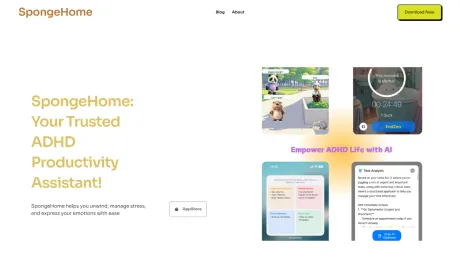
SpongeHome
Un outil utile alimenté par l'IA, conçu pour t'aider à retrouver le calme, la concentration et la joie dans ta vie quotidienne.
AI Collection Meilleurs choix

TheFluxTrain
Studio de production d'IA agentic pour des personnages, des flux de travail et des vidéos cohérents
Croissance personnelle et bien-être Choix de catégories

À propos de SpongeHome
SpongeHome t'aide à te détendre, à gérer ton stress et à exprimer tes émotions en toute simplicité Débordée par les tâches ? Notre gestionnaire à quatre quadrants alimenté par l'IA les décompose et se synchronise avec les rappels iOS. Tu as du mal à te concentrer ? Pomodoro, avec ses animaux de compagnie IA, te permet de rester sur la bonne voie. Besoin de réinitialiser ? La méditation semblable à un jeu et les sons apaisants apportent un calme instantané.
Ce que vous obtenez
Informations Complémentaires
SpongeHome is an innovative reading application tailored specifically for individuals with ADHD and those seeking to enhance their reading experience. By providing a distraction-free design alongside ambient sound environments, it helps users concentrate better and absorb information more effectively. The app transforms standard PDF documents into an engaging reading format, which helps to alleviate visual overwhelm.
The main features include built-in ambient sounds like white noise and brown noise, which help create an optimal reading atmosphere, encouraging users to enter a flow state. The Digital Reading Ruler serves as a visual anchor, reducing cognitive load and guiding the reader's eyes smoothly across the page.
SpongeHome is not limited to ADHD users; it is also beneficial for anyone who experiences digital eye strain or struggles with maintaining focus. It supports various file formats and aims to create a personalized reading environment that combines auditory and visual elements to improve concentration and retention.
With a commitment to privacy and user experience, SpongeHome ensures that your reading data remains secure on your device, allowing you to interact with the app without distractions. Whether for studying, reading textbooks, or exploring new knowledge, SpongeHome offers a tailored experience that addresses the needs of modern readers.
Foire aux questions
What is SpongeHome used for?
Un outil utile alimenté par l'IA, conçu pour t'aider à retrouver le calme, la concentration et la joie dans ta vie quotidienne.Is SpongeHome free?
Pricing for SpongeHome varies — see the Pricing section for details.What are alternatives to SpongeHome?
Top alternatives to SpongeHome include Podwise, Ask Poppy, RTutor, Kinestex, Ultimate Skill Extractor by Further.Where can I get SpongeHome?
SpongeHome is available at https://www.spongehome.com/.What category is SpongeHome in?
SpongeHome is listed in Croissance personnelle et bien-être.What is Spongehome exactly?
Spongehome (also known as Sponge Space) is a specialized reading environment designed for deep work and focus. Unlike standard PDF readers, we combine visual grounding tools (like the reading ruler) with auditory masking (ambient sounds) to help readers—especially those with ADHD—eliminate distractions and enter a flow state.Is Spongehome only for people with ADHD?
While Spongehome is built with the neurodivergent community in mind (ADHD, Dyslexia, etc.), it is a powerful tool for anyone suffering from digital eye strain, visual overwhelm, or a short attention span in today’s notification-heavy world.How does the 'Digital Reading Ruler' help me?
Many readers experience 'line skipping' or re-reading the same sentence multiple times. Our Digital Reading Ruler acts as a visual anchor, highlighting only the line you are reading while subtly shading the rest. This reduces cognitive load and helps your eyes move rhythmically across the page.Why does Spongehome use Brown Noise instead of White Noise?
Brown Noise has a lower frequency and a deeper, bass-like quality (similar to a distant rumble or a deep ocean). Research suggests that Brown Noise is often more effective for ADHD brains to mask erratic background sounds compared to the higher-pitched White Noise, providing a more 'grounded' sensory experience.Can I use Spongehome for my PDF textbooks?
Yes! Spongehome is an excellent distraction-free PDF reader. You can import your study materials, research papers, or eBooks and apply our focus filters and ambient sounds to make long-form reading less intimidating.What is 'Visual Overwhelm,' and how do you solve it?
Visual overwhelm occurs when a 'wall of text' feels paralyzing to the brain. Spongehome solves this by offering immersive backgrounds and customizable text masks that break down dense information into manageable, focus-friendly segments.Does Spongehome support Bionic Reading?
Currently, our MVP focuses on Immersive Backgrounds and the Reading Ruler. However, we are actively exploring layout enhancements like Bionic Reading and specialized fonts for dyslexia in our upcoming versions. Stay tuned!Is there a 'Study With Me' or 'Body Doubling' feature?
Spongehome is designed as a personal sanctuary. While we don't have live video, our immersive environments are built to provide a sense of 'Virtual Body Doubling' —creating a dedicated, ritualistic space that signals to your brain: 'It's time to focus.'Can I use the app offline?
Yes. We believe Digital Minimalism involves disconnecting from the web. You can use Spongehome's core reading tools and ambient sounds without an internet connection to ensure zero interruptions from notifications.How can Spongehome fit into my 'Dopamine Menu'?
A Dopamine Menu (or 'Dopamenu') is a list of healthy activities that provide the right amount of stimulation for ADHD brains. Spongehome fits into the 'Deep Work' or 'Calming' section of your menu, providing a high-reward reading experience without the crash of social media scrolling.What file formats are currently supported?
Currently, we support PDFs and Plain Text. We are working hard to bring EPUB and web-article syncing (Read-it-later) to the platform very soon.How is Spongehome different from apps like Speechify or GoodNotes?
While Speechify focuses on Audio/TTS and GoodNotes on Note-taking, Spongehome focuses exclusively on the Visual & Sensory environment of reading. We aren't just a tool; we are a 'Focus Space' that helps you stay on the page longer.Is the app available on iPad and iPhone?
Yes! You can find us on the Apple App Store. Our interface is optimized for both the portability of the iPhone and the expansive, immersive canvas of the iPad.How do I get started with a 'Flow State' session?
It’s simple: Import your document, pick a background sound (we recommend Deep Brown Noise), toggle the Reading Ruler to your preferred thickness, and set your focus timer. The world fades away; the words stay clear.Is my data private?
Absolutely. We take Privacy seriously. Your documents and reading habits stay on your device. We are here to help you read, not to track your data.How does the "Digital Reading Ruler" help me?
Many readers experience "line skipping" or re-reading the same sentence multiple times. Our Digital Reading Ruler acts as a visual anchor, highlighting only the line you are reading while subtly shading the rest. This reduces cognitive load and helps your eyes move rhythmically across the page.What is "Visual Overwhelm," and how do you solve it?
Visual overwhelm occurs when a "wall of text" feels paralyzing to the brain. Spongehome solves this by offering immersive backgrounds and customizable text masks that break down dense information into manageable, focus-friendly segments.Is there a "Study With Me" or "Body Doubling" feature?
Spongehome is designed as a personal sanctuary. While we don't have live video, our immersive environments are built to provide a sense of "Virtual Body Doubling" —creating a dedicated, ritualistic space that signals to your brain: "It's time to focus."How can Spongehome fit into my "Dopamine Menu"?
A Dopamine Menu (or "Dopamenu") is a list of healthy activities that provide the right amount of stimulation for ADHD brains. Spongehome fits into the "Deep Work" or "Calming" section of your menu, providing a high-reward reading experience without the crash of social media scrolling.How do I get started with a "Flow State" session?
It’s simple: Import your document, pick a background sound (we recommend Deep Brown Noise), toggle the Reading Ruler to your preferred thickness, and set your focus timer. The world fades away; the words stay clear.
Comparer SpongeHome avec…
Choisissez un outil pour voir une comparaison structurée côte à côte : tarifs, déploiement, capacités et politique de contenu.