- 类别
- 建筑与室内设计
- 替代品
- 6 个类似工具
- 最后更新
- 1 个月前
- 来源
- 官方网站 ↗︎
AI Collection 热门精选

建筑与室内设计 类别精选
关于 ArchiVinci AI
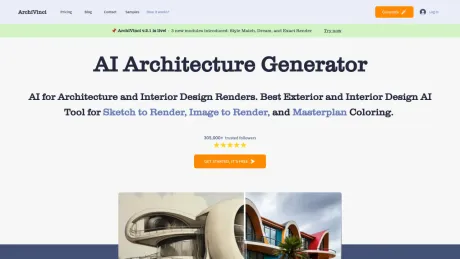
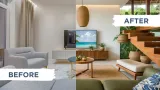
Archivinci 是一个由人工智能驱动的建筑设计平台,可快速精确地将草图、图像和 3D 模型的屏幕截图转换为超逼真的渲染。迎合建筑师、设计师、房地产专业人士、室内设计师和房主
常见问题
What is ArchiVinci AI used for?
ArchivInci AI 将原始草图、图像和 3D 模型转换为内部和外部空间的超逼真建筑效果图.Is ArchiVinci AI free?
Pricing for ArchiVinci AI varies — see the Pricing section for details.What are alternatives to ArchiVinci AI?
Top alternatives to ArchiVinci AI include Interior AI, Oda Studio, Deft, Image Computer, Dimensions.Where can I get ArchiVinci AI?
ArchiVinci AI is available at https://www.archivinci.com.What category is ArchiVinci AI in?
ArchiVinci AI is listed in 建筑与室内设计.What Is ArchiVinci AI Rendering Software And How Does The AI Render Engine Work?
A cloud-based tool that turns sketches, photos or CAD/3D screenshots into photorealistic renders by interpreting form, scale and perspective, then applying materials and lighting—within seconds.Why Choose ArchiVinci Over Other AI Rendering Tools?
Purpose-built for architecture: preserves design lines, reads spatial context, and includes modules like Exact Render, Style Transfer, Interior/Exterior, and ArchiGPT; 4K/8K and HDRI support in the browser.How Does ArchiVinci Compare To Traditional Rendering Engines?
Works directly from images with minimal setup and fast results—ideal for concept and client visuals—while tools like V-Ray/Corona remain for full production pipelines.What Are The Key Benefits Of Using ArchiVinci AI Rendering Software?
• Seconds instead of hours • Works with sketches/photos/CAD screenshots • 4K–8K realism • Instant style variations • 100% browser-based • Pro results for architects/designers/real estate.What Devices Can Run ArchiVinci?
Runs in modern browsers on desktop, laptop, tablet and phone (Windows, macOS, iOS/iPadOS, Android). No GPU required.How Secure Is My Data With ArchiVinci?
Uploads and renders are processed securely; personal data stays private in your account.What Is The Difference Between Free And Paid Plans?
Free tier limits resolution and render count; paid plans unlock higher resolution, faster processing, premium modules and commercial rights.What Pricing Plans Are Available?
3-day, monthly, 3-month, 6-month and annual subscriptions; annual includes discounts/bonus credits. Coin add-ons available for video/ArchiGPT.What Can I Create With ArchiVinci?
Interiors, exteriors, landscapes, masterplans, real-estate visuals, moodboards and furnishing layouts from simple images.Can I Use Freehand Sketches, CAD Files, Or Screenshots?
Yes—export or screenshot as images; ArchiVinci preserves lines and proportions while rendering.What Level Of Realism Can I Expect?
Photoreal results with accurate lighting/materials; presentation-ready for clients and portfolios.Can ArchiVinci Generate 4K Or 8K Renders?
Yes—supports 4K–8K and formats like PNG, JPG, AVIF and EXR.How Fast Is ArchiVinci Compared To Manual Rendering?
Seconds to minutes vs. hours or days with manual engines.Can I Edit Or Enhance Renders After Generation?
Yes—use Render Enhancer (Upscaler), Image Editor, Modify Room/Architecture and Variation tools.Who Owns The Rights To Renders?
You do. Paid plans include commercial usage rights.Is ArchiVinci Suitable For Beginners And Students?
Yes—no technical setup needed; beginners and students can achieve pro results easily.Does ArchiVinci Work With SketchUp, 3Ds Max, Or Revit?
Indirectly—export/screenshot from those tools and upload the image to render.What is ArchiVinci?
ArchiVinci is an AI-powered architectural visualization platform that transforms sketches, floor plans, elevations, facades, CAD drawings, site plans, photos, and 3D model screenshots into high-quality architectural renders.How does ArchiVinci AI rendering work?
Upload a sketch, photo, plan, elevation, facade, site plan, or model screenshot, choose the module that matches your workflow, set your render needs, and generate. ArchiVinci analyzes the input image and creates a realistic architectural visual based on your settings.Who is ArchiVinci for?
ArchiVinci is built for architects, interior designers, design studios, urban planners, landscape designers, real estate professionals, developers, students, and homeowners who need faster architectural visualization.Do I need a 3D model to use ArchiVinci?
No. ArchiVinci works with image-based inputs such as sketches, photos, CAD exports, floor plans, elevations, facades, site plans, and screenshots from tools like SketchUp, Revit, Rhino, Blender, 3ds Max, AutoCAD, or Archicad.Is ArchiVinci an AI render tool or an AI architecture generator?
It works as both. You can use ArchiVinci to turn an existing design into a photorealistic render or to explore new materials, lighting, styles, facade options, interior directions, and concept variations.How is ArchiVinci different from Midjourney or DALL·E?
General AI image tools are useful for inspiration, but they can change proportions or ignore spatial logic. ArchiVinci is designed for architectural workflows and focuses on preserving structure, layout, massing, openings, materials, and design intent.Does ArchiVinci preserve geometry, textures, and materials?
ArchiVinci is designed to preserve the main geometry, layout, material logic, textures, and visible design details of the input. For stronger source consistency, users can choose workflows such as Precise Visualizer.Is there a free AI architecture render generator?
Yes. ArchiVinci offers 3 free renders so users can test AI rendering with a real sketch, floor plan, elevation, facade drawing, site plan, project photo, or model screenshot before choosing a paid plan.Can I use the 3 free trial renders commercially?
Yes. The 3 free trial renders are delivered as watermark-free outputs and can be used across professional design and visualization workflows, including client work, real estate marketing, and commercial projects.
将 ArchiVinci AI 与其他工具比较…
选择任意工具,查看结构化的并排对比:定价、部署、功能和内容政策。