ChatPlayground review: every major AI model in one window, with a catch
By: AI Collection
At a glance
3.0 / 5
ChatPlaygroun AI
Paid
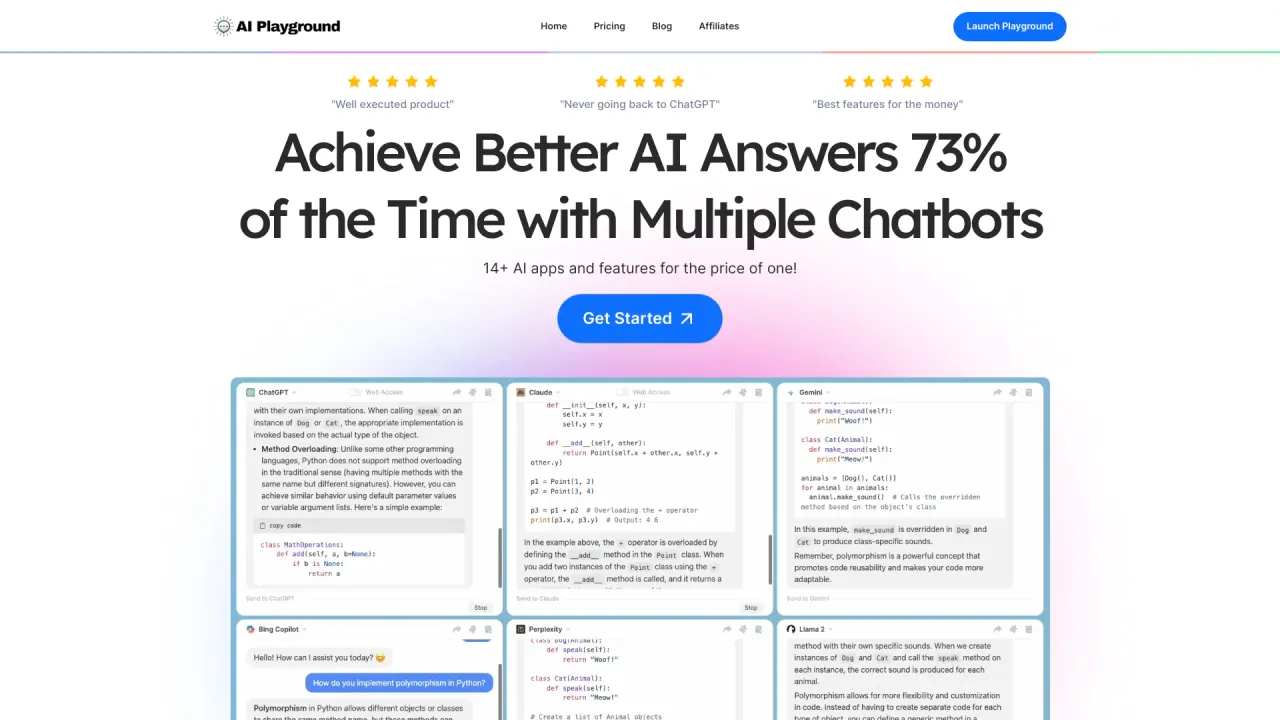
If you have ever asked ChatGPT a question, pasted the same thing into Claude to double-check, then opened Gemini for a third opinion, ChatPlayground is built around that exact habit. Instead of juggling tabs and retyping the prompt, you write it once and several models answer at the same time, lined up next to each other so you can pick the response that actually holds up.
What it actually does
ChatPlayground is a multi-model chat interface. The core idea is comparison: one prompt goes out to several large language models in parallel, and you read the replies side by side in a single window. The platform advertises access to more than 30 models and lets you run up to six at once on its top plan, including ChatGPT, Claude, Gemini, Grok, Perplexity, DeepSeek and Llama.
That is the whole pitch, and it is a reasonable one. Each model has its own temperament, and anyone who uses them seriously already knows that the "best" answer depends on the task. ChatPlayground turns that comparison from a manual chore into a default step.
Where the side-by-side view earns its keep
The company frames the benefit in a few plain terms, and they map well onto real work. Speed is the obvious one: a single input reaches every selected model in parallel, so you stop running the same prompt four times. For writing, you can request several rewrites at once and compare tone, structure and clarity before committing to a draft. For anything factual, disagreement between models is itself useful signal — when two assistants contradict each other, that is a flag to verify before you act, not a coin toss to resolve blindly.
Beyond the comparison grid, the feature set covers the things you would expect from a daily driver. You can upload PDFs or images to give a model context, generate AI images without leaving the tool, save conversations for ongoing work, and pull from a library of a couple hundred ready-made prompts. There is also a mobile app, searchable chat history, and a one-click option that summarizes several models' answers into one.
None of these are unique on their own. The argument for ChatPlayground is that it collects them behind one login and one bill.
What it costs
Pricing starts at $20 a month (about $15 a month billed yearly) for the Pro plan, which compares up to four models side by side with monthly query caps; the Unlimited plan, at $39 a month (about $25 billed yearly), lifts the query caps and compares up to six models at once. The marketing leans hard on the cost comparison: you are paying about what a single premium assistant subscription costs, but getting several of them in one place. For people who were genuinely paying for two or three separate AI subscriptions, that math is real.
ChatPlayground has also run lifetime deals on AppSumo, starting around $59 for a single seat capped at a few hundred queries a month. The lifetime framing is where I would slow down, for reasons in the next section.
The part buyers should weigh carefully
The product concept is sound, but the vendor's track record is the weak spot, and it is worth being direct about it. On Trustpilot the company sits at roughly 2.2 out of 5 across a small number of reviews, and its AppSumo listing averages about 3.7 from a larger pool — but the recent AppSumo and Trustpilot reviews cluster around the same complaints. Several buyers of the lifetime deal say the terms were effectively walked back less than a year after purchase. Others report being locked out of accounts and waiting a long time, sometimes with no reply, on support tickets.
Mixed reviews are normal for a small AI startup, and a few angry posts do not condemn a product. But the pattern here is specific: it is about honoring what was sold and answering customers, not about whether the comparison feature works. That matters more for a lifetime purchase than a monthly one. If ChatPlayground fits your workflow, the lower-risk way in is a monthly plan you can cancel, not a one-time payment that depends on the company's long-term goodwill.
One smaller note: the testimonials on the homepage are, as always, self-selected marketing. Treat them as evidence the tool has happy users, not as a balanced sample.
Overall I would put this at 3 out of 5 — a genuinely useful idea and a capable interface, held back by real questions about support and whether long-term commitments get honored.
Who it is for
ChatPlayground makes the most sense if you already cross-check AI answers as part of your routine: writers comparing drafts, researchers sanity-checking facts, or anyone who has quietly accumulated two or three model subscriptions and wants to consolidate. The side-by-side habit genuinely saves time once it becomes normal.
It is a weaker fit if you depend on one model's deeper, native features, if you need API access and heavy automation, or if dependable support and account stability are non-negotiable for you. For those cases, go in month to month and keep your expectations grounded in the reviews above.
Sources consulted
- ChatPlayground homepage — product positioning, model list, feature framing (speed, rewrites, cost)
- Run multiple AI models at once with ChatPlayground AI (Yahoo Tech) — model count, up-to-six comparison, PDF/image upload and Chrome extension
- ChatPlayground AI lifetime subscription (StackSocial) — lifetime/AppSumo deal structure and query caps
- ChatPlayground AI reviews (AppSumo) — verified-user rating and recurring support and lifetime-deal complaints
- ChatPlayground reviews (Trustpilot) — TrustScore and negative-review themes
- ChatPlayground AI review (daveswift.com) — independent multi-model walkthrough and pricing context
Published on: October 4, 2026
在寻找 ChatPlaygroun AI 的替代品? 查看所有 ChatPlaygroun AI 替代品 →
Have an AI tool of your own? Submit it below and get a free, in-depth product review article — just like this one.
几秒钟添加您的 AI 工具
粘贴 URL,我们将起草列表。提交前您可以审阅并编辑每一个字段。