Cleanvoice AI
Deshágase de las palabras de relleno de sus grabaciones de audio.
AI Collection Mejores opciones

TheFluxTrain
Estudio de producción de IA de Agentic para personajes, flujos de trabajo y vídeos coherentes
Potenciador de audio y eliminación de voz Selecciones de categoría


Potenciador de audio: potenciador de audio con IA para músicos, podcasts, entrevistas y más.
Acerca de Cleanvoice AI
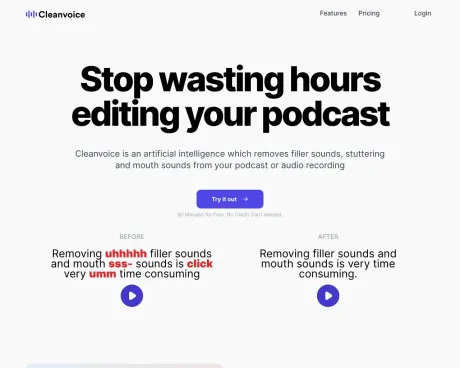
Cleanvoice es una inteligencia artificial que elimina los sonidos de relleno, la tartamudez y los sonidos de la boca de tu podcast o grabación de audio.
Lo que obtienes
información adicional
Cleanvoice AI is an audio and video editing tool designed specifically for podcasters, media agencies, and content creators. It leverages artificial intelligence to automate the editing process, enabling users to clean their audio by removing background noise, filler words, long silences, and mouth sounds quickly and efficiently. Users can simply drag and drop their audio or video files and let the AI handle the rest, saving significant editing time.
The platform also offers features like multitrack editing for users with multiple guest tracks, podcast transcription, automatic summaries, and content generation for social media. With compliance to GDPR and ISO 27001 certification, Cleanvoice ensures data privacy and safety. Additionally, it allows for customization in editing, enabling users to select specific edits they want to apply.
Cleanvoice is not just for individual podcasters but also useful for businesses and audio engineers looking for a scalable solution. The tool supports nearly all audio and video formats, facilitating batch uploads for those managing multiple episodes or projects. It provides a simple interface that is user-friendly even for novices, removing the need for extensive editing experience.
In short, Cleanvoice AI provides a comprehensive solution for audio and video editing, combining various functionalities into one easy-to-use platform that aims to enhance the quality of audio content while minimizing the time spent on editing.
Preguntas frecuentes
What is Cleanvoice AI used for?
Deshágase de las palabras de relleno de sus grabaciones de audio.Is Cleanvoice AI free?
Pricing for Cleanvoice AI varies — see the Pricing section for details.What are alternatives to Cleanvoice AI?
Top alternatives to Cleanvoice AI include Audio Enhancer, Adobe Speech Enhancer, Adobe Mic Check, Krisp, Assemblyai.Where can I get Cleanvoice AI?
Cleanvoice AI is available at http://cleanvoice.ai.What category is Cleanvoice AI in?
Cleanvoice AI is listed in Potenciador de audio y eliminación de voz.Who can use Cleanvoice?
Whether you are a podcaster, media agency, business, audio engineer, or video editor, you can use Cleanvoice's podcast editor.Can I try Cleanvoice for free?
Yes, you can upload audio or video and try editing it for free.Do you provide any free credits initially?
Yes. You get an additional 30 minutes of free credits once you sign up.What formats do you support?
We support (almost) all audio and video formats. Including .wav, .mp3, .m4a, .flac, .mp4, and more.Can I upload batch files?
Yes, we support batch uploading. You can upload more than one podcast episode simultaneously.Does Cleanvoice also edit a voiceover?
Yes, our podcast editor also cleans your voiceover file.What type of noise can you remove?
Our video and audio editor removes heavy background noise, wind noise, ambient noise, static and mic noise, buzz sounds, hiss, hum, puffs, and more.Can your audio editor improve the quality of my recording?
Yes, Cleanvoice’s audio enhancer sets up your tone, balances your voice level, removes echo, distortion, and more. And gives you a studio-quality sound.Can I choose what edits I want to apply?
Yes. If you don’t want to apply all features or want only certain features to work, you can choose from a pre-made template or create a custom template.What if I want to change the edits?
You can use Cleanvoice for rough cuts or edits as well. Once we clean your files, you can choose to export your results.Can I mute edits instead of removing them?
Yes, you can.Do I need to transcribe my audio or video first and then edit it based on the transcription?
No, Cleanvoice doesn’t work based on the transcript-to-edit flow. You only need to upload your files and we will transcribe video or audio automatically.What can I use Cleanvoice API for?
You can automate audio editing, video editing, audio enhancement or speech enhancement, and transcribing and summarizing your recording.Is there any usage limit to Cleanvoice API?
No, you can use Cleanvoice API without worrying about any hours-limit.How long do you save my files?
We store both your original and edited files for 7 days. After 7 days, we remove your files permanently.Are the prices with VAT included?
Sales tax or VAT may be charged, depending on where you live. Companies from Europe can use their VAT ID (UID number) to purchase without VAT.Should I get Pay-as-you-go credits or a subscription?
For one-off podcast and audio needs, pay as you go credits are a great option. For larger or ongoing audio (Ex. weekly episodes) needs, you'll save on every episode that you process with a subscription.What happens if I don't use all my subscription credits each month?
If at the end of the month you have not used all of your subscription credits, the remaining credits roll over to the next month—so you can still use them. You can roll over up to 3 × your monthly credit budget.How do you bill credits?
Billing is based on the duration of the audio files, the minimum processing time for billing is 1min. We round credit upwards.I have purchased both Subscription and Pay as you Go Credits. Which will be used first?
The subscription credit will be consumed first. If you have no more subscription credits left (or not enough to cover the current upload), we will then consume the pay as you go credits.Can I cancel/upgrade/downgrade my subscription?
Yes, you can cancel, upgrade or downgrade your subscription any time.
Comparar Cleanvoice AI con…
Elige cualquier herramienta para ver una comparación estructurada lado a lado: precios, implementación, capacidades y política de contenido.