PhotoGenerator — Generador de Fotos con IA
By: Sophie
At a glance
4.0 / 5
PhotoGenerator
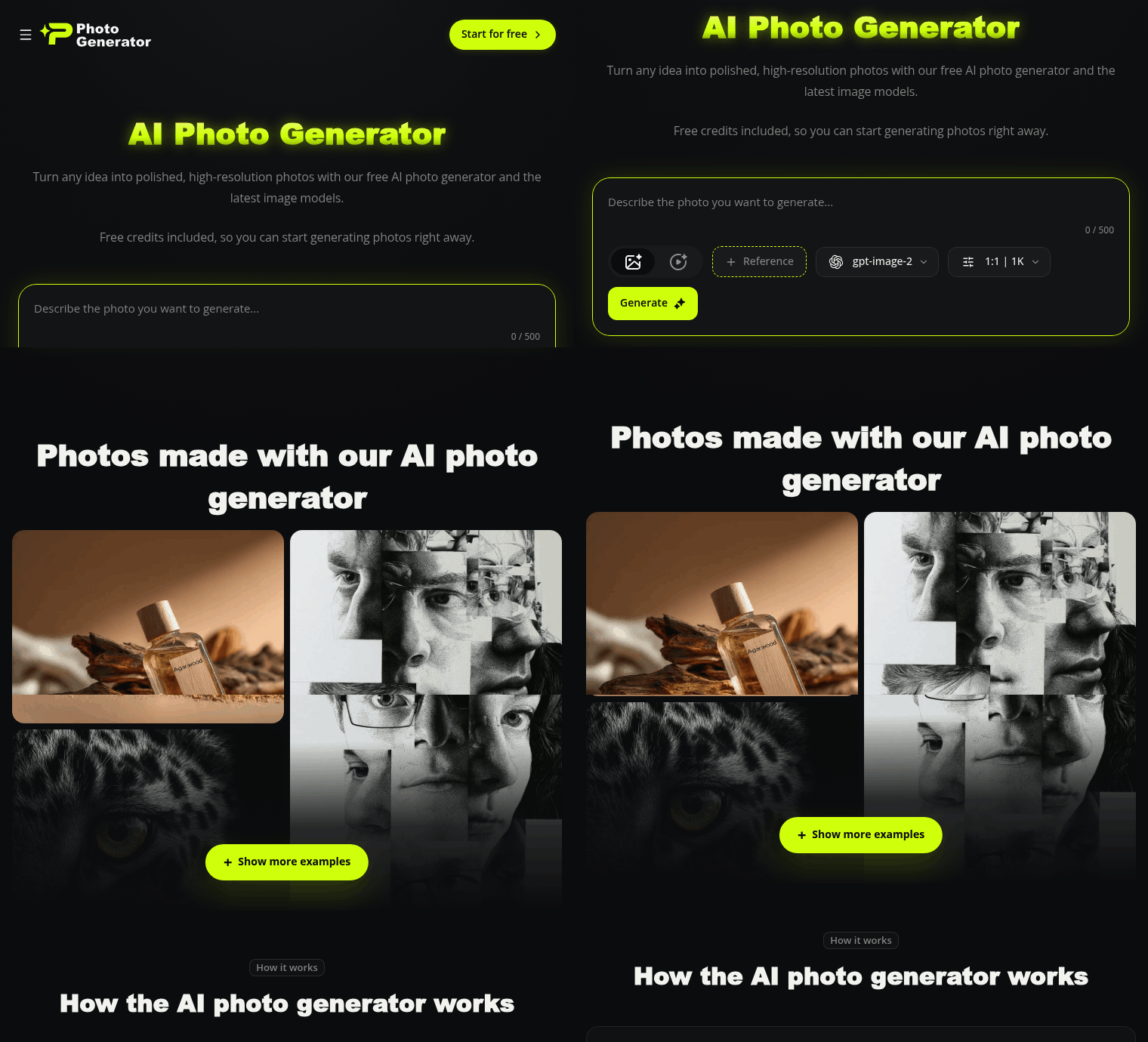
FreePhotoGenerator es una herramienta de imágenes con IA basada en navegador que transforma indicaciones de texto o fotos cargadas en imágenes de alta resolución y editables. Combina generación y edición de fotos: crea retratos realistas y fotos de producto a partir de indicaciones, retoca y rediseña tus propias imágenes, y amplía la salida a 4K para impresión o web.
Qué es
PhotoGenerator funciona en tu navegador (escritorio y móvil) y admite flujos de trabajo de texto a imagen e imagen a imagen. Puedes describir una foto, cargar una imagen para editarla, luego elegir un modelo y estilo para generar y descargar un resultado. El sitio incluye un ampliador de escala dedicado que agranda imágenes hasta 4K e intenta reconstruir detalles en lugar de simplemente estirar los píxeles.
Características principales
Múltiples modelos de imagen modernos: GPT Image 2 para resultados fieles al texto, Nano Banana 2 para ediciones, Midjourney para estilización artística y Seedream 5.0 para salida ultrafotorrealista.
Generación de texto a imagen para retratos, fotos de producto, arte conceptual y tomas temáticas a partir de una sola indicación.
Edición de imagen a imagen y basada en indicaciones: carga una foto para rediseñar, retocar, cambiar fondos o rostros y rehacer el original usando lenguaje natural.
Ampliación de escala a 4K: un ampliador de escala con IA que mejora los detalles y reduce el ruido para impresiones y salidas de mayor resolución.
Experiencia centrada en el navegador: no se requiere descarga de aplicación, disponible en 18 idiomas, más créditos gratuitos para comenzar.
Precios
PhotoGenerator ofrece una opción gratuita para empezar con créditos iniciales para que puedas probar la generación sin tarjeta de crédito. Los planes de pago (Plus y Profesional) aumentan los créditos anuales, amplían los límites de imágenes y videos, y añaden funciones como generación privada, uso sin anuncios y almacenamiento ilimitado. El sitio muestra una opción Plus facturada anualmente (ejemplo: $100/año indicado) y un plan Profesional con más créditos y límites; se ofrecen opciones de facturación anual y mensual. Dado que los planes enumeran límites específicos de créditos e imágenes/videos, revisa la página del plan publicado para encontrar el plan que se adapte a tu uso esperado.
Para quién es
Creadores y equipos pequeños que necesitan imágenes pulidas y rápidas para portafolios, fotos de producto, retratos o materiales promocionales.
Personas que quieren generación y edición en una sola herramienta de navegador — desde imágenes conceptuales hasta originales rediseñados.
Usuarios que quieren acceso a múltiples estilos de modelo (preciso con texto, editorial, fotorrealista y artístico) sin instalar varias herramientas.
Aspectos destacados
Múltiples modelos de imagen actualizados para diferentes objetivos visuales.
Flujo de trabajo basado en navegador con un nivel gratuito para comenzar y generación instantánea — no se requieren descargas.
Edición de imágenes basada en indicaciones más un ampliador de escala a 4K para salida de mayor resolución.
Mensajería compatible con uso comercial: las fotos generadas se presentan como utilizables para proyectos personales y comerciales.
Ideal para: creadores y equipos que necesitan creación y edición de fotos flexible basada en navegador con opciones para resultados tanto artísticos como fotorrealistas.
Consideraciones
El nivel gratuito es suficiente para las pruebas, pero una mayor resolución, modelos adicionales y una generación más rápida requieren planes de pago.
Los precios y las dotaciones de créditos varían entre los planes Plus y Profesional e incluyen límites de imágenes/videos — consulta la página del plan para que los créditos y las funciones se adapten a tus necesidades.
Obtener una imagen pulida generalmente requiere iterar las indicaciones; planifica refinar las indicaciones y probar diferentes modelos para conseguir el aspecto que deseas.
FAQ
¿Es PhotoGenerator gratuito?
Sí. PhotoGenerator ofrece un nivel gratuito para comenzar con créditos iniciales para que puedas generar fotos sin tarjeta de crédito. Registrarte y actualizar desbloquea mayor resolución, modelos adicionales y generación más rápida.
¿Qué modelos de IA puedo elegir?
Puedes elegir entre GPT Image 2, Nano Banana 2, Midjourney y Seedream 5.0, según si deseas salida precisa con texto, ediciones fieles, estilización artística o detalle fotorrealista.
¿Puedo editar mis propias fotos con indicaciones?
Sí. Carga una foto y usa una indicación de texto para rediseñar, retocar, eliminar fondos o hacer otras ediciones. Nano Banana 2 se destaca por mantener las ediciones fieles a la imagen original.
¿Puedo usar las imágenes generadas comercialmente?
La página del producto indica que las fotos generadas están disponibles para uso personal y comercial; revisa los términos de servicio de PhotoGenerator para conocer restricciones específicas.
Published on: July 18, 2026
¿Buscas alternativas a PhotoGenerator? Ver todas las alternativas a PhotoGenerator →
Have an AI tool of your own? Submit it below and get a free, in-depth product review article — just like this one.
Añade tu herramienta de IA en segundos
Pega tu URL y prepararemos el borrador. Tú revisas y editas cada campo antes de enviarlo.