
Image Text Editor
इमेज और फोटो टेक्स्ट एडिटर — इमेज के लिए एआई-संचालित टेक्स्ट रिप्लेसमेंट.
- श्रेणी
- इमेज एडिटिंग
- विकल्प
- 6 समान उपकरण
- अंतिम अपडेट
- 2 सप्ताह पहले
- स्रोत
- आधिकारिक साइट ↗︎
AI Collection ऊपर उठाता है

इमेज एडिटिंग श्रेणी चयन



ProductScope AI ईकॉमर्स ब्रांड्स और मार्केटर्स के लिए दो ज़रूरी टूल प्रदान करता है: एक AI प्रॉडक्ट फ़ोटोशूट टूल और एक लिस्टिंग ऑप्टिमाइज़र।
Image Text Editor के बारे में
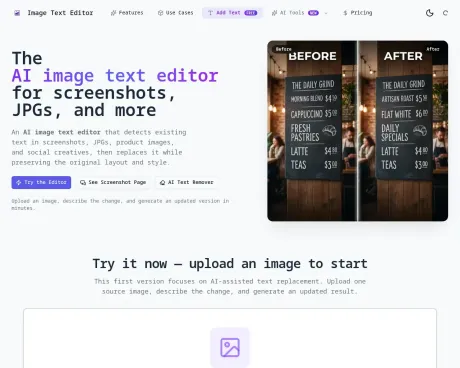
AI इमेज और फ़ोटो टेक्स्ट एडिटर, जो मूल लेआउट और स्टाइल को सुरक्षित रखते हुए स्क्रीनशॉट, JPG, पोस्टर और प्रॉडक्ट इमेज में टेक्स्ट का पता लगाता है और उसे बदल देता है।
आपको क्या मिलता है
अतिरिक्त जानकारी
PicText is an advanced AI-powered image text editor designed for seamless text replacement in images, screenshots, JPGs, banners, and other visual assets. The tool intelligently identifies and edits text, preserving layouts, styles, and fonts, making it ideal for marketers, designers, and content creators who need flexibility and efficiency in their workflows.
The editing process is simple and intuitive. Users begin by uploading their source image, after which they can describe the changes required. The system utilizes advanced AI algorithms to return a revised image that retains the original composition. Users can choose between Standard mode for basic edits and Pro mode for more complex adjustments requiring finer control over the affected areas.
PicText caters to a wide range of use cases, from modifying app screenshots to adjusting text on e-commerce product images. It boasts features such as same-font matching for consistent design aesthetics, as well as the capability to handle varying text complexities within images. Whether for social media, restaurant menus, or product labels, PicText provides tailored solutions that enhance editing precision.
With a flexible usage-based pricing model, users can purchase credits to edit images as needed, ensuring cost-effective management of resources. Included credit packs allow for a trial option and scalable usage according to individual editing requirements.
अक्सर पूछे जाने वाले प्रश्न
What is Image Text Editor used for?
इमेज और फोटो टेक्स्ट एडिटर — इमेज के लिए एआई-संचालित टेक्स्ट रिप्लेसमेंट.Is Image Text Editor free?
Pricing for Image Text Editor varies — see the Pricing section for details.What are alternatives to Image Text Editor?
Top alternatives to Image Text Editor include ProductScope AI, PicTools.AI, AI Photos Editor, AVCLabs PhotoPro AI, Fotor.Where can I get Image Text Editor?
Image Text Editor is available at https://imagetexteditor.net/.What category is Image Text Editor in?
Image Text Editor is listed in इमेज एडिटिंग.Is this a manual canvas editor?
No. The first release is an AI-assisted image text editor. You upload a source image, describe the text change, and generate a revised image.Can it edit screenshots as well as photos?
Yes. The homepage covers both image text editor and screenshot text editor intent, and there is a dedicated screenshot page for that use case.Can it keep the same font?
It tries to match the original font style, size, weight, color, and alignment as closely as possible. For the best results, use the same-font preset and provide the original text when you know it.Do I need to sign in to use it?
You can browse the pages and interact with the uploader publicly. Sign-in is required when you generate an edited image.What is Pro mode?
Pro mode lets you draw a bounding box around a specific text area, type the replacement text, and let AI (Ideogram v3 Turbo) redraw just that region. It's ideal for product images, banners, and creatives where precise regional control matters.How much does Pro mode cost?
Each Pro generation costs 2 credits. Standard mode costs 1 credit per edit. You can purchase credit packs on the Pricing page.
Image Text Editor की तुलना करें…
किसी भी टूल को चुनें और संरचित तुलना देखें: मूल्य, परिनियोजन, क्षमताएँ और कंटेंट नीति।








