Anyvids AI समीक्षा 2026: मूल्य, विशेषताएं, फायदे और नुकसान, और विकल्प
By: Daniel
Anyvids AI समीक्षा 2026: मूल्य, विशेषताएं, फायदे और नुकसान, और विकल्प
समग्र रेटिंग: 8.4/10
सबसे उपयुक्त: ई-कॉमर्स ब्रांड, परफॉर्मेंस मार्केटर्स, कंटेंट क्रिएटर्स, एजेंसियां, और वे उपयोगकर्ता जो नियमित रूप से कई AI इमेज और वीडियो जनरेटर के बीच स्विच करते हैं।
विशिष्ट विशेषता: एक मल्टी-मॉडल इमेज और वीडियो प्लेटफॉर्म पर बनाए गए कॉमर्स-केंद्रित AI वर्कफ्लो।
मुख्य कमी: मॉडलों और टूल्स की बढ़ती संख्या सीखने की अवस्था बनाती है, विशेष रूप से उन उपयोगकर्ताओं के लिए जो केवल एक प्रकार का कंटेंट जनरेट करना चाहते हैं।
समीक्षा पद्धति: यह संपादकीय समीक्षा 7 सितंबर 2026 तक Anyvids की सार्वजनिक रूप से उपलब्ध उत्पाद, विशेषता और मूल्य निर्धारण जानकारी पर आधारित है। यह प्लेटफॉर्म की उत्पाद पेशकश, वर्कफ्लो, मूल्य निर्धारण संरचना और प्रतिस्पर्धी स्थिति का मूल्यांकन करती है। इसे इमेज या वीडियो गुणवत्ता के नियंत्रित बेंचमार्क के रूप में नहीं समझा जाना चाहिए।
त्वरित निर्णय: क्या Anyvids AI इसके लायक है?
Anyvids AI को गलत समझना आसान है।
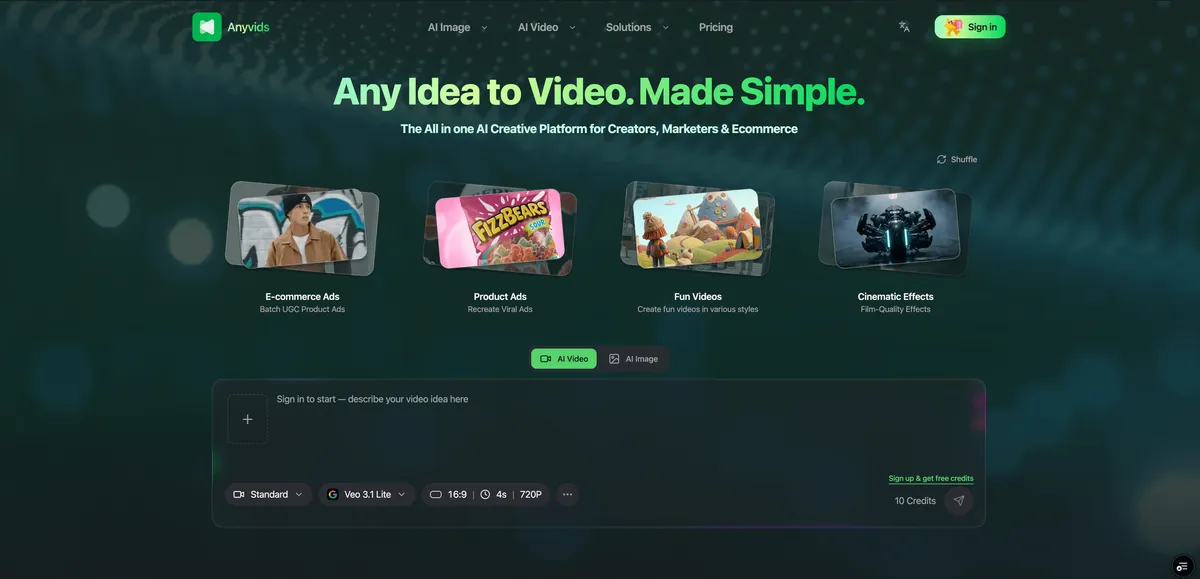
पहली नजर में, यह एक और ऑल-इन-वन AI इमेज और वीडियो जनरेटर जैसा लगता है — Kling, Seedance, Veo, Wan, GPT Image, Flux और Seedream जैसे मॉडलों तक पहुंचने के लिए एक जगह।
यह उपयोगी है, लेकिन अब असामान्य नहीं है।
Freepik और Pollo AI जैसे प्लेटफॉर्म भी कई जनरेटिव मॉडलों तक पहुंच प्रदान करते हैं, जबकि Runway व्यक्तिगत वीडियो मॉडलों से परे अधिक जटिल क्रिएटिव वर्कफ्लो में विस्तारित हो गया है।
Anyvids का उपयोग करने का अधिक आश्वस्त करने वाला कारण यह है कि यह उन मॉडलों के ऊपर क्या बनाता है।
इसका Commerce StudioCommerce Studio सामान्य-उद्देश्य AI जनरेशन को वर्चुअल ट्राई-ऑन, प्रोडक्ट फोटोग्राफी, प्रोडक्ट वीडियो, रिलाइटिंग, विज्ञापन और कमर्शियल विजुअल्स के लिए वर्कफ्लो में बदल देता है। ई-कॉमर्स विक्रेता को यह तय करने के बजाय कि कौन से मॉडल और प्रॉम्प्ट संयोजन का उपयोग करना है, Anyvids तेजी से उस वास्तविक कार्य से शुरू होता है जिसे वे पूरा करना चाहते हैं।
यह Anyvids को उन लोगों के लिए सबसे आकर्षक बनाता है जो केवल AI मॉडलों के साथ प्रयोग नहीं करना चाहते, बल्कि बार-बार उपयोग योग्य क्रिएटिव एसेट बनाने की जरूरत है।
यह हर AI क्रिएटर के लिए जरूरी सबसे अच्छा विकल्प नहीं है। गहरे प्रोडक्शन नियंत्रण चाहने वाले फिल्म निर्माता अभी भी Runway को अधिक आकर्षक पा सकते हैं, जबकि विशेष रूप से Kling के प्रति प्रतिबद्ध उपयोगकर्ता Kling के अपने इंटरफेस को पसंद कर सकते हैं।
लेकिन ई-कॉमर्स, मार्केटिंग और मल्टी-फॉर्मेट विजुअल प्रोडक्शन के लिए, Anyvids का अस्तित्व का एक बुनियादी मॉडल एग्रीगेटर से अधिक स्पष्ट कारण है।
Anyvids AI क्या है?
Anyvids एक AI इमेज और वीडियो क्रिएशन प्लेटफॉर्म है जो कई जनरेटिव मॉडलों को विशेष विजुअल-प्रोडक्शन टूल्स के साथ जोड़ता है।
इसकी वर्तमान मॉडल डायरेक्टरी में GPT Image 2, Nano Banana 2, Flux 2, Seedream 5.0, Seedance 2.5, MiniMax H3, Kling 3.0, Veo 3.1, Wan 3.0 और अन्य मॉडल शामिल हैं।
प्लेटफॉर्म को व्यापक रूप से तीन परतों के रूप में समझा जा सकता है:
1. मल्टी-मॉडल एक्सेस
उपयोगकर्ता प्रत्येक प्रदाता के लिए एक पूरी तरह से अलग वर्कफ्लो बनाए रखे बिना विभिन्न AI मॉडलों का उपयोग करके इमेज और वीडियो जनरेट कर सकते हैं।
2. सामान्य क्रिएटिव टूल्स
Anyvids इमेज जनरेशन, वीडियो जनरेशन, एडिटिंग, इफेक्ट्स और अन्य सामान्य जनरेटिव-मीडिया फंक्शन प्रदान करता है।
3. टास्क-विशिष्ट वर्कफ्लो
यहीं प्लेटफॉर्म अधिक रोचक बनता है।
Commerce Studio में AI प्रोडक्ट फोटोग्राफी, प्रोडक्ट वीडियो, वर्चुअल ट्राई-ऑन फोटो और वीडियो, AI रिलाइटिंग और कमर्शियल पोस्टर के लिए टूल्स शामिल हैं। मार्केटिंग-उन्मुख टूल्स प्लेटफॉर्म को एड जनरेशन, अवतार, पात्र, मोशन कंट्रोल और संबंधित क्रिएटिव वर्कफ्लो में विस्तारित करते हैं।
परिणाम एक पारंपरिक सिंगल-मॉडल जनरेटर की बजाय AI विजुअल प्रोडक्शन वर्कस्पेस के अधिक करीब है।
Anyvids की प्रमुख विशेषताएं
1. मल्टी-मॉडल AI वीडियो जनरेशन
Anyvids का उपयोग करने का सबसे सरल कारणों में से एक एक उत्पाद के भीतर कई वीडियो-जनरेशन मॉडलों तक पहुंच है।
यह महत्वपूर्ण है क्योंकि अभी भी कोई एकल AI वीडियो मॉडल नहीं है जो हर कार्य के लिए वस्तुनिष्ठ रूप से सर्वश्रेष्ठ हो।
एक क्रिएटर सिनेमैटिक कैमरा मूवमेंट के लिए एक मॉडल, कैरेक्टर कंसिस्टेंसी के लिए दूसरा, इमेज-टू-वीडियो काम के लिए तीसरा और तेज कॉन्सेप्ट इटरेशन के लिए चौथा पसंद कर सकता है।
इसलिए Anyvids का फायदा यह नहीं है कि यह Kling, Seedance या Veo को रिप्लेस करता है।
यह संभावित रूप से उन सभी का उपयोग करने में शामिल घर्षण को कम करता है।
यह एक महत्वपूर्ण अंतर है।
केवल Kling के साथ बनाने वाले किसी व्यक्ति के लिए, नेटिव Kling प्लेटफॉर्म एक अधिक तार्किक खरीद हो सकती है। Kling 3.0 अब नेटिव ऑडियो, मल्टी-शॉट जनरेशन, रेफरेंस-आधारित कंसिस्टेंसी और 15 सेकंड तक के आउटपुट की अवधि जैसी विशेषताओं का समर्थन करता है।
लेकिन जो क्रिएटर्स नियमित रूप से मॉडलों के बीच स्विच करते हैं, वे उसी वातावरण में अधिक प्रयोग होते देखना पसंद कर सकते हैं।
यह क्यों मायने रखता है
AI वीडियो बाजार असामान्य रूप से तेजी से बदलता है।
किसी प्लेटफॉर्म को केवल इसलिए चुनना क्योंकि आज उसके पास सबसे मजबूत मॉडल है, इस जोखिम को पैदा करता है कि अगले महीने आपके उपयोग के मामले के लिए एक और मॉडल बेहतर हो जाए।
एक मल्टी-मॉडल सेवा एक अलग दांव लगाती है: कि एक्सेस और वर्कफ्लो लचीलापन एक मॉडल के प्रति वफादारी से अधिक टिकाऊ होगा।
कई पेशेवर उपयोगकर्ताओं के लिए, यह एक उचित प्रस्ताव है।
2. Commerce Studio
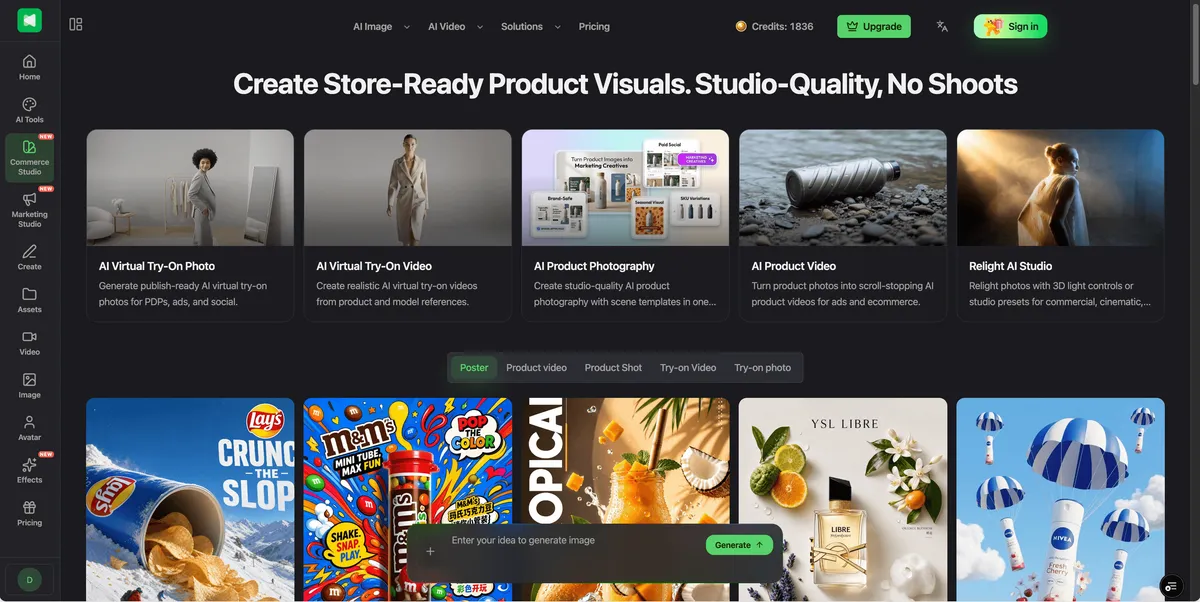
Commerce StudioCommerce Studio संभवतः Anyvids के उत्पाद स्थिति का सबसे मजबूत हिस्सा है।
AI तकनीक के आसपास सब कुछ व्यवस्थित करने के बजाय, यह ई-कॉमर्स डिलिवरेबल्स के आसपास टूल्स व्यवस्थित करता है।
वर्तमान सूट में शामिल है:
- AI प्रोडक्ट वीडियो
- AI वर्चुअल ट्राई-ऑन वीडियो
- AI वर्चुअल ट्राई-ऑन फोटो
- AI प्रोडक्ट फोटोग्राफी
- Relight AI Studio
- कमर्शियल पोस्टर
- AI एड जनरेटर
यह एक मामूली UI अंतर जैसा लगता है, लेकिन यह रणनीतिक रूप से महत्वपूर्ण है।
अधिकांश ई-कॉमर्स टीमें "AI इमेज मॉडल का उपयोग करने" की कोशिश नहीं कर रही हैं।
वे बनाने की कोशिश कर रही हैं:
- प्रोडक्ट-डिटेल-पेज इमेजरी;
- लाइफस्टाइल फोटोग्राफी;
- सोशल एड्स;
- सीजनल कैंपेन एसेट;
- मॉडल फोटोग्राफी;
- ट्राई-ऑन कंटेंट;
- प्रोडक्ट वीडियो;
- A/B टेस्टिंग के लिए क्रिएटिव वेरिएशन।
AI उत्पाद उन आउटपुट के जितना करीब होता है, उपयोगकर्ता को उतनी कम मॉडल विशेषज्ञता की जरूरत होती है।
वर्चुअल ट्राई-ऑन
Anyvids का वर्चुअल ट्राई-ऑन फोटो टूल कपड़े, फुटवियर और एक्सेसरीज का समर्थन करता है और वर्तमान में Simple और Custom दोनों मोड प्रदान करता है।
उपयोगकर्ता विभिन्न आस्पेक्ट रेशियो के साथ काम कर सकते हैं और 1K, 2K और 4K सहित आउटपुट रिज़ॉल्यूशन चुन सकते हैं।
इस प्रकार का वर्कफ्लो उपयोगकर्ता के सामने एक सामान्य इमेज एडिटर रखने की तुलना में ई-कॉमर्स के लिए बहुत अधिक समझ में आता है।
एक कपड़ों के विक्रेता को इस बात की परवाह है कि कोई परिधान किसी मॉडल पर विश्वसनीय दिखता है, न कि यह कि किस तकनीकी जनरेशन पाइपलाइन ने इसे बनाया।
एक महत्वपूर्ण चेतावनी है।
AI-जनरेटेड ट्राई-ऑन इमेजरी को अभी भी किसी वास्तविक उत्पाद को दर्शाने के लिए उपयोग करने से पहले परिधान की आकृति, प्रिंट, निर्माण विवरण, एक्सेसरीज और रंगों के लिए सावधानीपूर्वक जांचा जाना चाहिए।
AI उत्पादन लागत को कम कर सकता है; यह मर्चेंडाइजिंग जिम्मेदारी को समाप्त नहीं करता।
3. AI प्रोडक्ट फोटोग्राफी
प्रोडक्ट फोटोग्राफी एक समान वर्कफ्लो-फर्स्ट दृष्टिकोण अपनाती है।
उपयोगकर्ता एक प्रोडक्ट इमेज प्रदान करते हैं और फिर एक बैकग्राउंड टेम्पलेट चुन सकते हैं, एक बैकग्राउंड इमेज अपलोड कर सकते हैं या एक प्रॉम्प्ट से एक वातावरण बना सकते हैं।
वर्तमान आउटपुट विकल्पों में सामान्य ई-कॉमर्स आस्पेक्ट रेशियो और 4K रिज़ॉल्यूशन तक शामिल हैं।
यह छोटी ई-कॉमर्स टीमों के लिए संभावित रूप से उपयोगी है क्योंकि एक साफ पैकशॉट कई कैंपेन वातावरणों का आधार बन सकता है।
हर कॉन्सेप्ट के लिए बार-बार फिजिकल शूट आयोजित करने के बजाय, एक ब्रांड AI का उपयोग करके यह खोज सकता है:
- स्टूडियो बैकग्राउंड;
- लाइफस्टाइल सीन;
- सीजनल विजुअल्स;
- एडवर्टाइजिंग कंपोजिशन;
- सोशल-मीडिया वेरिएंट।
फिर से, प्रोडक्ट फिडेलिटी सीमित कारक है।
वास्तविक कमर्शियल उपयोग के लिए, जनरेटेड पैकेजिंग टेक्स्ट, ब्रांड मार्क्स, भौतिक आयाम, रंग और छोटे प्रोडक्ट विवरणों की प्रकाशन से पहले समीक्षा की जानी चाहिए।
4. Relight AI Studio
Relight AI Studio उन विशेषताओं में से एक है जो Anyvids को एक सामान्य प्रॉम्प्ट-आधारित जनरेटर से अधिक रोचक बनाती है।
यह कमर्शियल, सिनेमैटिक और पोर्ट्रेट लाइटिंग प्रीसेट प्रदान करता है, लेकिन इसमें एक मैन्युअल मोड भी शामिल है।
उत्पाद वर्तमान में उपयोगकर्ताओं को लाइटिंग दिशा को विजुअली नियंत्रित करने और बैकग्राउंड रिप्लेसमेंट के साथ रिलाइटिंग को संयोजित करने की अनुमति देता है।
यह AI इमेज जनरेशन से सूक्ष्म रूप से अलग समस्या को हल करता है।
कभी-कभी आपके पास पहले से ही सही फोटोग्राफ होती है।
प्रोडक्ट सही है। पोज सही है। कंपोजिशन उपयोगयोग्य है।
लाइटिंग बस काफी अच्छी नहीं है।
उस स्थिति में, पूरी इमेज को री-जनरेट करना अनावश्यक जोखिम पैदा करता है।
एक रिलाइटिंग वर्कफ्लो संभावित रूप से अपनी विजुअल ट्रीटमेंट बदलते हुए मूल एसेट का अधिक हिस्सा संरक्षित कर सकता है।
यह प्रोडक्ट फोटोग्राफी, पोर्ट्रेट और कमर्शियल स्टिल्स के लिए विशेष रूप से प्रासंगिक है।
5. AI एड जनरेटर और मार्केटिंग वर्कफ्लो
Anyvids भी रॉ जनरेशन तक खुद को सीमित करने के बजाय परफॉर्मेंस-मार्केटिंग वर्कफ्लो की ओर बढ़ रहा है।
इसका AI एड जनरेटर उपयोगकर्ताओं को एक मौजूदा एड टेम्पलेट से शुरू करने, इसका प्रॉम्प्ट एडजस्ट करने, प्रोडक्ट या ब्रांडिंग इमेज बदलने और एक नया क्रिएटिव जनरेट करने की अनुमति देता है।
वर्तमान प्लेटफॉर्म प्रोडक्ट डेमो, ई-कॉमर्स एड्स, सर्विस प्रमोशन और अन्य कमर्शियल कॉन्सेप्ट जैसे फॉर्मेट को कवर करने वाले 50 से अधिक सीन टेम्पलेट का विज्ञापन करता है।
यह किसी ब्रांड के फ्लैगशिप Super Bowl कैंपेन बनाने वाली क्रिएटिव एजेंसी की जगह नहीं लेगा।
लेकिन यह सबसे रोचक उपयोग का मामला नहीं है।
अधिक शक्तिशाली अनुप्रयोग परफॉर्मेंस मार्केटिंग है।
एक paid-social टीम को जरूरत हो सकती है:
- पांच हुक;
- चार विजुअल कॉन्सेप्ट;
- तीन प्रोडक्ट एंगल;
- कई आस्पेक्ट रेशियो;
- कई UGC-स्टाइल वेरिएंट।
प्राथमिक बाधा क्रिएटिव थ्रूपुट बन जाती है।
इन उपयोगकर्ताओं के लिए, टेम्पलेट और पुन: उपयोग योग्य वर्कफ्लो कभी-कभी सैद्धांतिक मॉडल गुणवत्ता के अतिरिक्त पांच प्रतिशत प्राप्त करने से अधिक महत्वपूर्ण हो सकते हैं।
Anyvids vs Runway vs Freepik vs Pollo AI vs Kling
Anyvids का मूल्यांकन करने का सबसे उपयोगी तरीका किसी विशिष्ट AI मॉडल के खिलाफ नहीं, बल्कि आज उपलब्ध विभिन्न प्रकार के AI क्रिएटिव प्लेटफॉर्म के खिलाफ है।
| प्लेटफॉर्म | सबसे उपयुक्त | मुख्य ताकत | कुछ और चुनने का संभावित कारण |
|---|---|---|---|
| Anyvids | ई-कॉमर्स, मार्केटिंग और मल्टी-मॉडल क्रिएटर | कॉमर्स-विशिष्ट वर्कफ्लो और व्यापक इमेज/वीडियो मॉडल एक्सेस का संयोजन | एक मॉडल या हाई-एंड फिल्म निर्माण पर केंद्रित उपयोगकर्ता गहरे नेटिव नियंत्रण चाहते हो सकते हैं |
| Runway | फिल्म निर्माता, वीडियो प्रोफेशनल, VFX और प्रोडक्शन वर्कफ्लो | एडवांस्ड वीडियो क्रिएशन, प्रोपराइटरी मॉडल, नोड-बेस्ड Workflows और प्रोफेशनल आउटपुट विकल्प | ई-कॉमर्स प्रोडक्ट-प्रोडक्शन वर्कफ्लो के आसपास कम केंद्रित |
| Freepik / Magnific | डिजाइनर और टीमें जो AI प्लस एक बड़ा कंटेंट इकोसिस्टम चाहती हैं | AI इमेज/वीडियो/ऑडियो जनरेशन, एडिटिंग और एक विशाल स्टॉक-कंटेंट लाइब्रेरी | इसका विशाल दायरा एक केंद्रित ई-कॉमर्स क्रिएटर की जरूरत से अधिक हो सकता है |
| Pollo AI | सामान्य क्रिएटर और परफॉर्मेंस मार्केटर | व्यापक मल्टी-मॉडल सूट और व्यापक मार्केटिंग/ई-कॉमर्स टूलिंग | Anyvids पर विचार करें यदि इसका Commerce Studio और विशिष्ट विजुअल वर्कफ्लो आपकी प्रक्रिया से बेहतर मेल खाते हैं |
| Kling AI | मुख्य रूप से Kling के अपने मॉडलों में रुचि रखने वाले उपयोगकर्ता | Kling की नवीनतम वीडियो, इमेज, ऑडियो और कंट्रोल फीचर तक फर्स्ट-पार्टी एक्सेस | एग्रीगेटर की तुलना में बहुत कम मॉडल विविधता |
Runway पेशेवर वीडियो काम के लिए विशेष ध्यान देने योग्य है। इसके वर्तमान इकोसिस्टम में Gen-4.5, Aleph 2.0, Act-Two और Workflows शामिल हैं, जबकि इसका डेवलपर प्लेटफॉर्म चुनिंदा फ्लैगशिप मॉडलों पर ProRes, PNG इमेज सीक्वेंस और HDR आउटपुट जैसे पेशेवर फॉर्मेट का समर्थन करता है।
Freepik — अब Magnific के साथ अपनी AI पेशकश को पोजिशन कर रहा है — और भी व्यापक है। इसके पेड प्लान एडिटिंग टूल्स और 250 मिलियन से अधिक एसेट की स्टॉक लाइब्रेरी के साथ AI इमेज, वीडियो और ऑडियो मॉडल को जोड़ते हैं। इसके वर्तमान मूल्य निर्धारण में उल्लिखित प्लान पर मासिक क्रेडिट रीसेट के बजाय वार्षिक क्रेडिट पूल भी शामिल हैं।
Pollo AI अवधारणात्मक रूप से Anyvids का सबसे करीबी प्रतिस्पर्धी हो सकता है। यह Marketing Studio, ई-कॉमर्स टूल्स, वर्चुअल ट्राई-ऑन और प्रोडक्ट-विजुअल वर्कफ्लो के साथ एक मल्टी-मॉडल जनरेटर को जोड़ता है, और वर्तमान में कुछ पेड प्लान पर चुनिंदा मॉडलों के असीमित उपयोग को बढ़ावा देता है।
Kling एक अलग प्रस्ताव है। मॉडल विकल्प को अधिकतम करने के बजाय, यह उपयोगकर्ताओं को अपने फर्स्ट-पार्टी इमेज और वीडियो इकोसिस्टम तक सीधी पहुंच देता है, जिसमें Kling 3.0 का नेटिव ऑडियो, मल्टी-शॉट और कंसिस्टेंसी नियंत्रण शामिल हैं।
आपको कौन सा चुनना चाहिए?
Anyvids चुनें यदि आपका काम ई-कॉमर्स, एड्स, इमेज और वीडियो को जोड़ता है और आप रेडी-मेड वर्कफ्लो को महत्व देते हैं।
Runway चुनें यदि फिल्म निर्माण, एडिटिंग, VFX और परिष्कृत प्रोडक्शन कंट्रोल ई-कॉमर्स फीचर से अधिक महत्वपूर्ण हैं।
Freepik चुनें यदि आप जनरेटिव AI प्लस एक बहुत बड़े पारंपरिक क्रिएटिव-एसेट इकोसिस्टम चाहते हैं।
Pollo AI चुनें यदि आप मजबूत मार्केटिंग फोकस वाला एक और व्यापक मल्टी-मॉडल प्लेटफॉर्म चाहते हैं और इसकी वर्तमान प्लान संरचना आपके जनरेशन वॉल्यूम के लिए बेहतर काम करती है।
Kling सीधे चुनें यदि Kling पहले से ही वह मॉडल है जिसे आप लगभग हमेशा उपयोग करने की उम्मीद करते हैं।
यहां कोई सार्वभौमिक विजेता नहीं है।
उत्पाद एक ही अंतर्निहित AI मॉडलों को साझा करने के बावजूद तेजी से अलग वर्कफ्लो समस्याओं को हल करते हैं।
Anyvids मूल्य निर्धारण
Anyvids एक क्रेडिट-आधारित मूल्य निर्धारण प्रणाली का उपयोग करता है।
इस समीक्षा के समय, इसकी वार्षिक मूल्य निर्धारण पृष्ठ सूचीबद्ध करती है:
| प्लान | वर्तमान वार्षिक मूल्य | वार्षिक क्रेडिट | स्थिति |
|---|---|---|---|
| Lite | $120/year | 3,600 | परीक्षण और हल्के उपयोग के लिए |
| Pro | $275.40/year वर्तमान प्रमोशन के दौरान | 18,000 | बढ़ते क्रिएटर |
| Premium | $1,199/year | 60,000 | पेशेवर/उच्च-वॉल्यूम क्रिएटर |
Pro वार्षिक प्लान को वर्तमान में इसकी सूचीबद्ध $550.80 वार्षिक कीमत से 50% की छूट के साथ विज्ञापित किया जा रहा है, जिसमें प्रमोशन 28 सितंबर 2026 को समाप्त होने वाला है।
प्लान मॉडल उपलब्धता, AI विजुअल-टूल एक्सेस, कन्करेंसी और अतिरिक्त क्रेडिट पैक पर छूट में भी भिन्न होते हैं।
Pro में वर्तमान में सभी सूचीबद्ध वीडियो और इमेज मॉडल, सभी AI विजुअल टूल्स, तीन समवर्ती कार्य और एक कमर्शियल लाइसेंस शामिल है। Premium कन्करेंसी और क्रेडिट आवंटन को और बढ़ाता है।
एक महत्वपूर्ण क्रेडिट नियम
सब्सक्रिप्शन क्रेडिट और खरीदे गए ऐड-ऑन क्रेडिट अलग तरह से व्यवहार करते हैं।
अप्रयुक्त सब्सक्रिप्शन क्रेडिट अगले बिलिंग अवधि में रोल ओवर नहीं होते, जबकि अलग से खरीदे गए ऐड-ऑन क्रेडिट समाप्त नहीं होते।
यह आपके प्लान चुनाव में ध्यान में रखने योग्य है।
हर महीने हजारों एसेट जनरेट करने वाला उपयोगकर्ता कभी-कभी AI वीडियो के साथ प्रयोग करने वाले किसी व्यक्ति से बहुत अलग तरह से प्लान का मूल्यांकन करेगा।
यह प्रतिस्पर्धियों के साथ सीधे मूल्य तुलना को भी कठिन बनाता है।
"क्रेडिट" AI प्लेटफॉर्म पर एक मानकीकृत इकाई नहीं है, और जनरेशन लागत मॉडल, रिज़ॉल्यूशन, अवधि और सेटिंग के आधार पर नाटकीय रूप से भिन्न हो सकती है।
उस कारण से, केवल क्रेडिट की संख्या की तुलना करना शायद ही कभी सार्थक होता है।
Anyvids के फायदे और नुकसान
फायदे
मजबूत मल्टी-मॉडल कवरेज
उपयोगकर्ता एकल इमेज या वीडियो मॉडल तक सीमित नहीं हैं, जो तेजी से मूल्यवान है क्योंकि मॉडल नेतृत्व तेजी से बदलता है।
Commerce Studio का एक स्पष्ट उपयोग मामला है
वर्चुअल ट्राई-ऑन, प्रोडक्ट फोटोग्राफी, प्रोडक्ट वीडियो और रिलाइटिंग Anyvids को एक खाली जनरेशन इंटरफेस की तुलना में विक्रेताओं के लिए अधिक उपयोगी बनाते हैं।
अच्छी वर्कफ्लो-फर्स्ट दिशा
उत्पाद तेजी से पूछता है कि उपयोगकर्ता क्या बनाना चाहते हैं, बजाय उन्हें हर अंतर्निहित मॉडल को समझने के लिए मजबूर करने के।
इमेज और वीडियो टूल एक साथ रहते हैं
यह मार्केटर्स और क्रिएटर्स के लिए संदर्भ स्विचिंग को कम कर सकता है जो मल्टी-फॉर्मेट कैंपेन बनाते हैं।
कमर्शियल-उन्मुख टूल जनरेशन से परे जाते हैं
रिलाइटिंग, एड्स, ट्राई-ऑन और प्रोडक्ट फोटोग्राफी वास्तविक प्रोडक्शन कार्यों को संबोधित करते हैं।
पेड प्लान में कमर्शियल लाइसेंसिंग शामिल है
वर्तमान मूल्य निर्धारण पृष्ठ पेड टियर पर कमर्शियल लाइसेंसिंग सूचीबद्ध करता है।
नुकसान
प्लेटफॉर्म भीड़भाड़ वाला लग सकता है
अधिक मॉडल और अधिक टूल अधिक निर्णय बनाते हैं।
क्रेडिट के लिए योजना की आवश्यकता है
विभिन्न जनरेशन प्रकार विभिन्न मात्राओं का उपभोग करते हैं, इसलिए हेडलाइन क्रेडिट संख्याएं उपयोगकर्ताओं को तुरंत नहीं बताती हैं कि एक प्लान कितना काम कवर करेगा।
सब्सक्रिप्शन क्रेडिट रोल ओवर नहीं होते
असंगत जनरेशन वॉल्यूम वाले उपयोगकर्ता क्रेडिट अप्रयुक्त छोड़ सकते हैं।
एक मॉडल एग्रीगेटर विशेष नियंत्रणों में नेटिव इंटरफेस से पीछे हो सकता है
जब कोई मॉडल प्रदाता एक अत्यधिक विशिष्ट नई सुविधा लॉन्च करता है, तो इसका अपना इंटरफेस उसे एक्सेस करने के लिए पावर उपयोगकर्ताओं के लिए सबसे अच्छी जगह रह सकता है।
AI-जनरेटेड ई-कॉमर्स इमेजरी को अभी भी गुणवत्ता नियंत्रण की आवश्यकता है
प्रोडक्ट विवरण, टाइपोग्राफी, परिधान संरचना और रंगों को स्वचालित रूप से सही नहीं माना जाना चाहिए।
Anyvids का उपयोग किसे करना चाहिए?
Anyvids उन उपयोगकर्ताओं के लिए सबसे अधिक समझ में आता है जिनका काम कई श्रेणियों में फैला है।
ई-कॉमर्स ब्रांड
यह शायद सबसे स्पष्ट दर्शक है।
एक एकल ब्रांड को हर हफ्ते प्रोडक्ट फोटोग्राफी, वर्चुअल मॉडल, विज्ञापन इमेज, वीडियो और सीजनल क्रिएटिव की जरूरत हो सकती है।
Commerce Studio उन कार्यों को असामान्य रूप से एक साथ लाता है।
परफॉर्मेंस मार्केटर
विज्ञापन अवधारणाओं, प्रोडक्ट विजुअल और वीडियो जनरेशन के बीच तेजी से स्विच करने की क्षमता क्रिएटिव परीक्षण वेग के लिए अनुकूलन करने वाली टीमों के लिए उपयुक्त है।
कंटेंट क्रिएटर
क्रिएटर जो पहले से ही कई जनरेशन प्लेटफॉर्म के बीच जंप करते हैं, वे अपने वर्कफ्लो को समेकित करने से लाभ उठा सकते हैं।
छोटी एजेंसियां
एजेंसियों के पास शायद ही कभी एक सार्वभौमिक उपयोग मामला होता है।
विभिन्न क्लाइंट को विभिन्न शैलियों, मॉडल और फॉर्मेट की आवश्यकता हो सकती है, जिससे मल्टी-मॉडल एक्सेस अधिक आकर्षक हो जाती है।
शायद किसे इसकी जरूरत नहीं?
यदि आप हर महीने केवल कुछ ही इमेज जनरेट करते हैं, तो Anyvids आपकी जरूरत से अधिक प्लेटफॉर्म हो सकता है।
इसी तरह, यदि आपका 90% काम Kling जैसे एकल मॉडल के भीतर होता है, तो उस मॉडल के नेटिव प्लेटफॉर्म पर सीधे सब्सक्राइब करना आसान हो सकता है।
क्या Anyvids अलग-अलग AI टूल्स का उपयोग करने से बेहतर है?
यह इस बात पर निर्भर करता है कि आप किसके लिए अनुकूलन कर रहे हैं।
व्यक्तिगत टूल अक्सर अपनी खुद की तकनीक तक सबसे गहरी पहुंच प्रदान करते हैं।
ऑल-इन-वन प्लेटफॉर्म किसी और चीज के लिए अनुकूलित होते हैं:
कम विखंडन।
आधुनिक AI क्रिएशन की लागत केवल सब्सक्रिप्शन शुल्क नहीं है।
यह भी है:
- इंटरफेस के बीच स्विच करना;
- विभिन्न क्रेडिट सिस्टम सीखना;
- प्रॉम्प्ट को फिर से बनाना;
- एप्लिकेशन के बीच फाइलें स्थानांतरित करना;
- याद रखना कि कौन सा मॉडल किस काम के लिए सबसे अच्छा प्रदर्शन करता है।
Anyvids का दीर्घकालिक मूल्य इस बात पर निर्भर करता है कि क्या यह उन लागतों को कम कर सकता है।
इसके टास्क-विशिष्ट वर्कफ्लो स्वचालित रूप से सही अंतर्निहित AI क्षमताओं का चयन या संयोजन करने में जितने अधिक सक्षम हो जाते हैं, उत्पाद उतना ही मजबूत होता जाता है।
यह अंततः ड्रॉपडाउन में एक और मॉडल जोड़ने से अधिक महत्वपूर्ण हो सकता है।
अंतिम निर्णय
Anyvids इसलिए रोचक नहीं है क्योंकि यह उपयोगकर्ताओं को ऐसे AI मॉडलों तक पहुंच देता है जो कहीं और नहीं मिल सकते।
अधिकांश महत्वपूर्ण मॉडल तेजी से कई प्लेटफॉर्म पर दिखाई देते हैं।
इसका अधिक मजबूत प्रस्ताव वर्कफ्लो समेकन है।
Anyvids वास्तविक कमर्शियल कार्यों के आसपास डिजाइन किए गए टूल की बढ़ती परत के साथ मल्टी-मॉडल इमेज और वीडियो जनरेशन को जोड़ता है।
Commerce Studio विशेष रूप से महत्वपूर्ण है।
वर्चुअल ट्राई-ऑन, प्रोडक्ट फोटोग्राफी, प्रोडक्ट वीडियो और AI रिलाइटिंग ई-कॉमर्स उपयोगकर्ताओं को Anyvids खोलने के कारण देते हैं, भले ही उन्हें परवाह न हो कि कौन सा मॉडल नीचे चल रहा है।
AI क्रिएटिव प्लेटफॉर्म को इसी दिशा में आगे बढ़ने की जरूरत है।
जैसे-जैसे मॉडल तेजी से परस्पर विनिमय योग्य होते जाते हैं, विजेता उत्पाद शायद वे होंगे जो सबसे अच्छी तरह समझते हैं कि उपयोगकर्ता क्या हासिल करने की कोशिश कर रहा है और अनावश्यक तकनीकी निर्णयों को हटाते हैं।
Anyvids अभी पूरी तरह वहां नहीं है।
इसकी व्यापकता अभी भी जटिलता पैदा कर सकती है, और पेशेवर उपयोगकर्ता विशेष काम के लिए नेटिव प्लेटफॉर्म पर निर्भर रह सकते हैं।
लेकिन उत्पाद "एक जगह 100 मॉडल" की पिच से आगे कुछ अधिक मूल्यवान की ओर बढ़ रहा है:
विजुअल काम पूरा करने की एक जगह।
अंतिम स्कोर: 8.4/10
इनके लिए अनुशंसित: ई-कॉमर्स ब्रांड, परफॉर्मेंस मार्केटर, एजेंसियां और मल्टी-मॉडल AI क्रिएटर।
विकल्पों पर विचार करें यदि: आपको मुख्य रूप से हाई-एंड फिल्म निर्माण वर्कफ्लो, एक विशाल स्टॉक/डिजाइन इकोसिस्टम, या एक विशिष्ट मॉडल तक सीधी पहुंच की जरूरत है।
अक्सर पूछे जाने वाले प्रश्न
क्या Anyvids AI मुफ्त है?
Anyvids उपयोगकर्ताओं को पेड उपयोग में जाने से पहले अपने प्लेटफॉर्म को एक्सप्लोर करने की अनुमति देता है, जबकि इसकी मुख्य पेड पेशकश सब्सक्रिप्शन और क्रेडिट का उपयोग करती है। उपलब्ध मुफ्त उपयोग और प्रचार भत्ते बदल सकते हैं, इसलिए साइन अप करने से पहले वर्तमान सीमाओं की सीधे जांच की जानी चाहिए।
Anyvids AI क्या बना सकता है?
Anyvids वर्तमान में AI इमेज और वीडियो जनरेशन के साथ-साथ वर्चुअल ट्राई-ऑन, प्रोडक्ट फोटोग्राफी, प्रोडक्ट वीडियो, रिलाइटिंग, विज्ञापन, अवतार, पात्र, मोशन कंट्रोल और अन्य विजुअल वर्कफ्लो के लिए टूल्स प्रदान करता है।
क्या Anyvids Kling का समर्थन करता है?
हां। Kling उन वीडियो-मॉडल परिवारों में से एक है जो वर्तमान में Anyvids द्वारा प्रदान किए जाते हैं, Seedance, MiniMax, Veo और Wan जैसे मॉडलों के साथ।
क्या Anyvids ई-कॉमर्स के लिए अच्छा है?
ई-कॉमर्स Anyvids के सबसे मजबूत उपयोग मामलों में से एक है। Commerce Studio विशेष रूप से प्रोडक्ट फोटोग्राफी, प्रोडक्ट वीडियो, वर्चुअल ट्राई-ऑन, कमर्शियल पोस्टर और इमेज रिलाइटिंग के आसपास आयोजित है।
Anyvids vs Pollo AI: कौन बेहतर है?
कोई भी सार्वभौमिक रूप से बेहतर नहीं है।
दोनों कई AI मॉडलों पर काम करते हैं और मार्केटिंग/ई-कॉमर्स-उन्मुख टूल प्रदान करते हैं। Pollo के पास वर्तमान में एक व्यापक Marketing Studio है और यह कुछ पेड प्लान पर चुनिंदा मॉडलों तक असीमित पहुंच को बढ़ावा देता है, जबकि Anyvids अपने Commerce Studio और Relight AI Studio जैसे विशेष वर्कफ्लो के आसपास एक मजबूत मामला पेश करता है।
बेहतर विकल्प उन मॉडलों, वर्कफ्लो और जनरेशन वॉल्यूम पर निर्भर करता है जिनकी आपको वास्तव में जरूरत है।
Anyvids vs Runway: मुझे क्या चुनना चाहिए?
पेशेवर फिल्म निर्माण, उन्नत संपादन और प्रोडक्शन-उन्मुख वर्कफ्लो के लिए, Runway के पास एक मजबूत विशेषज्ञ प्रस्ताव है।
ई-कॉमर्स टीमों के लिए जिन्हें एक वातावरण में प्रोडक्ट इमेज, ट्राई-ऑन, एड्स और कई बाहरी AI मॉडलों तक पहुंच की जरूरत है, Anyvids शायद अधिक प्रासंगिक उत्पाद है।
क्या Anyvids के क्रेडिट समाप्त होते हैं?
अप्रयुक्त सब्सक्रिप्शन क्रेडिट अगले बिलिंग चक्र में रोल ओवर नहीं होते। अलग से खरीदे गए ऐड-ऑन क्रेडिट समाप्त नहीं होते।
Published on: September 7, 2026
Have an AI tool of your own? Submit it below and get a free, in-depth product review article — just like this one.
कुछ ही सेकंड में अपना AI टूल जोड़ें
अपना URL पेस्ट करें और हम ड्राफ्ट तैयार कर देंगे। सबमिट करने से पहले आप हर फ़ील्ड की समीक्षा और संपादन कर सकते हैं।