Zust QR समीक्षा: कलात्मक QR कोड बनाना जो अभी भी स्कैन होते हैं
By: AI Collection
At a glance
3.0 / 5
Creative QR codes using AI
Paidएक सादा काला-सफेद QR कोड काम तो करता है, लेकिन यह हर दूसरे प्रिंट किए गए QR कोड की तरह ही दिखता है। Zust QR — Zust AI का "QR कोड आर्टिस्ट" टूल, जो हमारी डायरेक्टरी में Creative QR codes using AI के रूप में सूचीबद्ध है — एक सरल विचार पर बना है: स्कैन करने योग्य पैटर्न को बनाए रखें, लेकिन इसमें AI-जनित कला का एक टुकड़ा बुनें ताकि कोड आपके ब्रांडिंग का हिस्सा बन जाए न कि एक पोस्टर के कोने में एक भूरे रंग का वर्ग।
यह AI बाजार के एक व्यस्त कोने में है। एक बार जब लोगों ने AI कलाकृति को एक काम करने वाले QR पैटर्न में मिलाने का तरीका जान लिया, तो समान टूल की एक लहर आई — इसके लिए Hacker News खोजने पर ज्यादातर प्रतिस्पर्धी AI QR जनरेटर की एक लंबी सूची सामने आती है। Zust QR अधिक परिष्कृत प्रतियोगियों में से एक है, और यह उदाहरणों का एक वास्तविक संग्रह बनाने के लिए पर्याप्त समय से मौजूद है।
आप इसके साथ वास्तव में क्या करते हैं
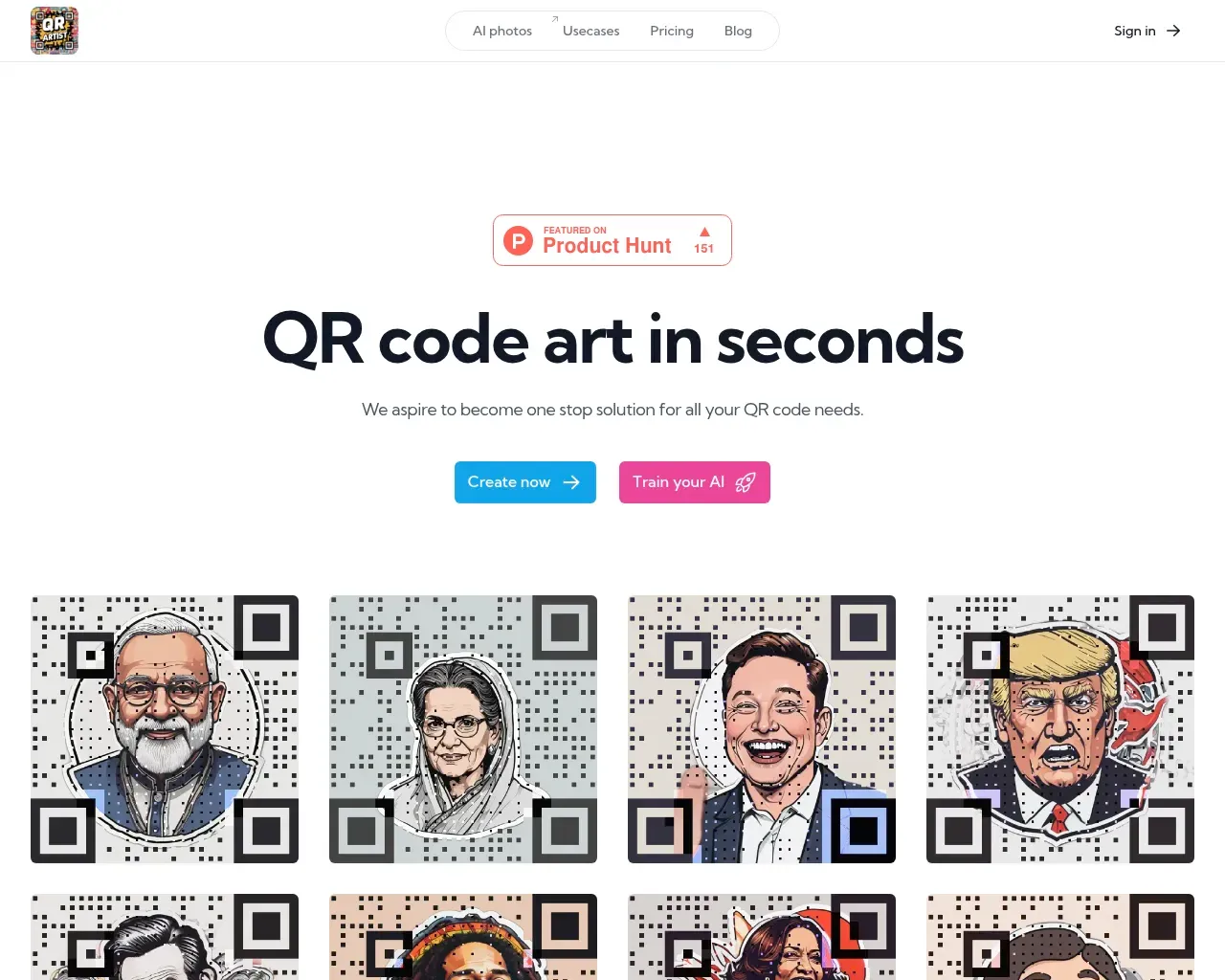
वर्कफ़्लो जानबूझकर छोटा है। आप इसे एक गंतव्य (एक URL, एक WiFi लॉगिन, एक भुगतान हैंडल) देते हैं और फिर या तो आप जो लुक चाहते हैं उसका वर्णन करते हुए एक टेक्स्ट प्रॉम्प्ट टाइप करते हैं या स्टाइल को निर्देशित करने के लिए एक संदर्भ छवि अपलोड करते हैं। AI एक QR कोड रेंडर करता है जो स्कैन करने योग्य ग्रिड के अंदर उस कलाकृति को ले जाता है, और आप परिणाम को PNG के रूप में डाउनलोड करते हैं। होमपेज गैलरी पोर्ट्रेट-स्टाइल कोड पर झुकती है — पैटर्न के अंदर रेंडर किए गए पहचानने योग्य चेहरे — जो आपको एक उचित विचार देती है कि मॉडल किसमें अच्छा है: साहसी, उच्च-कंट्रास्ट विषय बजाय बारीक बारीक विवरण के।
"अपना AI प्रशिक्षित करें" विकल्प भी है उन लोगों के लिए जो कई कोड पर एक अधिक सुसंगत हाउस स्टाइल चाहते हैं, बजाय हर बार प्रॉम्प्ट फिर से बनाने के। साइट जो संख्याएं आगे रखती है, उनके अनुसार यह 150,000 से अधिक कोड जनरेट और 40,000 उपयोगकर्ताओं का दावा करती है, और इसके लॉन्च से 151 अपवोट दिखाने वाला Product Hunt बैज है। ये विक्रेता के आंकड़े हैं, ऑडिट नहीं किए गए, लेकिन वे एक ऐसे टूल से मेल खाते हैं जिसकी एक मामूली, वास्तविक अनुयायी है न कि कोई भूतिया शहर।
यह किसके लिए लक्षित है
Zust QR स्पष्ट रूप से मार्केटर्स, छोटे व्यवसायों और क्रिएटर्स को लक्षित करता है न कि उन डेवलपर्स को जो कोड को एक पाइपलाइन में जोड़ रहे हैं। इसकी साइट पर उपयोग के मामले एक छोटे व्यवसाय की चेकलिस्ट की तरह पढ़े जाते हैं: सोशल प्रोफाइल (Instagram, TikTok, WhatsApp और बाकी), बिज़नेस कार्ड, इवेंट और प्रदर्शनी प्रमोशन, निमंत्रण कार्ड, स्कैन-टू-ऑर्डर मेनू, WiFi शेयर कोड और भुगतान कोड। वह अंतिम समूह इसके दर्शकों के बारे में एक संकेत है — यह विशेष रूप से PhonePe, Google Pay और Paytm का उल्लेख करता है, जो भारत में एक मजबूत उपयोगकर्ता आधार की ओर इशारा करता है जहाँ ये भुगतान रेल हावी हैं।
यदि आप एक फ्लायर, एक टेबल टेंट या एक कॉन्फ्रेंस बैज पर एक कोड प्रिंट कर रहे हैं और आप चाहते हैं कि यह डिजाइन किया हुआ दिखे न कि अटका हुआ, तो यही मीठा स्थान है। यदि आप एनालिटिक्स के साथ हजारों डायनेमिक, ट्रैक करने योग्य कोड चाहते हैं, तो यह उस तरह का उत्पाद नहीं है — यह QR आर्ट के लिए एक इमेज जनरेटर है, QR मैनेजमेंट प्लेटफ़ॉर्म नहीं।
मूल्य निर्धारण
आप साइन अप करके इसे मुफ्त में आज़मा सकते हैं, जो यह जांचने का सही तरीका है कि आउटपुट आपके लिए उपयुक्त है या नहीं। वॉटरमार्क हटाने और साफ कोड डाउनलोड करने से आप भुगतान किए गए क्रेडिट पर चले जाते हैं। यह मासिक सदस्यता के बजाय एक-बार के क्रेडिट पास का उपयोग करता है — एंट्री पास लगभग $5–$10 के आसपास है और एक बड़ा पास $19 में चलता है — प्रत्येक क्रेडिट कुछ पीढ़ियों के बराबर है। प्रतिबद्ध होने से पहले जानने योग्य: क्रेडिट काफी छोटी वैधता खिड़कियाँ रखते हैं, और साइट पर सटीक योजना विवरण समय के साथ बदल गए हैं, इसलिए दूसरे हाथ से पढ़ी गई किसी संख्या पर भरोसा करने के बजाय वर्तमान पास की शर्तें देखें।
वह हिस्सा जो तय करता है कि यह इसके लायक है या नहीं
कलात्मक QR कोड में एक अंतर्निहित खामी है, और यह इस श्रेणी के हर टूल के लिए समान है: आप जितना अधिक आर्ट पैटर्न में ठूंसते हैं, उतना ही कठिन हो जाता है कि एक फोन कोड पढ़ सके। AI QR जनरेशन पर स्वतंत्र गाइड इस बारे में स्पष्ट हैं — बहुत सारे AI कोड जो कोड जैसे दिखते हैं असली फोन पर विफल हो जाते हैं, या केवल एक अजीब रुकावट के बाद स्कैन होते हैं, क्योंकि कलाकृति उस कंट्रास्ट को खा जाती है जिस पर स्कैनर निर्भर करता है। समाधान हमेशा एक ही है: गहरे और हल्के मॉड्यूल के बीच पर्याप्त अलगाव बनाए रखें और अधिक स्टाइलाइज़ न करें।
इसके श्रेय को देखते हुए, Zust QR अपने भुगतान किए गए आउटपुट में एक "ऑटो-इम्प्रूव स्कैनेबिलिटी" कदम बनाता है, जो रखने के लिए बिल्कुल सही सुविधा है। लेकिन कोई भी स्वचालित प्रक्रिया ट्रेड-ऑफ को पूरी तरह नहीं हटाती। इस जैसे किसी भी टूल के साथ व्यावहारिक नियम — Zust सहित — यह है कि प्रिंट को भेजने से पहले दो या तीन अलग-अलग फोन और कैमरा ऐप के साथ तैयार कोड का परीक्षण करें, और गंतव्य URL को छोटा रखें। ऐसा करें, और एक अच्छी तरह बनाया गया कलात्मक कोड वास्तव में उपयोगी है। इसे छोड़ें, और आप एक सुंदर पोस्टर का जोखिम उठाते हैं जिसे कोई स्कैन नहीं कर सकता।
निर्णय
Zust QR वही करता है जो यह करने के लिए निकलता है: एक उबाऊ कोड को एक ब्रांड के अनुकूल चीज़ में बदल देता है, इंटरफ़ेस सुलभ है, और मुफ्त स्तर आपको भुगतान करने से पहले आउटपुट का मूल्यांकन करने देता है। यह अपनी नीश की बाधाओं से पीछे रह जाता है — स्कैनेबिलिटी टैक्स जो हर कलात्मक-QR टूल को प्रभावित करता है, मूल्य निर्धारण सस्ता लेकिन थोड़ा जटिल है, और एक भीड़ भरा क्षेत्र जिसमें तुलना के योग्य मुफ्त विकल्प शामिल हैं। कुल मिलाकर यह 3/5 पर उतरता है: एक-बार के मार्केटिंग और सोशल कोड के लिए एक ठोस, किफायती विकल्प यदि आप "प्रिंट करने से पहले परीक्षण करें" को गैर-परक्राम्य मानते हैं, न कि एक सेट-एंड-फोरगेट QR प्लेटफ़ॉर्म।
परामर्श किए गए स्रोत
- Zust QR होमपेज — सुविधाएं, वर्कफ़्लो, उपयोग के मामले, उपयोग के दावे और Product Hunt बैज
- Zust QR sitemap — जनरेटर ऐप (artistic-qr.codes) और इसके स्टाइल/ब्लॉग पेजों की पुष्टि की
- Hacker News खोज — इस टूल पर कोई प्रत्यक्ष थ्रेड नहीं, लेकिन प्रतिस्पर्धी AI QR जनरेटर की एक लंबी सूची
- Product Hunt पर Zust QR — स्वतंत्र लिस्टिंग और लॉन्च स्वागत
- AI QR कोड जनरेटर FAQ — कलात्मक कोड का दस्तावेज़ीकृत स्कैनेबिलिटी ट्रेड-ऑफ
- AI QR कोड आर्ट गाइड — व्यावहारिक स्कैनेबिलिटी और कंट्रास्ट मार्गदर्शन
Published on: September 3, 2026
Creative QR codes using AI के विकल्प खोज रहे हैं? सभी Creative QR codes using AI विकल्प देखें →
Have an AI tool of your own? Submit it below and get a free, in-depth product review article — just like this one.
कुछ ही सेकंड में अपना AI टूल जोड़ें
अपना URL पेस्ट करें और हम ड्राफ्ट तैयार कर देंगे। सबमिट करने से पहले आप हर फ़ील्ड की समीक्षा और संपादन कर सकते हैं।